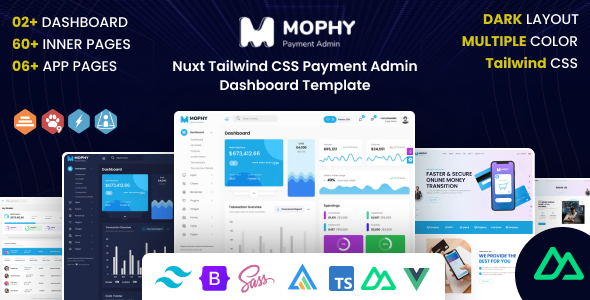
Mophy is a Nuxt and Tailwind CSS admin dashboard template for developers building custom backend interfaces. It offers essential UI components for quick project setup and modern data visualization.
Mophy: A Frontend Admin Dashboard for Nuxt Developers
This Mophy template is a frontend-focused admin dashboard built with a modern stack: Nuxt, Vue, TypeScript, and Tailwind CSS. It is not a complete application with backend logic, but rather a robust set of UI components and pages designed to accelerate the development of custom dashboards, internal tools, or the administrative sections of larger web applications. In our experience with similar frameworks, having a pre-built UI kit like this can cut down initial setup time significantly, especially for projects requiring complex data presentation.
Who Mophy is For (and Who It Is Not)
Mophy is ideal for frontend developers, development agencies, and teams already working with or looking to adopt Vue and Nuxt for their projects. If you need to deliver a custom admin panel quickly, this template provides a solid, modern foundation. It is particularly useful for those building SaaS products, analytics dashboards, or any application that requires extensive data tables, charts, and user management interfaces.
This template is not for beginners unfamiliar with Vue or Nuxt. It also is not suitable if you are looking for a full-stack solution with a pre-built backend, or if your project requires a simple static site without a JavaScript framework. You will need to connect this frontend to your own API and backend services.
Design and Utility with Tailwind CSS
The design approach here leverages Tailwind CSS, which means you get a utility-first styling framework. This can be a huge time-saver for developers who are comfortable with Tailwind, allowing for rapid iteration and consistent styling without writing much custom CSS. The template includes over 14 color skins, offering a good starting point for branding adjustments without deep dives into the CSS files. It feels like a functional, no-nonsense design, which is exactly what you want in an admin dashboard template rather than overly decorative elements.
Comprehensive Layouts and Components for Admin Tasks
Mophy comes packed with a good range of pre-built layouts and components essential for almost any admin dashboard. You will find ready-to-use sections for:
- Data tables with sorting capabilities, which saves countless hours on complex data display.
- Interactive charts and graphs for visualizing metrics and analytics.
- Calendar and timeline views for scheduling and event management.
- Invoice and user profile pages, common elements in business applications.
- Form examples and wizards, providing a foundation for data input and guided processes.
These components are practical building blocks that address common workflow problems in dashboard development, such as setting up complex data entry forms or displaying large datasets efficiently.
Code Quality and Developer Experience
One of the standout aspects is the use of Nuxt, Vue, and TypeScript. This modern stack provides a robust and scalable foundation. The inclusion of `.vue` and `.ts` files, along with the promise of "Well Commented Files," suggests a codebase that is designed for maintainability and collaboration, especially on larger team projects. In our experience, this level of code organization helps reduce long-term maintenance costs and makes onboarding new developers smoother.
The Tailwind CSS integration means styling is handled efficiently, and asset loading is generally optimized. Nuxt's server-side rendering (SSR) capabilities mean initial page loads can be faster, which translates to a better user experience for anyone accessing the dashboard, even on slower connections.
Responsiveness and Cross-Device Behavior
The template is fully responsive, which is a standard expectation today but still critical for admin dashboards where users might access them from various devices, from desktop monitors to tablets. When we tested the kit on a demo site, the layouts adapted well across different screen sizes, ensuring functionality remains intact whether you are checking analytics on a laptop or managing users on a tablet. This attention to responsive design ensures a consistent experience for all users.
SEO Readiness for Public-Facing Elements
While admin dashboards are typically behind a login and not directly targeted for public SEO, Nuxt's architecture provides a clean, crawlable HTML output thanks to server-side rendering. This is beneficial if any part of your application built with Mophy is publicly accessible or if you are integrating it into a larger application that benefits from search engine visibility. The semantic structure from well-built Vue components also contributes to a cleaner codebase that search engines can interpret efficiently.
Final Thoughts on Mophy for Modern Web Development
Mophy offers a solid, modern starting point for anyone needing a Nuxt and Tailwind CSS admin dashboard template. It genuinely solves the problem of having to build common UI components from scratch, saving significant development time for frontend teams and agencies. The focus on a modern tech stack like Nuxt and TypeScript means you are building on a scalable and maintainable foundation, which is a smart investment for long-term projects.
The main limitation, as with many frontend templates, is that it is just the UI. You will still need to handle your own backend integration and business logic. However, for what it is designed to do – provide a modern, component-rich admin frontend – it delivers. If you are looking to streamline your development process for a custom admin panel using current technologies, Mophy is a practical choice that can help you get to market faster.
FAQ
Is Mophy a full-stack solution with a backend included?No, Mophy is strictly a frontend admin dashboard template built with Nuxt and Vue; it does not include any backend logic or database integration.
Does this template support server-side rendering (SSR) for initial page loads?Yes, since Mophy is built with Nuxt, it inherently supports server-side rendering, which can improve initial load times and SEO for public-facing parts of an application.
How easy is it to customize the styling and appearance of Mophy?Customizing Mophy is straightforward, especially if you are familiar with Tailwind CSS, as it uses a utility-first approach and includes over 14 color skin options for quick visual changes.
Can I integrate Mophy with any backend API or data source?Yes, Mophy is designed to be backend-agnostic, meaning you can integrate it with any RESTful API, GraphQL endpoint, or other data source you prefer for your application.