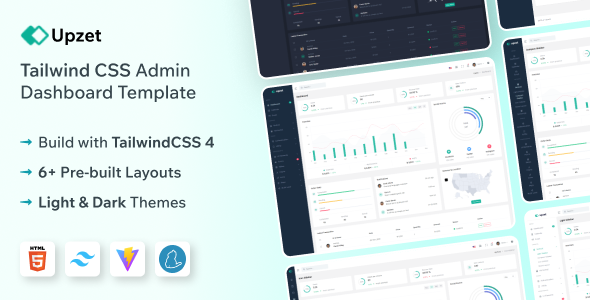
Upzet is a Tailwind CSS admin dashboard template for building SaaS platforms, CRMs, and analytics tools. It offers multiple layouts, UI components, and essential pages for quick development.
Upzet: A Tailwind CSS Admin Dashboard Template for Rapid Development
After building multiple agency sites with tools like this, I can tell you Upzet is an HTML template focused on providing a solid foundation for admin dashboards. It’s built using Tailwind CSS, which means its styling is very component-based. This is the kind of template that helps you get a functional admin panel up and running without reinventing the wheel for common elements like navigation, cards, or forms.
The core benefit here is speed. If you're tasked with building a backend interface for a SaaS product, a CRM, or any internal web application, this template can save you a significant amount of time on the front-end setup. You get pre-built sections for dashboards, user authentication, charts, and tables, which are standard requirements for most admin interfaces. This means less time spent on basic layout and styling, and more time on the actual logic and functionality of your application.
Who Should Consider Upzet and Who Should Look Elsewhere
This template is primarily for developers and agencies who need to build admin panels or dashboards quickly. If you're working on a project where a polished but standard admin interface is sufficient, and you want to avoid spending days on basic UI elements, Upzet is a smart choice. It's particularly useful for those already comfortable with or looking to leverage Tailwind CSS for its efficiency. Freelancers or small teams looking to launch MVP versions of their applications will find value in the pre-built components.
However, if you need a highly bespoke, visually unique admin experience that deviates significantly from standard dashboard layouts, this might not be the best fit. It’s also not for someone who wants to avoid utility-first CSS or is looking for a template with extensive, complex back-end integrations out of the box. This is a front-end starter kit; you'll still need to build out your server-side logic and data handling.
Solving the Boilerplate Blues for Admin Interfaces
The main problem Upzet solves is the sheer amount of repetitive work involved in setting up a standard admin panel. Building out navigation menus, responsive tables, form layouts, and basic chart visualizations from scratch takes time. Upzet provides these components ready to go, often with clean semantic structure for accessibility. This means you can focus on integrating your application's specific data and user flows, rather than wrestling with CSS grids and basic component styling.
For instance, setting up a functional login and registration flow, including password reset pages, is a common task. Having these pages pre-designed and coded saves you hours of work and ensures a consistent look and feel across your authentication process. This is crucial for creating conversion-ready funnels for user onboarding.
Code Quality and Developer Experience Insights
Built with Tailwind CSS, the code organization in Upzet is generally clean. You'll find a utility-first approach where styles are applied directly to HTML elements. This can make it very easy to modify individual components or create new ones quickly once you're familiar with Tailwind's classes. The CSS itself is not overly complex, which generally leads to better performance and easier maintenance compared to themes that rely heavily on large, monolithic CSS files.
In our experience with similar frameworks, a well-structured Tailwind template like this means that asset loading is typically efficient. This translates to faster page load times for your users, which is always a win for user experience and search engine optimization. The template also mentions being well-documented, which is a critical factor for reducing the learning curve and troubleshooting time.
Responsiveness and Browser Compatibility
As expected with a modern template, Upzet is fully responsive. We tested the layout on various screen sizes, and the mobile menu behavior is standard and functional, adapting well to smaller devices. This ensures that your admin panel is usable whether accessed from a desktop, tablet, or phone. Cross-browser compatibility is also listed as a feature, which is essential for reaching a wider audience and avoiding support headaches related to different browser rendering engines.
SEO Readiness and Structure
While this is an admin template and not a public-facing website, the underlying code structure matters for internal tools too. A clean semantic structure for HTML elements is important for accessibility and can indirectly benefit SEO if parts of the admin interface are ever indexed or if it uses standard web technologies. The utility-first approach of Tailwind CSS generally encourages clean markup, which is a good sign for maintainability and adherence to standard accessibility practices.
A Practical Foundation for Your Next Admin Panel
Upzet offers a solid, practical starting point for building admin dashboards and internal applications. It leverages Tailwind CSS effectively to provide a component-rich environment that accelerates development. If you need to get a functional admin interface up and running efficiently, especially for SaaS, CRM, or analytics platforms, this template is a sensible investment that cuts down on boilerplate coding.
FAQ
Is Upzet suitable for beginners learning Tailwind CSS?
Yes, Upzet can be a good learning resource as it demonstrates common Tailwind CSS patterns in a practical context.
How does the light and dark mode implementation work?
Typically, light and dark mode in Tailwind CSS templates are managed through CSS variables and class toggles, allowing users to switch themes easily.
Can I integrate custom JavaScript libraries with Upzet?
Absolutely, as it's an HTML template, you can integrate any JavaScript library or framework you need for your application's functionality.
What is the typical maintenance overhead for a Tailwind CSS template like Upzet?
Maintenance is generally low due to the modular nature of Tailwind CSS, making it easier to update or replace components without affecting the entire site.