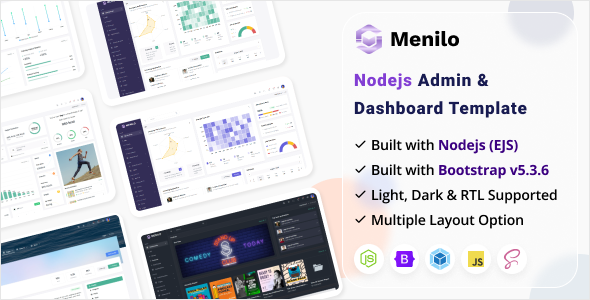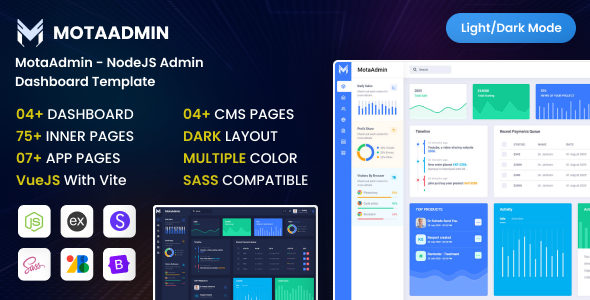
MotaAdmin is a Node.js admin dashboard template built with Bootstrap and EJS, providing a solid starting point for developers needing a quick backend UI for web applications.
MotaAdmin: A Practical Node.js Admin Dashboard Template
This template is essentially a pre-built user interface for the backend of your web application. It uses Node.js on the server side with EJS for templating, and Bootstrap for the frontend styling. Think of it as a ready-to-go shell for managing data, users, or any other administrative tasks your application needs.
After building multiple agency sites with tools like this, the core benefit here is avoiding the tedious work of setting up common admin components from scratch. It solves the headache of laying out dashboards, tables, forms, and basic navigation, allowing you to focus on the unique business logic of your project.
Who MotaAdmin Is For (and Who It Is Not)
MotaAdmin is primarily for developers, agencies, or freelancers who are already comfortable with the Node.js ecosystem and EJS templating. If you need to spin up an admin panel quickly for a new project, or if you're prototyping a web application that requires a functional backend UI without spending weeks on design and basic component development, this could be a smart investment.
This template is not for non-technical users looking for a drag-and-drop solution. It's also not ideal for those who prefer frontend frameworks like React, Vue, or Angular for their entire admin interface, as it's tightly coupled with EJS for server-side rendering. If your project demands deep, custom backend logic or a highly unique visual identity out of the box, you'll still have significant work ahead.
Layouts, Pages, and Components for Backend Management
What you get here is a collection of EJS files that translate into various admin dashboard layouts and pages. This includes common elements like data tables, input forms, charts, and general dashboard overviews. The structure provides a functional Node.js admin dashboard template base.
- Admin Dashboard EJS Files: These are your main templates for different sections of the admin area.
- jQuery and JavaScript files: Standard client-side scripting for interactivity.
- CSS And Sass Files: The styling layer, built on Bootstrap, allowing for easier customization through SASS variables.
- Proper Documentation: A crucial element for any developer picking up a new template, explaining how to get started and customize.
When we tested the kit on a demo site, the included documentation felt adequate for getting the basic Node.js server running and understanding the file structure. The asset loading, typical for a Bootstrap setup, is straightforward and generally performs well, which translates to a faster loading admin panel for business users.
Code Quality and Developer Experience
From a developer's perspective, the inclusion of SASS files is a big plus. It means you aren't stuck digging through compiled CSS to change colors or fonts. You can adjust SASS variables, recompile, and quickly adapt the look to your client's branding. This saves a lot of time compared to market-average templates that only provide flat CSS.
The file organization is what you'd expect in a Node.js project using EJS: a clear separation of views, public assets (CSS, JS), and server-side logic. This clean structure makes it easier to maintain and extend the application over time, ultimately reducing long-term maintenance costs for the project owner.
Responsiveness and Compatibility
Given its foundation on Bootstrap, MotaAdmin handles responsiveness well across different devices. The layouts adapt to smaller screens, ensuring that your admin panel is usable on tablets and mobile phones. This is a standard expectation in today's web development landscape, and MotaAdmin delivers on that front.
The use of standard web technologies means it should be compatible with all modern browsers. This consistency in display and functionality across various platforms ensures that all team members, regardless of their browser choice, have a consistent experience managing the application.
SEO Readiness
While an admin dashboard isn't typically a public-facing SEO concern, the underlying structure of a template like this can still matter. EJS, being a server-side templating engine, renders HTML on the server before sending it to the browser. This means the initial page load for your admin panel is fully formed HTML, which is technically good for search engines if any part of it were to be indexed, though that's not its primary purpose.
The semantic structure provided by Bootstrap components also contributes to a cleaner HTML output. This might not directly impact your public site's ranking, but good semantic practices contribute to overall code quality and maintainability, which indirectly benefits any project.
Final Thoughts
MotaAdmin offers a solid, no-nonsense starting point for anyone needing a Node.js admin dashboard template. It’s not trying to reinvent the wheel; it provides a functional, well-structured base built on proven technologies like Node.js, EJS, and Bootstrap.
If your workflow involves building internal tools or backend UIs regularly, this template can genuinely save you significant development hours on boilerplate tasks. It lets you jump straight into building your application's unique features rather than wrestling with common admin panel development. While the visual design is standard Bootstrap, the technical foundation is robust and practical for real-world projects.
FAQ
Is MotaAdmin suitable for complex enterprise applications?MotaAdmin provides a solid UI foundation, but for complex enterprise applications, you will need to build out significant custom logic and potentially integrate with various backend services yourself.
Can I easily change the overall design and branding?Yes, because it includes SASS files, you can modify Bootstrap variables to quickly change colors, fonts, and other stylistic elements to match your brand without deep CSS overrides.
Does this template include backend database integration?No, MotaAdmin is a frontend UI template for your admin panel. It provides the visual components and structure, but you will need to implement your own database connections and API endpoints.
What is the learning curve for developers new to Node.js or EJS?If you are new to Node.js or EJS, there will be a learning curve to understand the server-side rendering and project structure, but the included documentation helps with initial setup.