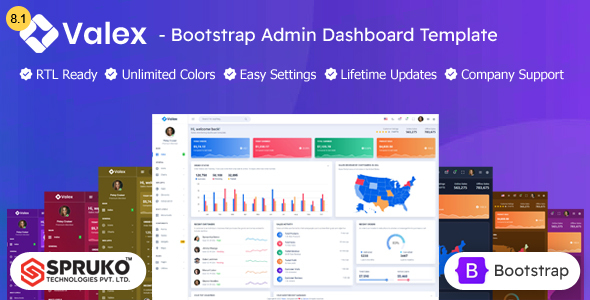
Valex is a Bootstrap 5 HTML admin dashboard template for developers needing a solid foundation for web application backends. It offers a wide range of pre-built components and layouts to speed up development.
Valex: A Bootstrap 5 HTML Admin Dashboard Template for Practical Use
Valex is a static HTML template built on Bootstrap 5, aimed at developers who need a starting point for admin panels and web application backends. It provides a collection of pre-designed pages, components, and UI elements that can significantly cut down the time spent on basic styling and layout. If you're building something that requires a functional dashboard interface, this template offers a lot of ready-to-use pieces.
Who Should Use Valex and Who Should Skip It
This template is best suited for developers and agencies who need to quickly assemble a functional admin panel. If you're building a custom web application, a client portal, or an internal tool where a standard dashboard is required, Valex can save you days of work. It’s particularly useful if you're comfortable with HTML, CSS, and JavaScript, and need to integrate these components into a larger application. Developers who need to build a data visualization dashboard or a complex user management system will find many useful elements here.
However, if you're looking for a theme that handles complex backend logic, dynamic data fetching out of the box, or requires deep integration with a specific CMS or framework beyond what static HTML allows, this is not the right tool. It's a front-end kit. Also, if you prefer a drag-and-drop page builder experience or a template that comes with a pre-built CMS integration, you’ll need to look elsewhere. This template requires you to write your own server-side code and integrate the front-end components yourself.
Solving the "Blank Page" Problem for Admin Interfaces
The biggest problem Valex solves is the dreaded blank page when starting a new admin panel project. Instead of spending hours setting up basic layouts, navigation, forms, tables, and charts, you get a comprehensive set of pre-built options. This means you can focus on the unique functionality of your application rather than reinventing the wheel for common UI patterns. For instance, the inclusion of Grid JS tables and various form elements means you don't have to build those from scratch, speeding up the process of displaying and managing data.
The template's approach to providing multiple menu styles (vertical, horizontal, hover effects) is also a practical time-saver. Instead of debating and coding different navigation patterns, you can select the one that best fits your application's hierarchy and user flow. This is especially helpful when developing for clients who might have specific preferences for how their backend interface should look and behave.
Design and Visual Approach
Valex sticks to a clean and simple design aesthetic, which is generally a good thing for admin panels. Overly flashy designs can be distracting and don't always translate well to complex data displays. The template leverages Bootstrap's grid system and components, ensuring a consistent look and feel across different elements. The inclusion of a color switcher is a nice touch for quickly testing different theme variations without digging deep into CSS files, though for production, you'd likely hardcode your chosen color scheme.
While the design is functional, it’s not particularly groundbreaking. It's a standard, modern admin dashboard look. This is not necessarily a bad thing; for an admin panel, predictability and usability often trump novelty. It adheres to common UI conventions, making it easy for users familiar with other dashboards to navigate.
Layouts, Pages, and Components
The template boasts a significant number of HTML pages, covering common administrative needs. You’ll find pages for login, registration, error states, lock screens, and even e-commerce related views like shopping cart and checkout. This extensive collection means you're likely to find a pre-built page or component that fits your requirements, reducing the need for custom page creation. The variety of layouts, including boxed and full-width options, provides flexibility in how the dashboard is presented.
The components library is quite extensive, featuring things like file uploaders (Filepond, Dropzone), various chart types, and message chat interfaces. This breadth of included plugins and components means you're less likely to need to source third-party libraries for common dashboard functionalities, which can simplify dependency management and reduce potential conflicts.
Code Quality and Developer Experience
Valex is built on Bootstrap 5 and avoids jQuery, which is a positive for modern development practices. The code is described as well-commented and clean, which is crucial for maintainability. Having Sass files included means developers can easily customize styles using variables and mixins, a standard practice in professional web development. The use of Gulp for build processes is also standard and helps in managing assets efficiently.
In practice, the organization of the CSS and JavaScript files will determine how easy it is to work with. A well-structured project means changes to one area don't break unrelated parts. The claim of easy customization is generally true for Bootstrap-based templates, but the depth of customization possible depends on how well the template's SCSS is architected. For instance, understanding how the theme's variables are set up will make changing the overall color scheme or typography much faster.
Responsiveness and Compatibility
As a Bootstrap 5 template, Valex is inherently responsive. This means the dashboard interface should adapt well to different screen sizes, from desktops to tablets and mobile devices. This is critical for any web application, as users will access it from various devices. Browser compatibility is also a standard expectation for templates like this, and the inclusion of W3C validated HTML is a good sign that it adheres to web standards, which generally leads to better compatibility across different browsers.
SEO Readiness
For an admin dashboard template, SEO readiness is less about ranking on search engines and more about having a clean, semantic HTML structure. The W3C validation mentioned suggests that the markup is clean and follows standard accessibility practices, which is beneficial for overall web health and can indirectly help with user experience. The focus is on building a functional backend, not a public-facing website, so traditional SEO concerns are secondary here.
Final Thoughts on Valex for Your Workflow
Valex is a solid choice if you need to build a custom admin dashboard quickly. It provides a well-organized set of components and pages based on Bootstrap 5, saving considerable development time. While it's a static HTML template and requires you to handle backend integration yourself, it’s a reliable foundation for projects that need a functional and adaptable interface. It's a practical investment for developers and agencies looking to streamline their workflow for backend development.
FAQ
Is Valex suitable for building a public-facing website?No, Valex is specifically designed as an HTML admin dashboard template for web application backends, not for public-facing websites.
Does Valex include backend code or server-side logic?No, Valex is a static HTML template. It provides the front-end structure and UI components, but you will need to implement your own backend code and server-side logic.
Can I integrate Valex with popular CMS platforms like WordPress or Drupal?While it's possible to integrate Valex with a CMS, it requires significant custom development work as it's a standalone HTML template and not built as a CMS theme.
What level of technical skill is required to use Valex effectively?Using Valex effectively requires a good understanding of HTML, CSS, and JavaScript, along with familiarity with the Bootstrap framework.