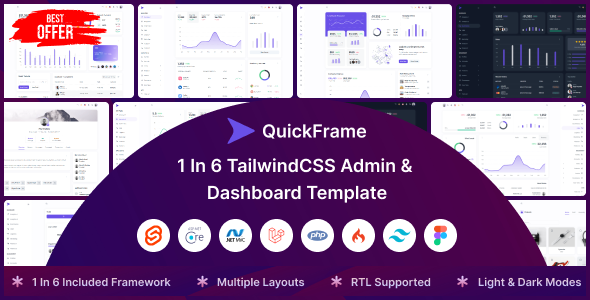
QuickFrame is a multi-framework admin dashboard template for Svelte, ASP.Net Core, Laravel, PHP, and CodeIgniter. Get 200+ components and pages for diverse backend solutions.
QuickFrame: A Multi-Framework Admin Dashboard Solution
QuickFrame positions itself as a comprehensive admin dashboard template, uniquely supporting multiple backend frameworks like Svelte, ASP.Net Core, Laravel, PHP, and CodeIgniter. The core idea here is to give you a ready-to-use UI foundation, saving significant development time on common backend interfaces. This approach solves the recurring problem of starting a new admin panel from scratch for each project, especially when your agency deals with varied client technology preferences.
Who Benefits Most from QuickFrame's Admin UI Kit?
This multi-framework admin dashboard template is clearly aimed at agencies and freelance developers who juggle client projects across different backend technologies. If you frequently need to spin up admin panels for Svelte, ASP.Net Core, Laravel, PHP, or CodeIgniter applications, QuickFrame offers a significant head start. It's particularly useful for those needing fast turnarounds on projects like SaaS platforms, eCommerce backends, or CRM systems where a solid, consistent UI is crucial but not the core innovation.
However, if your project demands highly specific, deeply integrated custom backend logic or if you only ever work with one framework, some of QuickFrame's multi-version overhead might be unnecessary. It's not for developers looking to build a highly optimized, lean application from the ground up without any pre-built UI, or those exclusively focused on Svelte admin panel development without needing the other frameworks.
QuickFrame's Design and Component Library Overview
QuickFrame leverages TailwindCSS for its styling, which is a practical choice for developers familiar with utility-first CSS. This means you get a consistent design language out of the box, and customizing styles is generally straightforward via the Tailwind config file. The template includes both dark and light versions, along with LTR and RTL support, which are standard but welcome features for international projects.
While the 'unlimited color options' is a pretty standard claim for any Tailwind-based kit, it does mean you have full control over the color palette without fighting against pre-defined styles. The overall design feels clean and modern, avoiding the overly busy or dated aesthetics sometimes found in older admin templates.
Practical Application: QuickFrame's Included Dashboards and Apps
The sheer volume of content in QuickFrame is notable: over 200 components and pages. This includes 8 distinct dashboard layouts and 7 pre-built application pages covering common use cases like email, chat, scrumboard, invoices, shopping carts, and user management. For a developer building a new admin panel, having these pre-styled modules can save hundreds of hours.
It means you're not just getting a blank canvas but a functional starting point for many common backend features. The benefit here for a business owner is quicker deployment and a more consistent user experience across different sections of their application, leading to lower maintenance costs down the line. This is a solid Laravel backend UI kit for agencies, among other frameworks.
Code Quality and Developer Experience with QuickFrame
From a developer's perspective, QuickFrame boasts a clean and well-commented codebase with an organized folder structure. This is critical for maintainability and onboarding new team members, as it reduces the learning curve significantly. The inclusion of Sass support alongside TailwindCSS provides flexibility for those who prefer a more traditional CSS preprocessor workflow or need to integrate existing Sass architectures.
The W3C validated code is a good sign, indicating adherence to web standards, which often translates to better cross-browser compatibility and a solid foundation for semantic accessibility, benefiting long-term SEO efforts. In our experience with similar frameworks, well-organized code like this directly impacts development speed and reduces future debugging headaches.
SEO Readiness and Performance Considerations for QuickFrame
While admin dashboards aren't typically SEO-focused in the traditional sense, the W3C validated code and clean structure provided by QuickFrame contribute to a solid technical foundation. This means the underlying HTML is generally semantic, which helps search engines understand content structure, even if it's behind a login. For performance, having over 200 components means you'll likely need to be mindful of asset loading.
While TailwindCSS helps with tree-shaking unused styles, a large component library can still impact initial bundle size if not optimized. However, for an internal admin tool, the benefits of rapid development often outweigh marginal initial load time concerns for logged-in users, ensuring a smooth user experience.
Final Verdict: Is QuickFrame a Smart Investment for Your Agency?
QuickFrame is a genuinely practical asset for agencies and developers who regularly build admin interfaces across varied backend technologies. Its multi-framework support is its key differentiator, offering a substantial shortcut for setting up dashboards and common application features. You're buying a significant head start, not just a design.
While the sheer number of components might require some initial pruning to keep your specific project lean, the time saved on design, front-end development, and cross-framework consistency is a clear win. For those looking to streamline their multi-framework admin dashboard template development, QuickFrame represents a smart investment that will pay dividends in saved hours and consistent output.
FAQ
Is QuickFrame suitable for a single-framework project?Yes, you can absolutely use QuickFrame for a project focused on just one of its supported frameworks. The multi-version setup allows you to pick and use only the specific framework version you need.
How does the multi-framework support affect performance or bundle size?The multi-framework support means you choose one specific version (e.g., Svelte, Laravel) to work with, so it doesn't add overhead to your deployed application. However, a large component library generally means you should optimize your build process to remove unused CSS and JavaScript for the best performance.
Can I easily integrate custom backend logic with these templates?Yes, the templates provide the front-end UI. Integrating your custom backend logic involves connecting the UI components (like forms or data tables) to your chosen framework's backend APIs and data models.
What's the learning curve like for customizing the design?If you're already familiar with TailwindCSS and the specific JavaScript or backend framework you choose, the learning curve for customization is moderate. The clean code and organized structure help, but understanding Tailwind's utility-first approach is key.