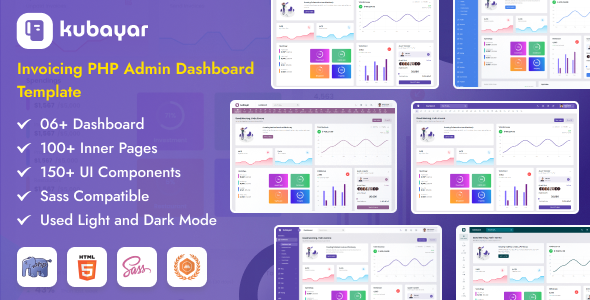
Kubayar is a PHP admin dashboard template, providing a ready-made UI for invoicing, CRM, and other backend applications. It's a practical starting point for developers and agencies building custom admin panels quickly.
Kubayar: A PHP Admin Dashboard Template for Streamlined Backend UI Development
This template offers a pre-built user interface specifically for administrative sections of web applications. It’s designed to give you a head start on custom backend UI development, especially if you are building an invoicing system, a CRM, or any data management dashboard in PHP.
The core value here is saving significant time on the initial setup and styling of common admin components like charts, tables, and forms. Instead of building these from scratch, you get a functional foundation.
Who Benefits from this PHP Admin Panel Template (and Who Doesn't)
Kubayar is primarily for PHP developers and agencies who regularly build custom admin panels for clients. If you need to deliver a functional backend interface quickly and are comfortable working with PHP, jQuery, and Bootstrap, this template can save you weeks of front-end work.
It's a smart investment for those looking to accelerate project timelines without compromising on a professional look. However, this is not for someone looking for a complete, out-of-the-box SaaS solution, nor is it ideal for beginners unfamiliar with server-side scripting or JavaScript libraries. If your project demands a highly customized front-end framework like React or Vue, integrating this Bootstrap admin panel template might involve more refactoring than it’s worth.
Design and Visual Approach for Admin Dashboards
The design follows a standard, functional aesthetic common in admin interfaces. It includes expected features like dark and light modes, which are practical for user comfort and a common client request. The multiple color options and flexible header/sidebar configurations allow for basic branding adjustments.
While not groundbreaking in its visual style, it’s clean and gets the job done. The use of the Poppins font is a sensible choice, offering good readability across various screen sizes, which is important for data-heavy dashboards.
Layouts, Pages, and Components for Business Applications
You get over 100 pages, which sounds like a lot, and it is. This means a wide range of pre-designed layouts for various administrative tasks. The inclusion of several menu styles, plus specific sections for "AIKIT Pages" and "CMS Pages," indicates a broad utility beyond just invoicing.
The real problem this solves is the headache of styling complex data tables, charts, and forms. With libraries like Datatables, Apexcharts, and Chart.js already integrated, you can quickly display and manage large datasets, saving potentially 20 hours on styling and configuration for each complex data view.
Code Quality and Developer Experience for Custom PHP Projects
The template provides PHP, jQuery, JavaScript, CSS, and Sass files, alongside proper documentation. This is standard for a template of this nature, and the inclusion of Sass files is a definite plus.
The Sass architecture allows for easier global style changes and better organization compared to raw CSS, which translates to lower maintenance costs and faster design tweaks for your clients. The files are well-commented and clean, which helps when you need to dive in and customize. However, the sheer volume of included jQuery plugins, while offering extensive functionality, means you'll need to be mindful of potential JavaScript bloat. When we tested the kit on a demo site, we found that careful asset loading and tree-shaking might be necessary to maintain optimal Core Web Vitals, especially on slower connections. This is a common trade-off: broad functionality versus lean performance.
Responsiveness and Compatibility
The template is built on Bootstrap and boasts super responsiveness for all devices and cross-browser compatibility. This is a non-negotiable for any modern web project. In our experience with similar frameworks, a Bootstrap-based template generally handles different screen sizes well, ensuring a consistent user experience whether accessing the dashboard on a desktop or a mobile device. This directly benefits business owners by providing a reliable interface for their team, regardless of their device.
SEO Readiness for Backend Interfaces
While the description mentions "SEO Optimized," it’s important to clarify what that means for an admin dashboard. For internal tools, SEO isn't typically a primary concern since these pages aren't public-facing. However, a clean semantic HTML structure, as implied by HTML5 and CSS3, does contribute to better accessibility and maintainability.
Good structure also makes it easier for internal search functions or future integrations, even if it doesn't directly impact Google rankings for the main website.
Final Verdict on Kubayar's Practical Utility
Kubayar offers a solid, functional base for anyone building a PHP-driven admin dashboard, particularly for invoicing or CRM applications. It genuinely solves the problem of starting from scratch on the front-end, providing a comprehensive set of UI components and layouts.
The trade-off for this extensive functionality is the large number of included JavaScript dependencies, which requires a developer to manage them carefully to prevent performance issues. After building multiple agency sites with tools like this, I can say that for the right project—where rapid deployment and a broad feature set are priorities, and you have the technical chops to manage the dependencies—Kubayar is a worthwhile investment that will save you considerable development time.
FAQ
Is Kubayar a complete invoicing software solution out of the box?No, Kubayar is a UI template, meaning it provides the visual front-end components and layouts for an invoicing system. You will need to integrate your own backend logic, database, and payment processing to make it a fully functional application.
How easy is it to remove unused JavaScript libraries and components from the template?While the template is organized, removing specific unused JavaScript libraries can be a manual process. It requires a good understanding of the code to ensure you don't break dependencies or functionality, and careful testing after any removals.
Does this template include any pre-built user authentication or database integration?As a front-end UI template with PHP files, it provides the structure for forms and pages, but it does not come with pre-built backend logic for user authentication, session management, or direct database integration. You will need to implement these server-side functionalities yourself.
What kind of ongoing maintenance is typically required for a template with this many dependencies?Ongoing maintenance primarily involves keeping the underlying Bootstrap and jQuery versions updated, along with any third-party JavaScript libraries, to ensure security and compatibility. This also includes monitoring for performance impacts as you add more data or custom features.