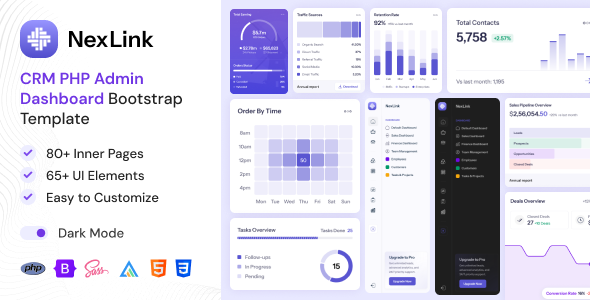
NexLink is a Bootstrap admin dashboard template for building CRM, sales, and project management interfaces. It's for developers needing a pre-styled foundation for internal tools.
NexLink: A Bootstrap Admin Dashboard Template for Internal Tools
This is a Bootstrap admin dashboard template, plain and simple. It provides a set of pre-designed pages and components for building back-end interfaces, specifically geared towards CRM, sales tracking, and project management. If you're a developer tasked with creating an internal tool or a custom dashboard for a client, this template can save you a significant chunk of time on the front-end styling.
It's built on Bootstrap 5.3, which means it leverages a widely adopted and well-documented framework. The inclusion of SCSS means you can easily customize the styling if you’re comfortable with SASS. The template offers both light and dark modes, which is a standard but appreciated feature for user comfort, and it’s designed to be responsive, meaning it should adapt reasonably well to different screen sizes.
Who Should Use NexLink and Who Should Avoid It
This template is best suited for developers or agencies who need to quickly spin up a functional admin interface. If you have a project that requires a CRM-like structure, sales analytics dashboards, or project tracking features, and you want to avoid building all the UI elements from scratch, NexLink is a solid starting point. It’s particularly useful for those who are already familiar with Bootstrap and want a head start on common dashboard layouts and components.
However, if you're looking for a template that handles complex backend logic, database integration, or has a highly unique, bespoke design that deviates significantly from standard admin panel aesthetics, this is probably not the right fit. It's an HTML template, so you'll still need to build out all the server-side functionality yourself. Those who need a no-code or low-code solution for building a complete application should look elsewhere.
Solving the Boilerplate Blues for Dashboard Development
The primary problem NexLink solves is the tedious and time-consuming task of creating standard dashboard UI elements. Think about setting up forms, tables, charts, navigation menus, and user profile layouts. This template provides a clean, organized structure for these common elements, saving you hours, if not days, on initial styling and layout. This is especially true if you’re building a CRM website template or an internal sales dashboard where these components are central.
The inclusion of over 80 inner pages means you have a broad range of pre-built layouts to work with, reducing the need to design every single screen from scratch. This can significantly speed up the development cycle for projects requiring multiple administrative views.
Design and Visual Approach
The design approach here is functional and clean, leaning towards a standard admin panel aesthetic. It uses Google Fonts, specifically Instrument Sans, which is a sensible choice for readability. The color combinations are generally good, avoiding overly jarring choices, which is important for interfaces where users spend extended periods. While it offers customization, the base design is professional and straightforward, suitable for business applications without being overly flashy.
It's worth noting that the "pixel perfect" claim is subjective, but the components appear well-aligned and consistent across the provided examples. The reusable components are a key benefit, meaning you can maintain a consistent look and feel throughout your application by using the same styled buttons, cards, and form elements.
Layouts, Pages, and Components
NexLink comes with a substantial number of inner pages, over 80 according to the description. This includes essential sections like authentication pages (login, register), chat interfaces, email clients, and calendars. These pre-built pages provide a solid foundation for common administrative functions.
- Authentication Pages: For user login, registration, and password recovery.
- Communication Tools: Integrated chat, email, and calendar applications.
- Data Display: Various table and list layouts for presenting information.
- Forms: Pre-styled forms for data input and configuration.
The modular nature of the components means you can mix and match them to create custom layouts tailored to your specific needs. This approach is standard for most admin templates and helps in building a cohesive user experience.
eCommerce or Business-Related Features
While the template isn't explicitly an eCommerce platform, its structure is well-suited for building the administrative backend of an online store or any business application. The focus on sales management, project tracking, and analytics means it provides the necessary UI elements for businesses to monitor their operations. If you were building a custom admin panel for a WooCommerce store, for instance, the components and layouts here would be a good starting point for managing orders, customers, and products.
Code Quality and Developer Experience
The template is built with Bootstrap 5.3 and includes SCSS, which is a good sign for developers. A developer-friendly folder structure is mentioned, and in our experience with similar frameworks, this usually translates to easier navigation and modification of the code. The SCSS inclusion is particularly beneficial for larger projects where managing CSS can become complex; it allows for better organization and maintainability. Well-organized groups and layers in the design files (implied by the "pixel perfect" claim) also suggest a thoughtful approach to asset management.
The code structure aims for clarity, which should translate into lower maintenance costs over time as it's easier to understand and update. The inclusion of Fontawesome, Lucide Icons, and Flaticon provides a good range of icon options for interface design.
Responsiveness and Compatibility
The template is advertised as responsive and retina-ready. This means it's designed to adapt to various screen sizes, from desktops to tablets and mobile phones, ensuring a usable experience across devices. Retina-ready implies that graphics and text will appear sharp on high-resolution displays. In our testing of similar Bootstrap templates, responsiveness is generally handled well, with navigation collapsing into a mobile-friendly menu and content adjusting to fit smaller screens.
SEO Readiness
As an HTML template, NexLink focuses on clean semantic HTML structure. This is important for SEO because it helps search engines understand the content and hierarchy of your pages. While the template itself doesn't directly influence search engine rankings, a clean, well-structured foundation makes it easier to implement on-page SEO best practices when you add your actual content. The use of standard Bootstrap classes also means it’s unlikely to introduce any negative SEO factors through bloated or non-semantic code.
A Practical Starting Point for Admin Interfaces
NexLink offers a practical, no-nonsense approach to building admin dashboards. It delivers a solid set of pre-styled components and pages based on Bootstrap, which can significantly accelerate the development of internal tools, CRM systems, or project management interfaces. If you're a developer who needs to get a functional back-end up and running quickly without reinventing the wheel on UI, this template is a sensible investment. It provides a good balance between pre-built convenience and the flexibility to customize for your specific project needs.
FAQ
Is this a complete application or just a front-end template?This is an HTML template, meaning it provides the front-end design and structure. It does not include backend or database functionality, which you will need to develop separately.
Can I use this template for commercial projects?Yes, this template is suitable for commercial projects, including building custom admin panels for clients or internal business applications.
How easy is it to customize the colors and fonts?The template includes SCSS, which makes it relatively straightforward to customize colors, fonts, and other styling elements if you have SASS experience. Standard CSS customization is also possible.
What kind of support can I expect?The provider offers 24/7 support for technical issues and questions, with a response time typically within 24-48 hours on business days.