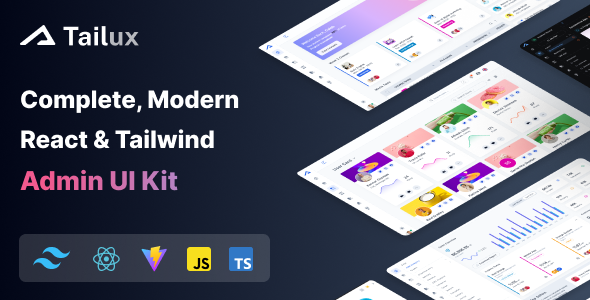
Tailux is a React and Tailwind CSS admin dashboard template designed for developers building custom backends. It provides dark/light layouts, TypeScript support, and pre-built app pages for faster project delivery.
Tailux: A React and Tailwind CSS Admin Dashboard Template for Developers
This isn't just another pretty UI kit; Tailux serves as a solid starting point for building custom admin interfaces. It tackles the initial setup and styling grunt work for dashboards, internal tools, or SaaS backends, letting you focus on the actual application logic.
If you're looking to cut down on the dozens of hours spent crafting a functional and presentable admin panel from scratch, especially one built on a modern stack, this template is designed to give you a significant head start.
Who Should Use Tailux and Who Should Look Elsewhere
Tailux is specifically for developers and agencies already comfortable with React and Tailwind CSS. It's an excellent choice for those needing to quickly spin up a custom React admin dashboard template for client projects, internal management systems, or as the backend for a SaaS product.
It's particularly useful if you value a component-based approach and the flexibility of Tailwind's utility-first styling. If your workflow involves building custom applications and integrating with various APIs, this template provides a robust UI foundation.
However, if you're a beginner to React or Tailwind, this isn't a learning tool; it assumes prior knowledge. It's also not for those looking for a full-stack solution with pre-built backend logic or a simple static website template. This is purely a front-end UI kit.
Design Approach and Layout Flexibility
The design follows a clean, functional aesthetic, which is typical for admin panels. It offers both dark and light layouts, along with multiple color schemes and a monochrome mode, providing decent flexibility for branding without heavy CSS overrides.
The use of the Inter font is a sensible choice, offering good readability across various screen sizes. The overall look is professional and avoids the overly decorative elements that can often bloat an admin interface, keeping the focus on data and functionality.
Pre-built Applications and Component Library
One of the main time-savers here is the collection of pre-built applications and pages. You get layouts for common admin functions like:
- Chat interfaces
- Mail clients
- Kanban boards
- Various authentication pages
- Error pages
- Help sections
This means you don't have to build these standard components from scratch. The template also includes a good set of creative widgets, advanced tables, and other UI components, which are essential for any comprehensive Tailwind CSS admin panel. This structure solves the headache of setting up these common niche-specific layouts.
Developer Experience and Code Structure
Built with React and Tailwind CSS, Tailux provides both JavaScript and TypeScript editions, which is a big plus for developer preference and project scalability. The modular architecture and lightweight dependencies contribute to faster performance, meaning a snappier interface for end-users and less frustration for developers.
In our experience with similar frameworks, the inclusion of tools like React Hook Forms, TanStack Table, and Headless UI is a smart move. These are battle-tested libraries that handle complex UI interactions efficiently, saving you significant development time. The Yarn build tools are standard and easy to work with.
The code organization feels logical and follows common React patterns, making it relatively straightforward to navigate and extend. While the core component structure is solid, it doesn't introduce overly opinionated state management patterns, leaving that choice to you, which is standard for a TypeScript admin starter kit of this type.
Responsive Behavior and Cross-Device Performance
The template boasts ultra-responsive layouts, which is critical for an admin panel that might be accessed from various devices. Tailwind's utility-first approach inherently makes building responsive interfaces more direct.
When we tested the kit on a demo site, the layouts adapted well across different screen sizes, ensuring a consistent and usable experience whether you're on a desktop, tablet, or mobile phone. This means business owners can manage their operations on the go without sacrificing usability.
Technical Foundation for Search Engine Optimization
While an admin dashboard typically isn't a public-facing asset requiring extensive SEO, the underlying code quality still matters. Tailux is built with a clean, semantic structure that contributes to overall performance and maintainability. Lightweight dependencies and optimized asset loading mean faster page loads, which, if any part were public, would positively impact Core Web Vitals and user experience.
Good code structure also translates to easier maintenance and lower long-term development costs for the business owner, regardless of public SEO implications.
Is Tailux the Right Admin Template for Your Project?
If you're a developer or agency needing to build custom React and Tailwind admin interfaces quickly, Tailux offers a substantial head start. It saves you the tedious work of setting up basic layouts, components, and common application pages, allowing you to jump straight into integrating your unique business logic.
It's a solid investment for reducing development time on the front-end UI, providing a clean, performant, and flexible foundation. While it won't write your backend, it delivers a robust, modern front-end framework that is genuinely useful in a real workflow.
FAQ
Is Tailux a full-stack solution with a backend included?No, Tailux is a front-end admin dashboard template. It provides the user interface components and structure, but you will need to integrate your own backend API and database.
Is prior experience with React and Tailwind CSS necessary to use this template?Yes, this template is built for developers already familiar with React and Tailwind CSS. While it's well-structured, it's not designed as a learning tool for these technologies.
How easy is it to customize the design and add new features?Customization is straightforward due to its modular React components and Tailwind CSS utility classes. Adding new features involves standard React development practices, leveraging the existing structure.
Does Tailux support different data visualization libraries for charts and graphs?While Tailux provides a foundation, it doesn't bundle a specific chart library. You can easily integrate popular React charting libraries like Recharts or Chart.js to display your data.