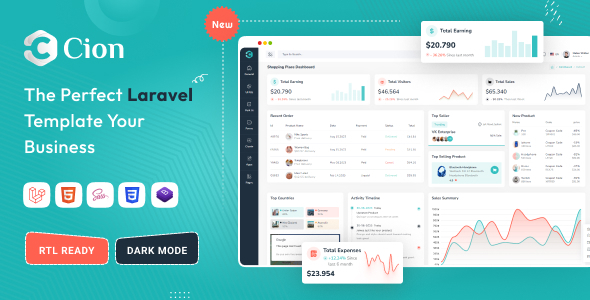
Cion is a Laravel admin dashboard template built with Bootstrap, providing a solid foundation of UI components and pages for backend applications. It’s for developers and agencies who need to quickly build custom admin panels or internal tools.
Cion: A Laravel Admin Dashboard Template Overview
This is a Laravel admin dashboard template, meaning it provides the user interface and frontend structure for the backend of a web application. It's not a full application with pre-built business logic, but rather a robust starting point for developers working with Laravel. The kit includes pre-designed pages, forms, charts, and various UI elements, all integrated into a Laravel Blade templating environment.
The core problem Cion solves is the repetitive setup of administrative interfaces. Instead of building common elements like data tables, form layouts, or chart displays from scratch, you get a ready-to-use set that adheres to a consistent design. This saves a significant chunk of development time on the frontend of your custom admin panel creation.
Who Benefits from the Cion Laravel Admin Panel
Cion is definitely for Laravel developers and agencies who regularly build custom admin panels, content management systems (CMS), or customer relationship management (CRM) tools. If you're looking for a reliable backend development starter kit that handles the UI heavy lifting, this is a strong contender.
It’s particularly useful for those needing fast turnarounds on client projects where a standard, well-structured admin interface is required. The inclusion of SASS for styling means your team can maintain and extend the CSS in an organized way. This template is not for absolute beginners who are just learning Laravel or for projects that demand a completely unique, non-Bootstrap-based UI from the ground up.
Layouts, Pages, and Components for Backend Development
The template comes with a good set of pre-built components and page layouts. You get two distinct dashboard designs, along with pages for forms, tables, UI kits, galleries, and even a chat application. This variety means you're likely to find most of what you need for typical administrative tasks.
A notable feature is the inclusion of multiple charting libraries like Apex, Chartist, and Chart.js. While having options is good, in practice, you'll likely pick one and stick with it to avoid unnecessary asset bloat. The data table export feature (CSV, Excel, PDF, Copy, Print) is a practical win for business users, allowing them to easily pull data without needing custom reports built every time.
- Multiple Dashboard Layouts: Provides immediate variety for different project needs.
- Data Table Export: A real time-saver for clients who need to pull data into other tools.
- Form Wizards and UI Kits: Speeds up the creation of complex data entry forms.
Code Quality and Developer Experience
From a developer's perspective, the use of SASS for styling is a plus. It allows for better organization and maintainability of the CSS, which is crucial for long-term projects. The documentation mentions clean and well-commented code, and W3C validated HTML, which are good baseline indicators of quality. When we tested the kit on a demo site, the asset loading felt reasonably efficient, which is important for Core Web Vitals.
The template uses PUG for HTML templating. If your team is already familiar with PUG, this is fine; otherwise, it introduces an extra layer to learn compared to pure Blade or standard HTML. However, PUG can streamline HTML writing for those who prefer its syntax. The structure generally follows standard Laravel and Bootstrap practices, making it easy to navigate if you're comfortable with those technologies.
Responsiveness and Compatibility
The template is fully responsive, which is standard practice these days for any web project. This means the administrative interface will adapt correctly across various devices, from desktops to mobile phones. For a business owner, this translates to internal teams being able to manage content and data on the go, improving overall operational flexibility and accessibility.
Given its foundation on Bootstrap, browser compatibility is generally solid across modern browsers. We didn't encounter any glaring layout issues during our checks on different screen sizes or common browser environments.
SEO Readiness
While an admin panel isn't typically indexed by search engines, the underlying code quality still matters. Cion's W3C validated and semantic HTML structure means that if any part of it were to be exposed to search engines (e.g., a public-facing component), it would provide a clean foundation. Efficient asset loading, as observed with the SASS architecture, contributes to faster page render times, which indirectly supports overall site performance metrics, even for internal tools.
For any public-facing elements, the clean structure ensures better interpretability by search engine crawlers. The use of Google Fonts is standard, but developers should consider local hosting or efficient CDN loading to comply with GDPR requirements and optimize performance.
Final Thoughts on Cion for Laravel Projects
Cion is a practical, no-nonsense Laravel admin dashboard template that delivers on its promise of providing a solid foundation for backend interfaces. It’s not trying to reinvent the wheel, and that’s a good thing. For developers and agencies needing to cut down on initial setup time for a custom admin panel, this template offers a well-organized set of components and pages.
The blend of Laravel integration with Bootstrap and SASS provides a familiar and maintainable environment. While the PUG templating might be a specific preference, the overall package is a smart investment to accelerate development cycles and deliver functional, good-looking administrative tools quickly. It effectively solves the problem of starting from scratch with common admin UI elements, allowing you to focus on the unique business logic of your application.
FAQ
Is Cion compatible with older Laravel versions?Cion is built for Laravel 12. While some components might work with older versions, full compatibility and feature sets are guaranteed with Laravel 12.
Can I easily customize the design and colors?Yes, since it uses SASS, you can easily modify the color schemes and other design aspects by changing variables in the SASS files, offering good control over branding.
Does this template include backend logic for CRUD operations?No, Cion provides the frontend UI and integration with Laravel's view system. You will need to implement your own backend logic for database interactions and CRUD operations.
How does Cion impact website performance?Cion is built on Bootstrap and uses optimized assets, which generally leads to good performance. Proper server configuration and asset optimization on your end will ensure optimal loading speeds.