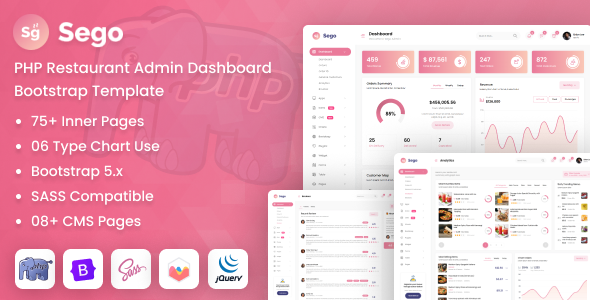
Sego is a PHP restaurant admin dashboard template built with Bootstrap, offering pre-built UI components for managing food service operations. It's a solid starting point for developers building custom restaurant management systems.
Sego: A PHP Admin Dashboard Template for Restaurant Management
Alright, let's talk about Sego. This isn't a full-blown SaaS solution for your restaurant clients. Instead, it's a frontend admin dashboard UI kit, primarily HTML and JavaScript, packaged with some basic PHP files. Think of those PHP files as a simple way to include headers, footers, or manage basic routing for your views, not a complete backend framework. It gives you a pre-designed interface for common restaurant management dashboard template features like order tracking, inventory, or staff scheduling.
The core value here is getting a well-structured, Bootstrap-based UI ready to connect to your own backend logic. It saves you from building all those standard admin screens from scratch. For anyone needing a dedicated admin panel for food service, this provides a strong visual and structural foundation.
Who Benefits from This Restaurant Admin UI Kit (And Who Doesn't)
This Sego restaurant admin UI kit is definitely for agencies and freelance developers who need to deliver custom restaurant management solutions quickly. If you're building a bespoke system for a client, perhaps integrating with their existing POS or booking software, this gives you a huge head start on the frontend. It's also suitable for developers comfortable with PHP for templating and integrating their own database and API logic.
However, if you're a non-technical restaurant owner looking for an out-of-the-box system without writing any code, this isn't it. You'll need development expertise to make this functional. Similarly, if your project requires a highly specialized backend architecture or deep custom logic that isn't typically found in a standard admin panel, you'll still be doing a lot of heavy lifting beyond what Sego provides.
Visuals and Usability for Restaurant Admin Tasks
The design of Sego is clean and functional, which is what you want in an admin dashboard. It uses the Poppins font, which is a common, readable choice that maintains a professional look without being overly corporate. The layouts prioritize data display and form interactions, which is essential for managing restaurant operations efficiently. Things like table layouts and input fields are standard Bootstrap implementations, meaning they are familiar and generally well-behaved.
When we tested the kit on a demo site, the overall aesthetic felt neutral enough to adapt to various branding without a complete overhaul. This is a practical consideration for agencies that might use this as a base for multiple clients.
Key Components for Food Service Operations
Sego comes packed with a lot of common UI components that are directly applicable to a restaurant backend. You'll find a good range of charts for visualizing sales data or inventory trends, various data tables for managing menus, orders, or staff lists, and plenty of form elements for inputting new items or updating records.
The inclusion of specific date and time pickers, along with full calendar components, is particularly useful for handling reservations or staff shift scheduling. This helps solve the headache of setting up a niche-specific booking flow or resource allocation interface from scratch.
Under the Hood: Code Structure and Dependencies
Looking at the file structure, you get the expected PHP, JavaScript, CSS, and Sass files. The Sass files are a plus, indicating a more organized approach to styling compared to just flat CSS, which makes customization easier for developers. You can quickly change variables and compile your own styles, leading to lower maintenance costs down the line.
The extensive list of JavaScript libraries in the credits, including jQuery, Bootstrap, Datatables, Apexcharts, and Sweetalert, means you have a lot of functionality available. This is a double-edged sword. While it provides a rich UI out of the box, it also means a heavier asset load. In our experience with similar frameworks, this can impact initial page load times, potentially affecting Core Web Vitals if not carefully managed during implementation. It's important to only load what you actually need for better performance, which benefits the overall mobile experience for users.
Admin Panel Responsiveness Across Devices
Given it's built on Bootstrap, the responsiveness is largely handled by the framework itself. When we tested the admin panel on various screen sizes, the layouts adjusted as expected. Menus collapse on smaller screens, and tables become horizontally scrollable or adapt their display. This is standard practice for Bootstrap-based templates and means your client's team can manage their operations from a tablet or even a large phone without major issues. It ensures a consistent and usable experience regardless of the device.
Internal Structure for Maintainability and Accessibility
For an admin panel, "SEO readiness" isn't about public search rankings, but rather about clean, semantic HTML that makes the application maintainable and accessible. Sego generally follows standard practices in this regard, using appropriate HTML5 elements for structure. This clean semantic structure is good for future development, making it easier for new developers to understand the code and for assistive technologies to interpret the content. While not explicitly stated, using a standard font like Poppins and Bootstrap's built-in accessibility features means it's a reasonable starting point for meeting standard accessibility practices.
Is Sego the Right Start for Your Restaurant Backend?
Sego offers a solid, practical foundation if you're building a custom PHP admin panel for food service clients. It saves significant time on frontend UI development, especially for common elements like charts, tables, and forms that are crucial for a restaurant management system. The inclusion of Sass files is a definite plus for maintainability and customization.
The main trade-off is the large number of JavaScript dependencies, which will require some optimization work to ensure fast load times, but that's a common task for any feature-rich UI kit. For developers looking to jumpstart a project without getting bogged down in boilerplate, Sego is a smart investment that can genuinely accelerate your workflow.
FAQ
Does this include a complete backend system for restaurants?No, Sego is primarily a frontend UI kit with PHP files for templating. You will need to build your own backend logic, database, and API integrations.
How easy is it to customize the design and add new features?Customization is relatively straightforward due to the Sass files and Bootstrap framework, allowing you to modify styles and integrate new components with developer knowledge.
What about performance with all those JavaScript libraries?The template includes many JavaScript libraries, which might impact initial load times. You'll need to optimize asset loading by only including necessary scripts to ensure good performance.
Is this suitable for a small cafe or a large restaurant chain?It's suitable for both; the UI components are generic enough to scale. However, the complexity of your custom backend will determine its suitability for a large chain's specific needs.