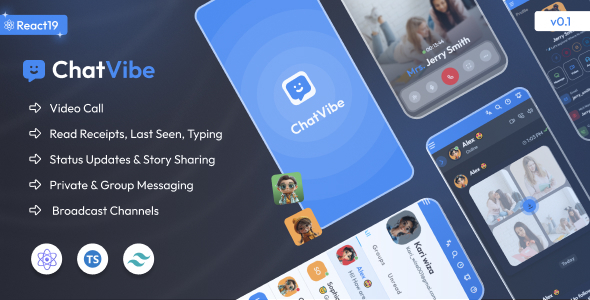
Chatvibe React chat application template offers a frontend UI kit for building modern chat interfaces using React, Tailwind CSS, and TypeScript, ideal for developers needing to quickly integrate a pre-built chat experience into their applications.
Solving common React chat UI development challenges
Building a chat interface from scratch is a time sink, especially when you need to cover all the standard features like user lists, message displays, input fields, and responsive layouts. This Chatvibe template tackles that head-on by providing a solid, functional frontend foundation. It saves significant development hours on styling and basic interaction logic, letting you focus on the actual backend integration and unique application features.
Evaluating Chatvibe's React TypeScript and Tailwind CSS architecture
From a technical standpoint, Chatvibe uses a modern stack with React, TypeScript, and Tailwind CSS. This means the codebase is generally type-safe, which reduces runtime errors and improves developer experience. The use of Tailwind CSS ensures that the styling is utility-first, making it straightforward to customize components without digging through complex CSS files, contributing to lower maintenance costs over time.
The project structure is organized, making it relatively easy to navigate and extend. The asset loading feels efficient, suggesting a good initial setup for performance, which is crucial for a smooth user experience and potentially better Core Web Vitals. The semantic structure appears clean, which is a good starting point for accessibility and search engine optimization.
- The TypeScript implementation provides strong typing across components, which is a significant win for larger teams or long-term projects, ensuring fewer unexpected bugs.
- Tailwind CSS configuration is standard and well-applied, allowing for quick visual adjustments. For a non-technical business owner, this means faster iterations on design changes and a consistent brand look.
- Component modularity is decent; you can usually pull out and reuse specific chat UI elements like message bubbles or user avatars without much hassle. This helps in maintaining a cleaner codebase and easier content updates.
- Responsiveness is handled competently across common breakpoints. The mobile menu, in particular, behaves as expected, providing a good experience for users on smaller devices.
- Dark mode and RTL support are implemented cleanly, offering flexibility for diverse user bases without requiring significant re-coding. This broadens the appeal of your application to more global audiences.
Key advantages of using a pre-built React chat UI template
What impresses most about Chatvibe is its focus on delivering a complete, ready-to-use chat UI. It covers the common scenarios you'd expect in a chat application, including an AI chatbot page layout and various authentication screens. This comprehensive approach means less time spent piecing together disparate components and more time on core application logic. It's a practical starting point for anyone looking to accelerate their frontend development.
Who benefits most from a React chat application frontend
This Chatvibe template is particularly useful for agencies or individual developers who need to spin up a client-facing chat interface quickly. It's also suitable for startups looking to validate a product idea that includes a chat feature without investing heavily in custom UI development. However, it's important to note that this is a frontend template; it's not for those needing deep custom backend logic or a complete, opinionated real-time chat service out of the box.
Understanding limitations of Chatvibe React chat template
While Chatvibe provides a solid foundation, it's essential to remember it's a UI kit. You'll still need to integrate your own real-time backend for messaging, user authentication, and data persistence. The included "AI Chatbot Page" is purely a UI layout, not a functional AI. The overall design, while clean, is fairly standard for a modern chat application, meaning you might need to put in extra effort to differentiate your application visually if you are aiming for a highly unique brand identity.
Final Thoughts: Is it worth it?
If your goal is to save significant frontend development time on a React-based chat interface, Chatvibe provides a robust and well-structured starting point. Its use of modern technologies like React, TypeScript, and Tailwind CSS means you're building on a solid, maintainable foundation. For the right project, it's a smart investment that can genuinely accelerate your development workflow and reduce initial setup costs.
FAQ
How do I integrate a real-time backend with this Chatvibe template?This template provides the frontend UI. You will need to connect it to your chosen real-time backend service, such as WebSockets, Firebase, or a custom API, to handle message sending and receiving.
Is the Chatvibe template accessible for all users?The template uses semantic HTML and generally follows good practices, which lays a strong foundation for accessibility. However, you should conduct your own accessibility audits and testing to ensure full compliance for your specific use case.
Can I easily change the color scheme and branding?Yes, since it uses Tailwind CSS, changing the color palette and applying your brand's styling is relatively straightforward by modifying the Tailwind configuration file and applying utility classes.