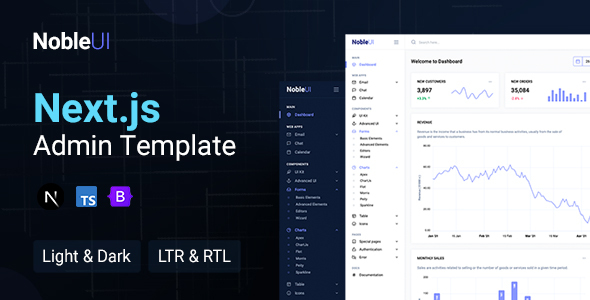
NobleUI Next.js is a feature-rich admin dashboard template for developers building complex web applications. It offers a solid foundation with reusable components and multiple integrations for faster development.
Building Admin Dashboards with Next.js: A Practical Look at NobleUI
When we're tasked with building a custom admin panel or a complex dashboard interface, the first thing we look for is a solid starting point. NobleUI Next.js presents itself as just that, a Next.js based admin template packed with components and features. In our experience, having a pre-built structure for things like data tables, forms, and various app layouts saves significant time. This template leverages Next.js and React, which are standard choices for modern web applications, and Bootstrap for its styling framework. The inclusion of App Router and TypeScript support means it aligns with current development practices, making it easier for teams to jump in and contribute without a steep learning curve on the framework itself.
Key Components for Efficient Dashboard Development
The real value of an admin template like NobleUI lies in the pre-built components it offers. We found the collection of UI elements to be quite extensive, covering common needs for dashboards:
- Reusable UI Components: Things like buttons, cards, modals, and form elements are all ready to go, which is a huge time saver compared to building them from scratch.
- Data Table Integration: Handling tabular data is a core function of most admin panels, and NobleUI includes a data table component that we found to be functional and easy to integrate.
- Form Validation Utilities: Pre-built form validation logic reduces boilerplate code and ensures a more consistent user experience for data input.
- Application Layouts: The template provides layouts for common applications like an Email App, Event Calendar, and Chat App. This is useful if your project requires similar functionalities, as it provides a good starting point for those sections.
For anyone looking to quickly set up a dashboard for managing data or internal tools, these pre-built pieces significantly accelerate the initial setup and styling phases.
Workflow Considerations: What Makes NobleUI Stand Out (and Where It's Standard)
In our work building multiple agency sites with tools like this, we've seen a wide spectrum of admin template quality. NobleUI's strength is its straightforward integration with Next.js. The App Router setup is clean, and the code organization is generally well-commented, which is a big plus for team collaboration and future maintenance. We appreciate that it supports both light and dark modes out of the box, along with RTL (Right-to-Left) language support, addressing common internationalization needs without extra effort. The responsiveness across devices is as expected with a Bootstrap-based template, ensuring the interface looks good on desktops, tablets, and mobile phones.
While many admin templates offer chart options, NobleUI includes multiple chart types, which is standard for this category. The asset loading feels reasonably optimized, aiming for good performance, which is crucial for Core Web Vitals and overall user experience. This means your dashboard will load faster, leading to better user engagement and potentially higher conversion rates if it's part of a customer-facing application.
Who Should Use NobleUI Next.js?
This template is best suited for developers and agencies who need to build custom admin panels, internal dashboards, or data-heavy web applications quickly. If you're already comfortable with Next.js, React, and Bootstrap, you'll find NobleUI a productive starting point. It’s a smart investment for projects where a significant portion of the development effort is focused on the backend interface and data management, such as building a custom CRM, an analytics dashboard, or a content management system.
Who Should Look Elsewhere?
NobleUI Next.js is not the best fit for those looking for a highly opinionated, complete SaaS product out of the box. It's a template, meaning you’ll still need to do significant development to integrate your specific business logic and backend APIs. If your project requires deep customizability beyond the standard UI components or a unique visual design that deviates heavily from Bootstrap's aesthetic, you might find yourself spending more time overriding styles than building features.
A Realistic Look at Limitations
One area where NobleUI, like many admin templates, feels standard rather than exceptional is in its out-of-the-box application examples. While the Email, Calendar, and Chat apps are functional, they serve more as demonstrations of component usage than fully fleshed-out applications. If your project requires a very specific or complex implementation of these, you’ll likely need to rebuild them to meet your exact requirements. This is common, but worth noting for anyone expecting plug-and-play application modules.
Final Thoughts on NobleUI Next.js for Dashboard Projects
NobleUI Next.js provides a strong, component-driven foundation for building sophisticated admin dashboards and web applications. By leveraging established technologies and offering a good set of pre-built elements, it effectively reduces development time and effort for common dashboard functionalities. For teams prioritizing speed and a clean, maintainable codebase in their Next.js projects, this template is a practical and worthwhile investment.
FAQ
What kind of projects is NobleUI Next.js most suitable for?
NobleUI Next.js is ideal for custom admin panels, internal dashboards, SaaS application backends, and any project requiring a robust data management interface.
How does the TypeScript support benefit our development process?
TypeScript adds static typing to JavaScript, catching errors during development rather than at runtime, which leads to more stable code and easier maintenance.
Is the template’s responsiveness reliable across different screen sizes?
Yes, being built on Bootstrap, the template is designed to be fully responsive, ensuring a consistent and usable experience on desktops, tablets, and mobile devices.
What level of customization can we expect with this template?
You can customize colors, typography, and layout variations through Bootstrap variables and by overriding component styles, offering good flexibility for design adjustments.