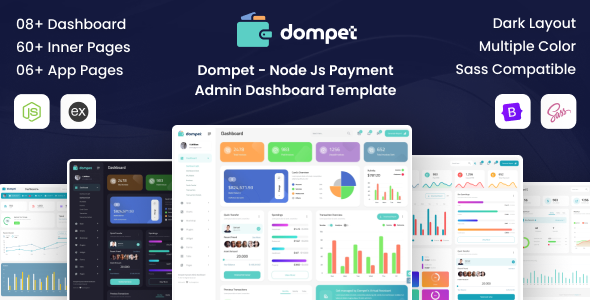
Dompet is a Node.js and Bootstrap admin dashboard template built with EJS, offering 8 dashboards and 60+ pages for payment and financial application backends. Launch internal tools fast.
What Dompet Offers for Backend Development
This Dompet template provides a pre-built frontend UI for Node.js applications, specifically targeting payment and financial dashboards. It's essentially a comprehensive UI kit wrapped around an EJS templating engine, powered by Bootstrap for its core styling.
The main problem it solves is the significant time investment required to set up a functional, visually consistent admin panel from scratch. Instead of piecing together various UI components and integrating them with a Node.js backend, Dompet gives you a ready-to-use framework.
Who Benefits from This Node.js Admin Dashboard Template
This template is ideal for developers and small to medium-sized agencies who regularly build Node.js-based internal tools or client dashboards. If you need to quickly spin up a backend interface for managing users, transactions, or displaying data visualizations, Dompet can save you substantial development hours.
It's particularly useful for projects that align with the provided dashboard layouts, such as payment gateways, financial analytics, or general business administration. The inclusion of many chart and form components makes it suitable for data-heavy applications.
However, this template is not for absolute beginners without a grasp of Node.js, Express, and EJS. It also isn't the right fit if your project demands a completely custom frontend framework like React or Vue, or if you require deep, highly unique backend logic that doesn't benefit from a pre-structured UI.
Design and Core UI Components
Dompet comes with 8 distinct admin dashboard layouts and 15 color skins, offering a good range of aesthetic choices out of the box. The design feels generally clean and functional, adhering to common admin panel patterns.
It includes features like light and dark themes, various menu styles, and horizontal navigation options, which are standard for this type of product. The template integrates a light gallery, which is a common need for image heavy admin areas.
The value here is in the aggregation of many commonly used UI components. You get pre-integrated charting libraries, data tables, date pickers, form elements, and more, all styled to work together within the Bootstrap framework. This solves the headache of finding, testing, and styling individual components yourself.
Practical Code Structure and Developer Experience
When you dive into the files, you will find EJS files for templating, along with CSS and Sass files for styling. This Sass architecture means you can easily customize colors, fonts, and other visual aspects by tweaking variables, which is a significant time-saver compared to digging through raw CSS.
The documentation is proper, which is essential for understanding how the numerous integrated JavaScript libraries work together. All files are well commented, which helps developers navigate the codebase and make modifications without extensive reverse-engineering.
In our experience with similar frameworks, while the extensive list of included jQuery and other JavaScript files provides a rich feature set, it can lead to a somewhat heavier asset load. This is a common trade-off in feature-rich admin templates, where functionality often takes precedence over extreme minimalism. However, for an internal admin panel, this is often an acceptable compromise for the speed of development it enables.
Performance and Browser Compatibility
The template is responsive and designed to work across all modern browsers and mobile devices. This means your admin panel will be accessible and usable whether your team is on a desktop, tablet, or phone, which is a standard expectation today.
The claim of "high speed performance" needs to be taken with a grain of salt. While the code might be optimized, the sheer number of included JavaScript libraries for charts, forms, and other UI elements will inevitably contribute to the initial page load size. For an internal tool, this usually isn't a critical bottleneck, but it's something to be aware of if you're aiming for sub-second load times on public-facing sites.
Final Thoughts on Dompet for Your Workflow
Dompet offers a solid foundation for anyone needing to build a Node.js admin dashboard template, especially if payment or financial application backends are your focus. The template's strength lies in its comprehensive set of pre-integrated UI components and layouts, which genuinely save development time.
While the reliance on many jQuery plugins is a bit old-school compared to modern frontend frameworks, it’s a practical approach for a quick-start admin panel that just needs to work. If you're comfortable with Node.js, Express, EJS, and Bootstrap, this template provides a significant head start, allowing you to focus on your application's core logic rather than UI boilerplate.
FAQ
Is this Node.js admin dashboard template suitable for real-time data?While the template provides a robust UI for displaying data, integrating real-time updates would require additional backend logic and WebSocket implementation, which is not part of the template itself.
Can I easily change the overall color scheme of the Dompet dashboard?Yes, the template includes Sass files, which means you can modify variables to quickly change the color skin and other visual elements across the entire dashboard, making customization straightforward for developers.
Does this template include any backend database integration examples?The template primarily focuses on the frontend UI. While it's built for Node.js, it does not come with pre-built database integration examples. You will need to implement your own database connections and API endpoints.
What is the learning curve for a developer new to EJS?If you are new to EJS, there will be a moderate learning curve to understand its templating syntax and how it integrates with Express. However, EJS is relatively simple compared to full-fledged frontend frameworks, and the provided documentation should help.