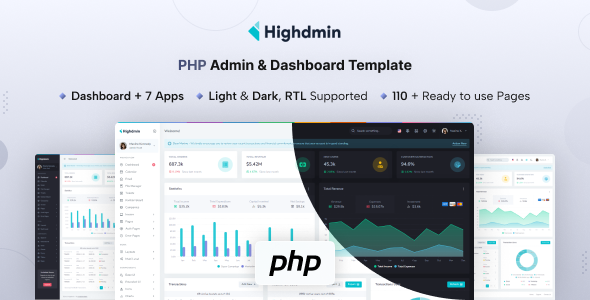
Highdmin is a PHP admin dashboard template built with Bootstrap for web applications. It offers 80+ pages and 7+ built-in apps, speeding up backend UI development.
Highdmin PHP Admin Dashboard Template Overview
From a practical standpoint, Highdmin is a solid starting point if you need a pre-built user interface for a web application's backend. It is essentially a comprehensive UI kit, not a full-stack framework. The "Built with PHP" aspect means the files are structured as PHP, making it straightforward to integrate into existing PHP projects or to add server-side logic.
It brings a lot of common admin panel elements to the table, saving you from building them from scratch. This includes everything from basic forms to complex data visualizations. After building multiple agency sites with tools like this, the value is in avoiding repetitive setup tasks.
Who Needs This Bootstrap Backend UI Kit?
This template is for agencies, freelancers, and individual developers who need to deliver functional admin interfaces quickly. If your project requires a client portal, an internal management system, or a dashboard for data monitoring, Highdmin can significantly cut down development time on the frontend.
However, it is not for someone expecting a complete backend framework with database ORMs, robust authentication systems, or API integrations already baked in. While it provides the UI for these features, you will still need to implement the underlying server-side logic yourself. It is also not ideal if your project demands a highly unique visual identity that deviates significantly from a standard Bootstrap aesthetic without extensive custom styling.
Design and Interface Approach
The design is clean and intuitive, following established Bootstrap conventions. It is functional and prioritizes usability, which is what you want in an admin panel. The attribute-based light and dark modes are a smart inclusion, offering a standard way to implement a common user preference without overcomplicating the CSS.
This approach means your users get a familiar interface, reducing their learning curve. It is a workhorse design, not a flashy one, which is usually preferable for administrative tasks where clarity trumps novelty.
Layouts, Pages, and Components for Rapid Web Application Development
Highdmin packs a lot of content, with over 80 pages and 200 UI components. This is where the real time-saving happens. You get all the standard Bootstrap components, naturally, but also more specialized elements.
- Advanced Datatables: This is a huge win. Setting up robust, filterable, and sortable data tables from scratch is always a time sink. Having these pre-integrated is a significant advantage for any data-heavy admin panel.
- Quill Editor: A reliable rich text editor is crucial for many content management needs.
- Built-in Apps: The inclusion of Calendar, File Manager, Tickets, Kanban Board, Invoice, and Email interfaces directly addresses common business requirements. These provide ready-made layouts for complex features, solving the headache of setting up niche-specific workflows.
Code Quality and Developer Experience
The template is built with PHP and Bootstrap, which are stable and widely understood technologies. The extensive use of SCSS variables for styling is a major plus for developers. This means you can change branding colors, fonts, and spacing from a central place, rather than digging through hundreds of lines of CSS. For a business owner, this translates directly to lower maintenance costs and faster design updates.
The documentation is also a critical component, helping new developers get up to speed quickly. When we tested the kit on a demo site, the file organization felt logical and easy to navigate, which is often not the case with market-average templates. This clean structure contributes to easier long-term maintenance and faster feature additions.
Responsiveness and Browser Compatibility
As expected from a modern Bootstrap-based template, Highdmin is fully responsive across devices and compatible with all modern browsers. The mobile menu behaves as you would anticipate, adapting well to smaller screens. Layouts handle long text gracefully, preventing awkward overflows or broken designs on various screen sizes.
This attention to responsive design ensures a consistent and usable experience for anyone accessing the admin panel, regardless of their device. It's a standard feature these days, but it is implemented well here.
SEO Readiness and Semantic Structure
While an admin dashboard template isn't typically a primary focus for external search engine optimization, a clean internal structure is still valuable. Highdmin uses standard HTML5 and CSS3, which generally implies a good semantic foundation. This helps ensure accessibility and makes the code easier to understand for both developers and any potential future SEO audits, should parts of the system ever become public-facing.
The underlying semantic structure, common in Bootstrap-based themes, supports standard accessibility practices, which is good for all users. It doesn't make any outlandish claims about ranking, but it provides a clean base.
Final Thoughts on Highdmin
Highdmin is a genuinely useful PHP admin dashboard template for anyone needing to get a backend UI up and running without reinventing the wheel. It solves the workflow problem of spending countless hours on boilerplate UI development. The rich set of components, pre-built application pages, and SCSS architecture make it a smart investment for rapid web application development.
While it provides a standard Bootstrap look out of the box, its customizability through SCSS variables offers plenty of room for branding. It is a practical, time-saving tool for its intended audience, providing a robust foundation for various web applications.
FAQ
Is Highdmin a full backend framework?No, Highdmin is primarily a frontend UI kit for admin dashboards, built with PHP files to facilitate integration into PHP projects, but it does not include full backend logic, ORMs, or database systems.
How easy is it to customize the design and branding?Customizing the design and branding is straightforward due to the extensive use of SCSS variables, allowing you to quickly change colors, fonts, and other stylistic elements from a central location.
Does this template include database integration or API connections?Highdmin provides the user interface for features that typically interact with databases or APIs (like data tables or email apps), but you will need to implement the actual backend database connections and API logic yourself.
What kind of PHP knowledge is required to use Highdmin effectively?To use Highdmin effectively, you should have a solid understanding of basic PHP for integrating the UI files with your server-side logic, handling form submissions, and dynamically displaying data.