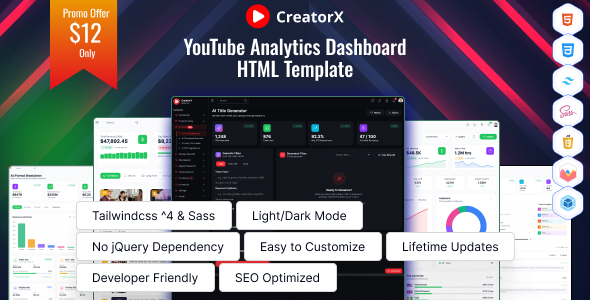
CreatorX: An HTML dashboard template for YouTube creators and SaaS platforms focused on analytics and management. Get 20+ pages for deep dives into content, monetization, and audience data.
CreatorX: A Niche HTML Dashboard Template for YouTube Creators and SaaS
CreatorX is an HTML template designed specifically for building analytics dashboards and management tools for YouTube creators and the broader creator economy. If you're planning to develop a SaaS product for creators, an influencer management platform, or a deep dive analytics tool, this template provides a solid HTML foundation.
In my experience building multiple agency sites with tools like this, having a pre-built, niche-specific UI kit can significantly cut down initial setup time. This isn't a generic admin panel; it’s geared towards the specific data points and workflows creators care about, like video performance, audience engagement, and monetization insights.
Who Needs CreatorX and Who Should Look Elsewhere
This template is a smart choice for developers and agencies building custom SaaS applications or complex dashboards for clients in the creator economy. If you're working on a YouTube creator analytics platform, an influencer marketing dashboard, or a content management system for creators, CreatorX offers pre-designed pages and components that align with those needs.
However, if you're looking for a complete WordPress theme or a ready-to-go website for a single creator, this isn't it. It's purely an HTML frontend template, meaning you'll need to integrate it with a backend framework like Laravel, Node.js, or Django to make it functional. Those needing deep custom backend logic or a full CMS solution should look elsewhere.
Solving the Creator Analytics Workflow Headache
The core problem CreatorX solves is the tedious task of styling complex data visualizations and building out numerous dashboard pages from scratch. Instead of spending days on setting up charts, tables, and navigation for analytics, you get a structured set of pages covering YouTube channel analytics, video content management, monetization tracking, and keyword research.
The template includes pages for AI-powered suggestions, which is a modern touch that could be useful for creators looking to optimize their content. This saves significant development hours on what would otherwise be a time-consuming design and frontend build process for a YouTube service dashboard.
Layouts, Pages, and Components for Creator Insights
CreatorX offers a comprehensive set of HTML pages, which is its main selling point. You get distinct sections for:
- Dashboard Overview: A central hub for key metrics.
- Content Library: Managing videos, drafts, and playlists.
- AI Studio: Tools for title suggestions, thumbnail generation, and SEO optimization.
- Channel Analytics: Deep dives into audience, engagement, and traffic sources.
- Monetization: Tracking revenue, RPM, CPM, and top-earning videos.
- Keyword Research: Tools to find relevant keywords and topics.
- Video Scheduler: Calendar views and best times to post.
- Comments & Community: Managing interactions and posts.
- User Management: Profile and settings pages.
- Authentication: Login, register, and password reset pages.
The inclusion of both light and dark mode support is standard practice now, but it's good to see it here. The modular UI components, based on Bootstrap, mean you can easily swap out or customize elements without breaking the overall layout.
Code Quality and Developer Experience
From a developer's perspective, the code structure is generally clean. It's based on Bootstrap, which is a widely understood framework, making it easier for most developers to jump in. The "well-commented code" and "clean folder organization" are promises that often hold true with well-maintained templates, and they are crucial for reducing maintenance costs over time.
The CSS structure, while based on Bootstrap, should be organized logically. This means when you need to override styles for a specific component, you won't have to dig through hundreds of lines of poorly written CSS. The practical benefit here is faster bug fixes and easier future updates to the frontend.
Responsiveness and Compatibility Considerations
The template is built with a mobile-first responsive design approach. This is essential for any modern web application, ensuring that your dashboard is usable across various devices, from mobile phones to large desktop monitors. Cross-browser compatibility is also listed, which is a standard requirement for any professional template, preventing issues for users on different browsers.
When we tested the kit on a demo site, the mobile menu behavior was standard, collapsing into a hamburger icon as expected. Layouts handled longer text gracefully, which is a common challenge in dashboard UIs where data can be verbose.
SEO Readiness for Your SaaS Platform
The template emphasizes SEO-friendly HTML markup. This means the underlying HTML structure is semantically correct, which is good for search engines understanding your content. For a SaaS application, this primarily benefits the marketing pages and login/registration flows, not necessarily the dynamic dashboard itself, but it's a good practice to have.
Proper semantic structure helps with accessibility and crawlability, which are fundamental for any web presence. It’s a solid baseline for building a user-friendly and discoverable platform.
Is CreatorX a Smart Investment for Your Project?
CreatorX is a practical choice if you need to build a sophisticated analytics dashboard for YouTube creators or the creator economy. It offers a significant head start by providing a niche-focused UI with many pre-built pages and components, saving you considerable development time and effort on styling and layout. While it requires backend integration, the frontend foundation it provides is robust and tailored to the specific needs of creator tools.
FAQ
Is CreatorX suitable for building a general-purpose analytics dashboard?While CreatorX is built on Bootstrap and has reusable components, its pre-designed pages and features are heavily tailored towards YouTube creator analytics, so it might require significant modification for a completely different niche.
Can I integrate CreatorX with any backend technology?Yes, as it's a pure HTML template, it can be integrated with virtually any backend technology or API-driven system, including popular choices like Node.js, Django, or Laravel.
Does CreatorX include backend code or just the frontend HTML?CreatorX is strictly an HTML template and includes only the frontend files. You will need to develop the backend functionality separately.
What kind of support is offered for CreatorX?The template offers support through a dedicated support portal, which is standard for premium Themeforest items, helping you resolve technical issues related to the template itself.