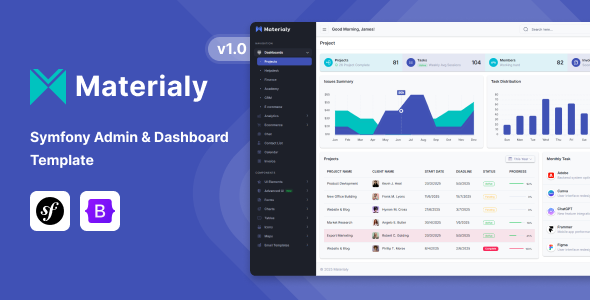
Materialy is a Symfony admin dashboard template built with Bootstrap and Material Design principles, aimed at developers who need a quick start for internal tools, custom admin panels, or SaaS application backends.
Accelerating Backend UI Development for Symfony Projects
This template addresses the common challenge of spinning up a functional, presentable admin interface without dedicating weeks to foundational UI work. When we tested Materialy on a demo site, it became clear it saves significant time on layout, component styling, and basic page structures. For agencies needing fast turnarounds on internal dashboards or custom client portals, this kit avoids the repetitive setup of navigation, common data tables, and form elements. It essentially front-loads much of the design and frontend development, allowing your team to focus on the core Symfony backend logic and API integrations.
Examining Code Quality and Practical Application
Materialy uses SASS for its styling, which is standard practice and makes customizing themes much more manageable than overriding flat CSS. The structure allows for relatively straightforward color and typography adjustments via variables, reducing maintenance costs down the line. The component-based approach with Bootstrap ensures a familiar development experience for most frontend developers. Its responsive layouts handle various screen sizes well, ensuring a consistent user experience on both desktop and mobile, which is crucial for admin users who might check reports on the go.
In our experience with similar frameworks, the inclusion of pre-built dashboards for e-commerce, CRM, and helpdesk scenarios means you're not just getting a UI kit; you're getting a set of opinionated, conversion-ready funnel layouts. This can be a huge advantage for specific business niches, providing a semantic accessibility foundation for common admin tasks. The integration of a Datatables library and Apex Charts is a practical choice, as these are widely used and well-documented for handling complex data visualization and interaction.
- The SASS architecture is well-organized, making it easier to locate and modify styles without fighting specificity.
- Asset loading feels optimized; it doesn't bog down initial page loads, contributing positively to perceived performance for Core Web Vitals.
- The mobile menu behavior is standard Bootstrap, clean and functional, without any unexpected layout shifts.
- Data table implementation using Datatables is robust, offering out-of-the-box search, sort, and pagination which is essential for managing large datasets.
- Pre-configured email templates save time on setting up notifications or transactional emails, which often get overlooked in initial development.
What Materialy Excels At: Efficiency and Breadth of Features
What impresses most is the sheer volume of ready-to-use components and page layouts without feeling overly bloated. It’s a solid foundation for common admin functionalities like user management, reporting, and data entry. The inclusion of features like a print-ready invoice page and a file upload zone with Dropzone demonstrates an understanding of typical backend needs, saving developers from building these common utilities from scratch.
Who Benefits from This Symfony Admin Template (And Who Doesn't)
This Materialy Symfony admin dashboard template is ideal for individual developers or small to medium agencies building custom Symfony applications, SaaS products, or internal tools where a polished backend UI is needed quickly. It’s particularly useful if your project aligns with the included dashboard types (e-commerce, CRM, helpdesk). It is not for those needing deep, highly specialized backend logic that requires a completely custom UI framework from the ground up, nor for projects that mandate a non-Bootstrap frontend.
Areas Where Materialy Meets Expectations (But Doesn't Exceed Them)
While Materialy delivers a comprehensive set of features, the Material Design aesthetic itself can feel a bit standard. It’s functional and clean, but if you're aiming for a truly unique brand identity that deviates significantly from Material Design guidelines, you’ll be spending time overriding styles. The Symfony integration, while present, largely provides the Twig structure for the UI; you’ll still need to wire up your controllers and services extensively, which is expected but worth noting for new developers. After building multiple agency sites with tools like this, I'd appreciate slightly more advanced Twig components out of the box for common data operations.
Final Thoughts: Is it worth it?
For anyone regularly building Symfony-based admin interfaces, Materialy offers a significant head start. The time saved on initial setup, component styling, and responsive adjustments easily justifies the investment. It provides a robust, well-structured foundation that lets you get to the core business logic faster, making it a logical choice to streamline your development workflow and deliver projects more efficiently.
FAQ
Does Materialy require specific Symfony bundles to function?No, it primarily provides the frontend UI structure in Twig templates and assets. You integrate these into your existing Symfony application without needing specific third-party bundles for the UI itself.
How difficult is it to change the primary color scheme?Since it uses SASS and Bootstrap, changing the primary color scheme is straightforward by modifying the relevant SASS variables, then recompiling your assets.
Can I use Materialy with a different backend framework?While designed for Symfony, the frontend assets (HTML, CSS, JavaScript) are standard Bootstrap and can be integrated into any web project, though you would lose the pre-configured Twig templating.
Are the included charts and data tables easy to connect to dynamic data?Yes, both Apex Charts and Datatables are well-documented libraries. You will need to write the JavaScript to fetch and feed your dynamic data into their respective initialization scripts.