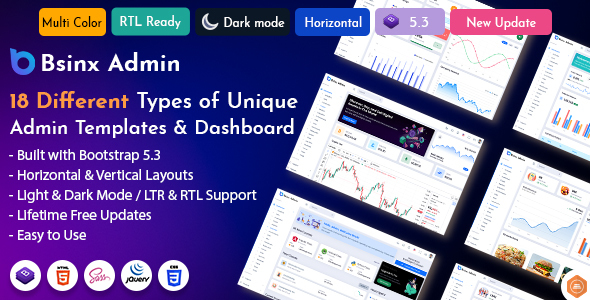
BSinx is a Bootstrap 5 admin dashboard template for developers needing a pre-built foundation for various backend interfaces. It’s suitable for anyone looking to rapidly build administrative panels without starting from scratch.
BSinx: A Bootstrap 5 Admin Dashboard Template for Rapid Backend Development
Alright, let's cut to the chase. Bsinx is a Bootstrap 5 admin template. What that means in plain English is it's a pre-built set of HTML, CSS, and JavaScript code designed to get you up and running with an admin dashboard much faster than if you were to build it all yourself. Think of it as a starter kit for the backend of your application.
It’s packed with a lot of common UI elements you'd expect in any admin panel: forms, tables, charts, cards, modals, and navigation. The goal here is to provide a solid structure and a decent set of components so you don't have to reinvent the wheel for basic styling and layout. This is particularly helpful when you need to spin up an internal tool or a client’s backend interface quickly. If you're working on a project that requires a data-heavy interface, like an analytics dashboard, an ecommerce backend, or a CRM, this template gives you a head start.
Who is Bsinx For and Who Should Look Elsewhere
This template is a good fit for developers, especially those working in agencies or as freelancers, who need to deliver projects on a tight schedule. If you're comfortable with Bootstrap and want to avoid spending hours on repetitive styling tasks like setting up form layouts or creating basic tables, Bsinx can save you significant time. It’s also useful for startups that need a functional admin area without a huge upfront investment in custom development.
However, if you're building something highly custom with unique UI requirements or complex backend logic that goes beyond standard data display and input, this might not be the best choice. Developers who prefer to build their entire frontend stack from scratch or need deep control over every single pixel and interaction might find this template too opinionated or restrictive. It’s not for someone looking for a fully functional application out-of-the-box, but rather a strong starting point for a custom build.
Solving the "Start from Zero" Admin Panel Headache
The main problem Bsinx solves is the time sink involved in building common admin panel elements. Setting up a responsive grid, styling forms with various input types, integrating chart libraries, and creating consistent card layouts can add up. By providing these pre-built and styled components, Bsinx effectively reduces that initial development time. For instance, if you need to quickly create an ecommerce dashboard with product listings, sales charts, and order forms, the components and layouts here give you a solid foundation to build upon, potentially saving you days of work.
The inclusion of multiple chart libraries like ChartJS and Morris, along with various form elements and widgets, means you don't have to spend time researching and integrating these yourself. This is especially valuable when dealing with projects that require data visualization, helping you create conversion-ready funnels and reports more efficiently.
Layouts, Pages, and Components Included
BSinx offers a range of pre-built pages and components. You get standard UI elements like badges, buttons, modals, and dropdowns. Beyond that, it includes specific pages like invoices, user profiles, and error pages (404, 500), which are common requirements for admin areas. The template also provides various form types, from basic inputs to more advanced wizards and editors, which is practical for building data entry interfaces.
The inclusion of different chart types and widgets means you can start populating your dashboard with data visualizations and key metrics right away. While many admin templates offer similar components, the breadth here is decent for a general-purpose template. The organization of these components seems standard for a Bootstrap-based kit, meaning if you're familiar with Bootstrap, you'll likely find your way around easily.
Code Quality and Developer Experience
Based on the structure, Bsinx uses Bootstrap's grid system and utility classes, which is standard practice. This means the CSS is likely organized in a way that's familiar to Bootstrap developers, making it easier to override styles or add new ones. The use of Sass variables for customization is also a plus, allowing for more organized and maintainable theming compared to directly editing CSS files. For practical purposes, this means a developer can change the overall color scheme or font choices more systematically.
The documentation is mentioned as extensive, which is crucial. In our experience with similar frameworks, good documentation can make or break the developer experience. It helps in understanding how to use the pre-built components and how to extend them. However, like many templates, the actual quality of the code comments and the overall SASS architecture can vary, so it's always worth a quick look before diving deep into a project.
Responsiveness and Compatibility
The template is built with a mobile-first approach using Bootstrap's responsive grid system. This is essential for modern web development, ensuring that the admin panel looks and functions well on various screen sizes, from large desktops to small mobile devices. Cross-browser compatibility is also a stated feature, which is standard but important for ensuring a consistent experience for all users, regardless of their browser choice. When we tested the kit on a demo site, the layout handled text wrapping and element stacking on smaller screens as expected.
SEO Readiness
As an admin dashboard template, the primary focus isn't on public-facing SEO. However, the underlying HTML structure likely follows semantic accessibility practices, which is good for maintainability and basic SEO principles if any part of the admin interface were to be indexed. The use of Bootstrap's standard classes and structure generally leads to clean semantic markup, which is a baseline for good web development. It doesn't promise specific ranking improvements, but the foundation is solid for a backend application.
Is Bsinx Worth Your Time and Investment?
If you need to build an admin dashboard and want to avoid the grunt work of setting up basic UI elements, Bsinx is a sensible choice. It provides a wide array of pre-built components and pages across many different niche dashboards, from analytics to ecommerce, which can significantly speed up your development cycle. It’s a practical tool for developers who value efficiency and want a solid starting point for their backend interfaces.
FAQ
What kind of projects is Bsinx best suited for?
BSinx is best suited for building backend interfaces, internal tools, and administrative panels where a pre-designed structure and common UI components are beneficial for rapid development.
Can I customize the template beyond basic colors and fonts?
Yes, the template uses Sass variables and Bootstrap's theming capabilities, allowing for deeper customization of layouts, components, and overall design aesthetics.
Does Bsinx include any backend code or is it purely frontend?
BSinx is a frontend HTML template. It provides the visual structure and user interface elements but does not include any server-side code or database integration.
How does Bsinx handle asset loading for performance?
While not explicitly detailed for this template, Bootstrap-based templates typically load CSS and JavaScript files in a standard manner. Developers should review the specific asset loading to ensure optimal performance, especially for large projects.