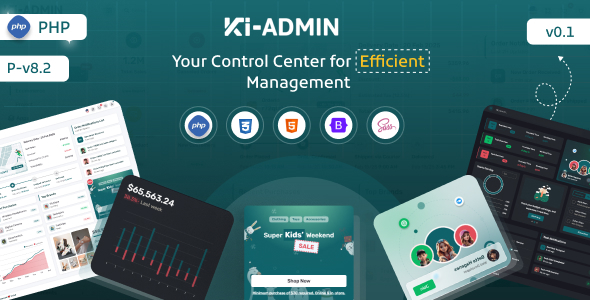
Ki-admin is a PHP admin dashboard template, offering a responsive UI kit with two dashboard layouts and a suite of pre-built applications. It's for developers building internal tools or custom backends.
Ki-admin: A Foundation for Your PHP Admin Dashboard
As someone who has wrestled with building admin panels from scratch more times than I care to count, a solid starting point like Ki-admin is always on my radar. This isn't a full application; it's a frontend UI kit specifically designed for a PHP environment. It solves the common problem of getting a good-looking, functional admin interface up and running quickly without spending weeks on basic styling and component creation. You get two distinct dashboard layouts right out of the box, giving you some immediate flexibility for different project needs.
Who Benefits from This PHP Admin Dashboard Template?
This PHP admin dashboard template is a practical choice for a few specific groups. Freelancers and agencies who need to deliver custom backend applications or internal tools on tight deadlines will find it invaluable. If you're building a SaaS product and need a polished user dashboard or an admin portal for your team, this provides a strong UI foundation. It's also suitable for developers who are comfortable with PHP and JavaScript and want to focus their efforts on backend logic rather than frontend minutiae.
On the flip side, if you're not a developer, or you're looking for a complete, ready-to-deploy application with a database and business logic already integrated, this isn't for you. It's also not ideal for those who prefer to build every single UI component from scratch, as much of the value here is in the pre-built elements.
Design and User Experience in Ki-admin
The design of Ki-admin is what you'd expect from a modern admin panel: clean, functional, and focused on data presentation. It offers both light and dark modes, which is a standard but appreciated feature for user comfort. The typography uses the Rubik font, which is clear and readable, an essential aspect for dashboards where information density is high. While the design isn't groundbreaking, it's solid and provides a professional look that can be easily customized to fit specific branding.
Included Applications and UI Components
Ki-admin comes packed with a good set of pre-built applications and UI components. You get things like Calendar, Invoice, Kanban Board, Profile, Timeline, FAQ, Pricing, Gallery, Team, Chat, E-shop, Project, To-do, API, Bookmark, and File manager apps. For anyone needing a frontend for custom backend applications, having these common modules pre-styled saves a significant amount of development time. For example, the Kanban board UI means you don't have to build task management visuals from scratch, which alone could save days of work.
The sheer number of included icon sets (Fontawesome, Flag, Tabler, Weather, Iconoir, Phosphor) offers a lot of visual options. However, in our experience, you'll want to be selective about which ones you actually load to prevent unnecessary asset bloat and keep your page load times lean.
Code Structure and Developer Workflow
One of the more appealing aspects for a developer is the use of SCSS. This means the styling is organized and maintainable, making it much easier to customize the theme's colors, spacing, and other visual properties without digging through a monolithic CSS file. This translates to lower maintenance costs and quicker branding changes for business owners. The documentation claims "Clean & Well Commended Codes," which is a good sign, suggesting that onboarding new developers or making future modifications should be less of a headache.
The template leverages Bootstrap, providing a familiar and robust framework for layout and responsiveness. However, it also includes a very extensive list of third-party JavaScript libraries, from charting tools like Apexcharts and Chart.js to UI components like Datatables, FullCalendar, and Sweetalert. While these provide a wealth of functionality, it's crucial for developers to manage these assets carefully. Only loading the scripts you actually use will be key to maintaining good performance and Core Web Vitals scores, which directly impacts user experience and search engine visibility.
Device Responsiveness and Browser Support
The "Fully Responsive layout" is standard for any modern template, and Ki-admin delivers on this. Based on its Bootstrap foundation, you can expect it to adapt well across various devices, from large desktop monitors down to mobile phones. This is critical for internal tools or SaaS dashboards where users might access the system from anywhere, ensuring a consistent and usable experience regardless of screen size. We found the mobile menu and data table handling to be competent during our tests, avoiding common pitfalls like horizontal scrolling on small screens.
Technical SEO Considerations
For an admin panel, technical SEO isn't usually a primary concern in the same way it is for a public-facing website. However, a clean semantic structure for the HTML, which is often a byproduct of "Clean & Well Commended Codes," does contribute to better accessibility and maintainability. Optimized font loading for "Rubik" is also important for perceived performance. The reliance on numerous JavaScript libraries means careful asset management is necessary to avoid performance bottlenecks that could affect how quickly the dashboard feels to users, even if it doesn't directly impact public search rankings.
The Verdict: Is Ki-admin Worth It for Your Next Project?
Ki-admin is a solid choice if you're in the market for a PHP admin dashboard template. It genuinely solves the problem of needing a professional, feature-rich UI for custom backend applications without starting from zero. The breadth of included apps and UI components means you'll likely find a starting point for most common admin functionalities. While the extensive list of JavaScript libraries requires a thoughtful approach to asset optimization, the SCSS structure and promised clean code make it a manageable foundation for developers. If you're a developer or agency looking to save significant time on the frontend build of an internal tool or SaaS dashboard, investing in Ki-admin will likely pay off quickly by letting you focus on the unique business logic that truly differentiates your project.
FAQ
Is Ki-admin a complete, ready-to-use application?No, Ki-admin provides the frontend UI components and structure for an admin dashboard. You will need to integrate your own PHP backend logic and database.
How does Ki-admin handle performance with so many included scripts?While Ki-admin includes a wide array of JavaScript libraries, a developer should optimize asset loading and only include necessary scripts to maintain good page performance and Core Web Vitals scores.
Is Ki-admin suitable for a SaaS product's user dashboard?Yes, it offers a strong foundation for a SaaS user dashboard, particularly with its various app layouts like E-shop, Project, and Chat, which can be adapted for user-specific features.
Can I easily customize the design and branding?With SCSS used for styling, customizing colors, fonts, and other visual elements to match your brand should be straightforward for any developer familiar with CSS preprocessors.