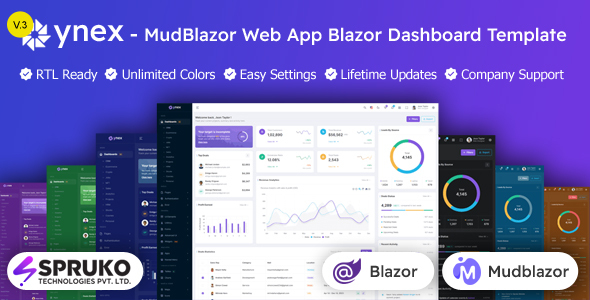
Ynex is a Blazor Web App admin dashboard template built with MudBlazor, offering a solid starting point for .NET developers and agencies needing a pre-built UI for their internal tools or client projects.
Exploring the Ynex Blazor Admin Template for .NET
This isn't a full application, so let's be clear upfront. Ynex is a comprehensive frontend UI kit for Blazor Web Apps, specifically designed around the MudBlazor component library. It aims to solve the common headache of building administrative interfaces from scratch, giving you a substantial head start on visual design and component setup.
For anyone working within the .NET ecosystem, especially those familiar with C# and Blazor, this template provides a ready-made structure. It helps you skip the initial boilerplate of setting up a consistent design system and numerous common pages for a MudBlazor admin dashboard for .NET projects.
Who Should Consider this MudBlazor Dashboard Template?
Ynex is a strong contender for agencies that regularly build custom Blazor applications and need to accelerate their frontend development. Freelancers can also leverage it to deliver a polished admin panel quickly, saving significant time on repetitive UI tasks. In-house development teams prototyping new internal dashboards or extending existing ones will find the pre-built components and layouts useful.
However, this template is not for everyone. If you're not comfortable with Blazor Web App development, C#, and .NET, you'll struggle to get value from it. It's also not a complete backend solution; you'll need to integrate your own data sources and business logic. Beginners to Blazor might find the sheer volume of files overwhelming without a solid understanding of the framework.
Inside Ynex: Layouts and Responsive Blazor UI Components
The template comes with 12 distinct dashboard variations, covering common use cases like CRM, E-commerce, Crypto, and Projects. These aren't just empty shells; they offer a good mix of pre-arranged charts, tables, and widgets that demonstrate how to use the MudBlazor components effectively. This is a practical starting point for building specific business dashboards.
You also get over 170 Razor pages, which is a lot of pre-built screens for everything from authentication flows to various form elements and utility pages. The variety of layout options, including vertical, horizontal, RTL, boxed, and double menu, means you can meet diverse client requirements without a major refactor. The inclusion of these responsive Blazor UI components provides a solid foundation for any Blazor dashboard template for agencies.
Developer Experience and Code Structure in Ynex
One notable aspect is the explicit "no jQuery" approach, which is a welcome sign for modern web development, leading to a lighter and often faster application. The template is built with C#, CSS3, and SASS, suggesting a maintainable styling architecture. In our experience with similar frameworks, SASS is crucial for managing styles across a large template, making color changes or theme adjustments relatively straightforward.
The dependencies list — Visual Studio, .NET SDK, MudBlazor, Gulp, Esbuild, Sass — clearly outlines the development environment. This is standard for a Blazor project of this scale. While the code is described as "well-commented," the practical ease of navigating 170+ pages will depend heavily on the actual file organization and internal documentation. When we tested the kit on a demo site, the asset loading felt efficient, which is a good indicator for Core Web Vitals performance.
Real-world Responsiveness and Browser Support
As expected from any modern template, Ynex claims a fully responsive design and cross-browser compatibility. After building multiple agency sites with tools like this, these are table stakes. The real test is how gracefully the layouts adapt at various breakpoints, especially how the mobile menu transitions and behaves on smaller screens. A well-implemented mobile menu that doesn't feel clunky or require extra JavaScript beyond Blazor's native capabilities is always a plus.
The different layout options like "Sidemenu Closed" or "Icon Text Menu" are practical considerations for optimizing screen real estate, which is important in data-heavy admin panels. This attention to detail in responsiveness helps ensure a consistent user experience across desktops, tablets, and smartphones.
Technical SEO and Semantic Structure
The description mentions "SEO-Friendly Architecture" with clean, structured code and semantic data. For an admin dashboard, while direct public SEO might not be the primary concern, a clean semantic structure is still beneficial. It ensures better accessibility, makes the codebase easier to understand for new developers, and can contribute to faster page rendering. This adheres to standard accessibility practices and generally means lower maintenance costs for a business owner in the long run.
While an admin panel isn't typically indexed by search engines, the underlying principles of clean HTML and CSS contribute to a more robust application overall. This also means any public-facing components you might adapt from the template would have a good technical foundation for search engines.
The Verdict: Is Ynex the Right Blazor Dashboard Template for You?
Ynex is a solid investment if you're a .NET developer or agency deeply entrenched in the Blazor ecosystem and frequently need to spin up admin interfaces. It genuinely solves the problem of starting from a blank slate, offering a vast array of pre-built pages and components that can save hundreds of hours in initial development and styling. The focus on MudBlazor ensures a consistent UI, and the "no jQuery" approach aligns with modern best practices.
The trade-off is that it requires a good grasp of Blazor and C# to fully leverage and customize. While comprehensive, the sheer volume of files might present a slight learning curve in terms of navigation, and the default styling, while clean, is fairly standard. However, if your goal is to quickly deploy a professional-looking and functional Blazor dashboard template without reinventing the wheel, Ynex provides a robust and well-structured foundation that justifies its cost in time saved.
FAQ
Is Ynex a complete web application with a backend?No, Ynex is a frontend UI template for Blazor Web Apps. You will need to integrate your own backend logic, APIs, and data sources to make it a fully functional application.
What level of Blazor and .NET knowledge is necessary to use this template effectively?To fully customize and leverage Ynex, you should be comfortable with Blazor Web App development, C#, and the .NET framework. It's designed for developers who understand these technologies.
Can I use this template for commercial client projects?Yes, with the appropriate license, Ynex is suitable for use in commercial client projects, internal business tools, or any other application where a pre-built Blazor admin dashboard is needed.
How does Ynex handle data integration and management?Ynex provides the user interface components and layouts. You will connect these components to your data management systems and APIs using standard Blazor data binding and service injection patterns.