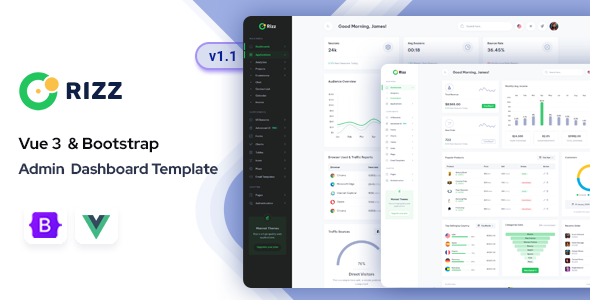
Rizz Vue 3 is an admin dashboard template built with Vue 3 and Bootstrap, offering a comprehensive UI kit for custom backend applications. It's a solid foundation for developers and agencies needing to quickly build robust admin panels.
Product Overview for Custom Admin Panels
This isn't just another generic UI kit; Rizz Vue 3 provides a pre-built frontend for various administrative interfaces. It's designed to give you a significant head start when you're tasked with building custom admin panels for clients, saving you the grind of setting up common components from scratch. The focus here is on delivering a ready-to-use set of tools for data visualization, user management, and other typical backend functions.
Intended Users for Rizz Vue 3 Admin Template
This Vue 3 admin dashboard template is genuinely useful for freelance developers and agencies who regularly build custom web applications. If your workflow involves delivering many client projects that need a dedicated backend interface, this template can cut down significant development time. It's particularly strong for those who are comfortable with Vue and Bootstrap and want to accelerate the UI phase of their projects.
However, if you're looking for a complete, integrated backend system with pre-built database connections or complex server-side logic, this isn't it. Rizz Vue 3 is a frontend UI solution. It's also probably overkill for someone just learning Vue or needing a very simple, single-page admin panel without much customization.
Layouts, Pages, and Components for Frontend Development
Rizz Vue 3 comes packed with a lot of UI. You get over 96 pages and more than 40 components, which cover most scenarios you'd encounter in an admin panel. This includes:
- Two distinct dashboard layouts for different data overview needs.
- A range of application pages like Calendar, Chat, eCommerce product listings, project management, task lists, and invoice generation.
- Essential authentication and error pages, which are always a pain to build from scratch.
- Utility pages such as profile settings, timelines, pricing tables, and FAQs.
Having these ready-made elements means you don't have to spend hours on basic form styling or chart integration. It's a significant time-saver for any frontend development workflow.
Code Quality and Developer Experience
From a developer's perspective, the use of a Gulp-based workflow is a practical choice. It provides a standard, maintainable build process that many developers are already familiar with, making it easier to integrate into existing project setups. The SCSS variables for styling are a huge plus; changing themes or branding colors across the entire application is as simple as tweaking a few lines in a variable file, which translates to lower maintenance costs for clients.
The code is described as "light-weight, clean, and commented," and in our experience with similar frameworks, this is crucial. A well-organized folder structure also means less time spent figuring out where everything lives, speeding up customization and future updates. While the "Drag & Drop" feature is mentioned, its scope isn't fully detailed, so assume standard component reordering rather than a full page builder.
Responsiveness and Compatibility
The template is built with Bootstrap, which naturally means it handles responsiveness well across desktops, tablets, and mobile devices. This is a standard expectation for any modern web project, but it’s good to confirm it’s baked in from the start. Browser compatibility is also broad, covering Chrome, Firefox, Safari, and Edge, which means fewer cross-browser headaches during deployment. This ensures that users can manage their data and access the admin panel efficiently from any device or browser, which is a practical benefit for business owners.
SEO Readiness for Admin Interfaces
While an admin dashboard template isn't typically optimized for public-facing SEO in the traditional sense, the clean semantic structure and light-weight code contribute to good technical performance. Fast loading times and a solid underlying structure, which this template aims for with its clean code and Gulp workflow, are beneficial for user experience within the admin panel itself. This indirectly supports overall project quality and maintainability, even if it's not directly boosting Google rankings.
Final Thoughts on Rizz Vue 3
Rizz Vue 3 is a solid, practical choice if you're an agency or freelancer frequently tasked with building custom admin panels. It genuinely solves the problem of repetitive UI development for common backend features. The combination of Vue 3 and Bootstrap, along with a Gulp-based SCSS workflow, provides a modern and maintainable foundation. You're buying a significant head start on the frontend, allowing you to focus on the unique backend logic your client needs. While it's a UI kit and requires your own backend integration, it's a smart investment to streamline your development process and deliver projects faster.
FAQ
Is Rizz Vue 3 a complete backend solution?No, Rizz Vue 3 is a frontend admin dashboard template providing the user interface; you will need to integrate your own backend logic and database.
How easy is it to customize the design and colors?It's quite straightforward to customize colors and themes using the SCSS variables and data attributes, which allows for quick branding changes across the template.
Does this template support dark mode?Yes, Rizz Vue 3 includes both light and dark modes, which can be easily switched to suit user preferences or application branding.
What level of Vue.js knowledge is needed to use this template effectively?You should have a working knowledge of Vue.js, especially Vue 3, to effectively customize components, integrate data, and extend the template's functionality beyond basic styling.