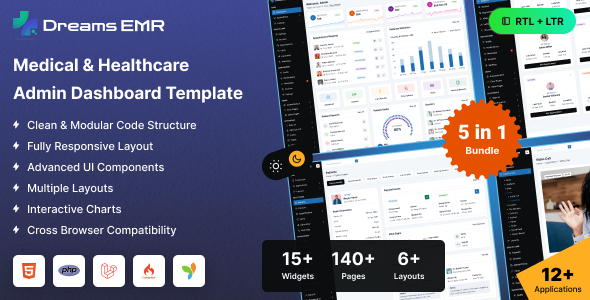
Welly is a PHP hospital admin dashboard template built on Bootstrap, providing a solid UI kit for healthcare management systems. It's for developers needing a fast start on internal hospital applications.
Welly: A Practical UI Kit for Healthcare Management Systems
This product isn't a full hospital management application; it's a front-end UI kit. What you get are the HTML, CSS, JavaScript, and PHP files structured to quickly build out an administrative dashboard. It solves the common problem of starting from scratch when you need a robust, data-heavy interface for managing hospital operations.
For anyone tasked with developing a custom patient management system, an internal staff portal, or an appointment scheduling dashboard, Welly provides the ready-made components. This saves a significant amount of development time on foundational UI elements, allowing teams to focus on backend integration and specific business logic.
Who Welly PHP Admin Dashboard Serves Best
Welly is well-suited for agencies, freelance developers, or in-house development teams building custom healthcare applications. If your project requires a PHP-based backend and you need to rapidly prototype or deploy an administrative interface for a hospital or clinic, this template offers a strong starting point.
However, it is not for those expecting a complete, ready-to-deploy application with pre-built database connections or advanced backend logic. It's also probably not the best fit for designers looking for an extremely unique visual aesthetic without diving into the code, as its strengths lie in its functional components rather than groundbreaking design.
Visuals and User Interface of this Medical Admin Template
The template uses Bootstrap as its foundation, which means you get a predictable and functional design out of the box. The focus is clearly on presenting data and interactive elements in an organized manner, typical for a healthcare management UI kit.
The "Poppins" sans-serif font ensures good readability, which is crucial for data-intensive dashboards where clarity is paramount. While the design is not revolutionary, it's clean and professional, avoiding unnecessary visual clutter that could distract from critical information.
Core Components for a Hospital Management UI Kit
Welly provides a good range of components essential for a hospital environment. Based on the included libraries, you can expect well-designed pages for common administrative tasks.
- Data tables: These are crucial for displaying patient lists, appointment schedules, billing records, and staff rosters. The integration of Datatables suggests robust sorting, filtering, and pagination capabilities.
- Charting libraries: With multiple chart libraries like Apexcharts and Chart.js, the template supports detailed medical analytics and performance reporting, which is vital for hospital administration.
- Form elements: There's a comprehensive set of form inputs, including date pickers, multiselects, and validation tools, making it easier to build patient intake forms, medical history updates, and prescription entries.
- Calendar views: Fullcalendar integration means robust appointment scheduling and staff shift management are well-supported, a core requirement for any hospital admin dashboard.
Business Logic Support for Healthcare Admin Workflows
While Welly doesn't come with pre-built business logic, its UI components are specifically designed to support the complex workflows of a healthcare facility. It provides the front-end structure for managing patient records, scheduling appointments, tracking medical resources, and generating various operational reports.
This makes it a smart investment for developers building custom solutions for hospital operations, as it significantly reduces the time spent on creating these specialized interfaces from scratch. The range of form and data visualization components directly addresses the needs of a healthcare management UI kit.
Developer Experience and Code Structure for a PHP Dashboard
The inclusion of Sass files is a positive for maintainability, allowing for organized CSS and easier customization of themes and styles. The PHP file structure means it's ready for integration into a PHP-based application framework, which is standard for many internal business systems.
The documentation is adequate for getting started. However, like many Bootstrap-based dashboards from this era, it leans heavily on jQuery for its interactive elements. While functional, developers accustomed to modern JavaScript frameworks might find the jQuery-centric approach a bit dated, potentially impacting Core Web Vitals if not optimized carefully for asset loading. This heavy dependency means more JavaScript to load, which can slow down initial page rendering if not managed well, affecting the overall mobile experience for users.
Device Responsiveness and Browser Support
Leveraging Bootstrap ensures that Welly provides standard responsiveness across various devices. The layouts adapt well from desktop screens down to mobile phones, which is essential for staff who might need to access the dashboard on tablets or other portable devices within a hospital setting.
In our experience with similar Bootstrap frameworks, cross-browser compatibility is generally solid. The mobile menu behavior is typical for Bootstrap, offering a clean toggle navigation that works as expected, making the healthcare management UI kit accessible on smaller screens.
Technical SEO Considerations for Internal Tools
For an internal PHP hospital admin dashboard, traditional public-facing SEO isn't a primary concern. However, good technical practices still matter. The template's clean semantic HTML structure contributes to accessibility and makes the content machine-readable, which is beneficial for internal search functions and future integrations.
A well-structured codebase also means lower maintenance costs in the long run. While not built for Google rankings, the underlying code quality ensures that any data displayed is presented in a logical, structured way that's easy for developers to work with and extend.
Final Take: Is Welly the Right Healthcare Admin UI for You?
Welly offers a solid, functional foundation for anyone building a PHP hospital admin dashboard. It’s not going to win awards for groundbreaking design, but it delivers where it counts: providing a comprehensive set of UI components tailored for healthcare management systems. You're effectively buying a significant head start on development, especially for data entry, reporting, and scheduling interfaces.
If your team is comfortable with PHP, Bootstrap, and jQuery, and needs to quickly spin up a reliable administrative UI without building every component from scratch, this template is a sensible choice. It saves time and effort on the repetitive aspects of dashboard development, allowing you to focus on the unique backend logic that truly differentiates your application.
FAQ
Does Welly include a working backend?No, Welly is a front-end UI template. It provides the HTML, CSS, JavaScript, and PHP file structure, but you need to integrate your own backend logic and database.
Is this template suitable for patient-facing portals?While technically possible, Welly is designed as an administrative dashboard for internal use. For public-facing patient portals, you might want a design with a different user experience focus.
How easy is it to customize Welly's appearance?Customization is relatively straightforward if you're familiar with Sass and Bootstrap. The Sass architecture means you can modify variables and mixins to change colors, fonts, and spacing efficiently.
What are the main benefits of using a PHP-based admin template?A PHP-based template like Welly integrates smoothly into existing PHP application environments, making it easier for developers to connect the front-end UI with PHP-driven backend systems.