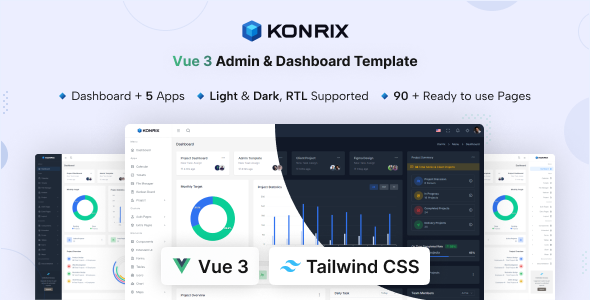
Konrix is a Vue 3 admin dashboard template built with Tailwind CSS, offering a solid starting point for web application backends. It's a practical choice for developers building internal tools, SaaS dashboards, or CRM interfaces.
Konrix: A Practical Vue 3 Admin Dashboard Template
This template is a frontend foundation for administrative interfaces. It gives you a pre-built set of UI elements and page layouts using Vue 3 and Tailwind CSS. The core problem it solves is the time-consuming process of setting up a consistent design system and common dashboard functionalities from scratch. Instead of spending days styling data tables or user management pages, you get a ready-to-use structure that handles a lot of the boilerplate.
From our experience building internal tools with Vue, having a well-structured starting point like Konrix can shave off weeks of initial development time. It's a smart investment if your project needs a functional, good-looking admin panel quickly, letting your team focus on the actual business logic rather than frontend scaffolding.
Who Needs This Tailwind CSS Admin Panel?
Konrix is primarily for agencies and freelance developers who need to deliver custom admin portals or SaaS dashboards with tight deadlines. If you're building a new web application and want to leverage Vue 3 and Tailwind CSS for the backend UI, this template provides a significant head start. It's particularly useful for projects requiring common features like user management, data visualization, and task tracking.
However, this template is not for everyone. If you're an absolute beginner with Vue 3 or Tailwind CSS, you might find the learning curve steeper than starting with a simpler framework. It's also not ideal for projects that require extremely unique UI/UX that deviates significantly from standard admin patterns, as you'll spend more time overriding styles than building. It's a frontend template, so it won't help you with deep custom backend logic or database design.
Core Features and Pre-Built Applications
Konrix comes packed with a lot of components and pre-built pages, which is where it genuinely saves time. You get over 150 pages and 500 UI components covering everything from forms and charts to extended components like sliders and drag and drop interfaces. This breadth means you're unlikely to need to build common elements from scratch.
The inclusion of 5+ built-in apps like Calendar, Chat, Email, Task, Kanban Board, and File Manager is a major plus. For many internal tools, these are standard features, and having them integrated and styled out of the box means less development effort. This solves the headache of setting up niche-specific booking flows or project management interfaces, as a lot of the groundwork is already done.
- Vue 3 (Typescript): Modern JavaScript framework with type safety, which helps catch errors early and improves code maintainability.
- Tailwind CSS: A utility-first CSS framework that promotes rapid UI development and generally results in smaller CSS bundles.
- Multiple Layouts: Seven distinct layout options, including compact and hidden sidebars, offer flexibility without manual re-architecting.
- Pre-built Apps: Apps like Kanban Board and File Manager provide functional starting points for common admin features.
Developer Experience and Code Structure
The template is built with Vue 3 and TypeScript, which is a solid foundation for modern web development. Using Tailwind CSS means the styling is handled with utility classes, making it easy to see what styles are applied directly in the HTML. This approach can be a bit polarizing, but for rapid development and consistent styling, it's efficient.
When we tested the kit on a demo site, the file structure felt logical and the documentation was thorough enough to get started quickly. The code is generally clean, which helps with maintenance and understanding how different components interact. The responsiveness is handled well by Tailwind's utility classes, ensuring a consistent experience across devices, which is a standard expectation these days.
Responsive Design and Browser Compatibility
Konrix states it's fully responsive and works across all modern browsers and devices, which is a baseline requirement for any template today. The use of Tailwind CSS inherently supports responsive design through its utility-first approach, allowing for easy adaptation of layouts for different screen sizes. This means a better mobile experience for your users, regardless of their device.
From a practical standpoint, this usually translates to less time spent debugging layout issues on various breakpoints. While this is standard for most templates, the Tailwind implementation makes it particularly straightforward to adjust or extend responsive behaviors if needed, leading to lower maintenance costs in the long run.
SEO Considerations for Admin Interfaces
For an admin dashboard, SEO readiness typically focuses on the underlying code quality rather than public-facing content optimization. Konrix, being a frontend template, provides a clean semantic structure for the UI elements. This means the HTML is generally well-formed, which is a good starting point for any application.
The use of Google Fonts and efficient asset loading (inherent with Tailwind's smaller CSS footprint) contributes positively to page load times, which impacts Core Web Vitals. While an admin panel isn't usually indexed by search engines, good technical practices here ensure a performant and maintainable application, which is crucial for long-term project health and user experience.
Final Thoughts on Investing in Konrix
Konrix is a solid choice if you need a Vue 3 admin dashboard template that uses Tailwind CSS. It delivers on its promise of providing a comprehensive set of UI components and pre-built applications, which genuinely saves development time. The use of Typescript with Vue 3 is a strong foundation for maintainability and scalability.
The main trade-off is that while it's highly customizable, you'll be working within the Tailwind and Vue ecosystem. If your project requires a highly specific, non-standard design, you might spend time overriding utility classes. Overall, for any developer looking to build internal tools with Vue and Tailwind, this template offers a robust and practical starting point that justifies the investment by accelerating your workflow.
FAQ
Is Konrix suitable for large-scale enterprise applications?Konrix provides a strong frontend foundation for enterprise applications, but its suitability depends on the complexity of your backend logic and data architecture, which you would need to build separately.
How easy is it to customize Konrix's design?Customizing is straightforward if you're comfortable with Tailwind CSS, as you can easily adjust utility classes or extend Tailwind's configuration. For deep design changes, a good understanding of Vue components is helpful.
Does Konrix support different backend technologies?Yes, Konrix is a frontend template, so it's agnostic to your backend technology. You can integrate it with any API-driven backend built with Node, Laravel, Python, or any other framework.
What is the ongoing maintenance like for this template?Maintenance is generally low due to its clean code, Vue 3 with Typescript, and Tailwind CSS structure. Updates from the vendor are also provided, ensuring compatibility with newer library versions.