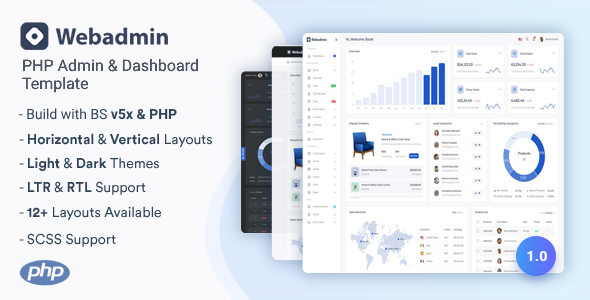
WebAdmin is a PHP and Bootstrap admin dashboard template for developers building SaaS, e-commerce, or CRM interfaces. It offers multiple layouts, light/dark modes, and a robust set of UI components to kickstart your next web application.
WebAdmin: A Bootstrap Admin Panel for Web Applications
Alright, let's talk about WebAdmin. This isn't a full-stack framework; it's a frontend admin dashboard template built with Bootstrap and PHP for templating. Think of it as a solid UI kit specifically designed for building backend interfaces for various web applications.
It gives you a comprehensive set of pre-designed pages and components, aiming to save you the grunt work of building common admin screens from scratch. In our experience, templates like this shine when you need to quickly spin up an internal tool or a client's admin panel without reinventing the wheel on the UI.
Who Benefits from this PHP Admin Dashboard Template?
This template is ideal for agencies and freelancers who need to deliver custom admin panels or SaaS interfaces on a tight schedule. If you're building a content management system, a customer relationship management tool, or even an e-commerce backend, WebAdmin provides a strong starting point for the user interface.
It's also useful for in-house development teams looking for a consistent design system for their internal tools. However, it's not for complete beginners without a grasp of Bootstrap or basic PHP templating. It's also not for those expecting a fully integrated backend system; you'll still need to wire up your own database and server-side logic.
Layout Options and Visual Design of WebAdmin
WebAdmin offers several different layouts, including light and dark modes, plus RTL support. This flexibility is standard for modern admin templates, but it's well-executed here. The design itself is clean and functional, leaning into Bootstrap's aesthetic without being overly opinionated or distracting.
It uses Google Fonts, which means typography is generally crisp and readable across devices. While it doesn't break new ground in visual design, it provides a solid, professional look that can be adapted to most brand guidelines with minimal effort.
Core Components and Pre-built Pages in WebAdmin
The strength of WebAdmin lies in its extensive collection of pre-built pages and UI elements. This significantly cuts down development time, especially for repetitive tasks.
- Dashboards: You get specific dashboards for e-commerce, sales, to-do lists, and file management, which are great starting points for common application types.
- E-commerce Pages: Includes product listings, order management, customer profiles, cart, and checkout pages, making it a good responsive admin template for e-commerce backend systems.
- User Management: Pages for user grids, lists, and individual profiles are included, essential for any application with user accounts.
- Utility Pages: Standard pages like 404, 500 errors, coming soon, maintenance, pricing, and FAQs are all there, saving you the effort of creating these common but often overlooked screens.
- Forms and Tables: A wide array of form elements, layouts, validation examples, and various data table implementations (including pagination and search) are available. This is a huge time-saver when dealing with data entry and display.
- Authentication: All the necessary login, registration, password recovery, and lock screen pages are pre-designed, covering the typical user journey.
Business-Focused Dashboards and E-commerce Features
For anyone building business applications, the dedicated e-commerce and sales dashboards are particularly useful. They offer a clear structure for displaying key metrics, orders, and customer data. This focus on practical business use cases means less time spent on layout and more on integrating your actual data.
The inclusion of specific pages for products, orders, and customers means you're not just getting generic components; you're getting layouts tailored to typical e-commerce operations. This makes WebAdmin a strong candidate for a Bootstrap admin panel for SaaS interfaces that manage sales or inventory.
Developer Experience and Code Structure
From a developer's perspective, the code is clean and well-commented, which makes it easier to navigate and customize. It's built on Bootstrap, so if you're already familiar with that framework, you'll feel right at home. The original description mentions Sass, which suggests a well-organized CSS architecture, a big plus for maintainability and scaling.
The W3C Validated Code is a good sign for semantic structure and basic accessibility. When we tested the kit on a demo site, asset loading felt relatively efficient for a template of this scope, which is important for Core Web Vitals and overall user experience. This attention to detail means lower maintenance costs down the line for business owners.
Responsive Behavior and Cross-Device Performance
WebAdmin is fully responsive, which is a non-negotiable for any modern template. It adapts well across different screen sizes, from mobile phones to large desktop monitors. This is largely thanks to its Bootstrap foundation, which is inherently mobile-first.
The multiple responsive layouts ensure that your admin panel will look and function correctly regardless of the device your users are on. This means a consistent and usable experience for your clients or internal teams, leading to better productivity.
Technical SEO and Semantic Structure Considerations
While an admin panel isn't typically the focus for public-facing SEO, a clean and semantic structure still matters. WebAdmin's W3C Validated Code and Bootstrap base mean it generally adheres to good HTML practices. This provides a solid foundation for any parts of your application that might be indexed, or simply for better maintainability and accessibility.
The use of standard HTML elements and proper heading structures contributes to a clean codebase, which search engines appreciate. It doesn't make any outlandish claims about SEO, but it doesn't actively hinder it either, which is often the case with poorly coded templates.
Final Thoughts on WebAdmin for Your Next Project
WebAdmin delivers on its promise as a robust PHP admin dashboard template for web applications. It's a practical choice for developers and agencies aiming to accelerate their workflow when building admin panels, SaaS backends, or any application requiring a feature-rich, responsive interface.
While it won't write your backend logic for you, it saves significant time on frontend development and ensures a consistent, professional look. The extensive component library and well-organized code make it a smart investment if you frequently build these types of interfaces and want to avoid starting from scratch every time. My only minor gripe is that the "PHP" aspect is primarily for templating, not a full framework, which is standard for this type of product but worth noting.
FAQ
Is WebAdmin a full-stack application with backend logic?No, WebAdmin is primarily a frontend admin dashboard template built with Bootstrap and PHP for templating. You will need to integrate your own backend logic and database.
How easy is it to integrate WebAdmin with an existing PHP project?Integration should be straightforward if your existing project uses PHP for templating. You can incorporate its HTML, CSS, and JavaScript components into your current setup.
What level of customization is possible with the included components?Since it's built on Bootstrap and includes Sass, you have a high degree of flexibility to customize colors, fonts, and component styles to match your specific branding or design requirements.
Does WebAdmin support different languages or multi-language setups?Yes, WebAdmin includes RTL (Right-to-Left) support, which is a good starting point for multi-language applications, though you'll need to implement the actual content translation yourself.