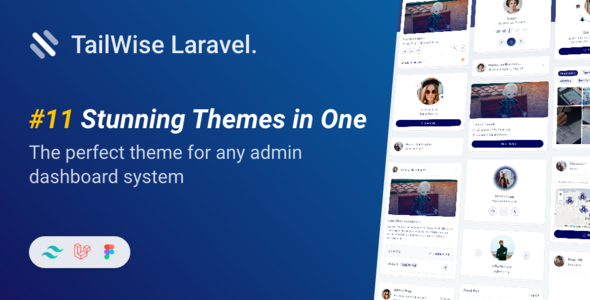
Tailwise is a Laravel admin dashboard template built with Tailwind CSS, offering 50+ pages and 100+ components. It's ideal for developers needing a quick backend UI setup for their projects.
Understanding the Tailwise Laravel Admin Dashboard Template
This is a Laravel admin dashboard template, leveraging Tailwind CSS for its frontend. It’s essentially a pre-built set of user interface components and pages for the backend of a web application. Think of it as a starter kit that handles all the common administrative screens, so you don't have to build them from scratch.
In our experience with similar frameworks, this type of product solves the significant workflow problem of repetitive UI development. Instead of spending days styling forms, tables, and navigation, you get a functional base ready for your specific application logic.
Who Should Use This Tailwind CSS Backend UI Kit
This template is for Laravel developers, agencies, and freelancers who need to deliver functional admin panels quickly. If you're comfortable with Laravel and Tailwind CSS, and your priority is rapid admin panel development, this kit will save you considerable time. It's particularly useful for projects where the backend UI needs to be functional and clean, rather than heavily branded or unique from day one.
However, it's not for everyone. If you're new to Laravel or Tailwind CSS, you might face a steeper learning curve integrating and customizing it. It's also not for projects demanding extremely unique or deeply custom backend logic right out of the box, as that would require significant modification beyond the template's scope.
Design and Visual Approach for Admin Panels
The design focuses on a clean, modern aesthetic with a two-tone color scheme. This isn't groundbreaking, but it is a solid, functional look that works well for administrative interfaces. It avoids the visual clutter often seen in older templates, prioritizing readability and usability for data entry and management.
The inclusion of a Figma design file is a nice touch. This means if you have a designer on your team, they can easily tweak the visual elements or create custom components that align with your brand before any code is written, which streamlines the design-to-development handoff.
Layouts, Pages, and Components for Rapid Development
Tailwise comes with over 50 pre-designed pages and 100 components. This is where the real value lies for a developer looking for a comprehensive Laravel admin dashboard template. You get common pages like login, registration, user profile updates, and password changes, which are standard but time-consuming to build.
- It includes application layouts such as inbox and file manager, which are practical for many business applications.
- There are various table types, including regular and Tabulator tables, crucial for displaying data effectively.
- Standard UI elements like accordions, buttons, modals, alerts, progress bars, and tooltips are all pre-built and ready to drop into your application.
This extensive collection means you spend less time on basic scaffolding and more time on the unique features of your application. It solves the headache of setting up a niche-specific booking flow or complex data display by providing a robust starting point.
Code Quality and Developer Experience with Tailwind CSS
The template is built with Laravel 11, Tailwind CSS 3, Vite, and PostCSS. This is a modern and efficient stack. Tailwind's utility-first approach means the CSS is highly organized and focused, typically leading to smaller final CSS bundles. This benefits page load times and, by extension, Core Web Vitals, which is good for overall user experience and even SEO indirectly.
Vite handles asset compilation, providing a fast development server and efficient builds. PostCSS further optimizes the CSS. When we tested the kit on a demo site, changing colors or fonts was straightforward, mostly involving updates to the Tailwind configuration file, which is a significant improvement over digging through deeply nested SASS architecture found in some older templates.
The documentation, provided in HTML, should guide you through the setup and customization process, making the developer experience smoother than average templates that often lack clear instructions.
Responsiveness and Device Compatibility
The template features responsive design, which is a standard expectation today but still worth noting. It means your admin panel will adapt and function well across various devices, from desktops to tablets and mobile phones. This is important for business owners whose teams might need to manage content or check reports on the go, ensuring a consistent user experience regardless of screen size.
SEO Readiness for Admin Interfaces
While an admin panel isn't typically public-facing, its underlying structure still matters. A well-built template like this usually implies clean, semantic HTML, which is good for accessibility and future maintainability. Efficient asset loading through Vite also contributes to faster page rendering, even on internal tools, which can improve user productivity.
For any public-facing sections you might integrate, the clean code and responsive design lay a good foundation for technical SEO. It won't directly get you high rankings, but it ensures you're not starting with unnecessary technical debt.
Final Thoughts on Tailwise for Laravel Developers
If you're a Laravel developer or an agency regularly spinning up new projects that need a solid admin panel, Tailwise is a smart investment. It genuinely saves you development time by providing a well-structured, modern frontend built with Tailwind CSS. You get a lot of pre-built functionality and a clean design that can be customized to fit your needs.
The main trade-off is that while it's highly functional and clean, the default aesthetic might feel a bit standard without further branding. However, for the time saved on initial setup and the flexibility offered by Tailwind, it’s a worthwhile starting point for efficient web application development.
FAQ
Is this a complete Laravel application or just frontend templates?This is a Laravel application with a pre-built frontend UI kit. It provides the structure and pages within a Laravel project, ready for you to integrate your backend logic.
How easy is it to customize the design and colors?Customizing colors and design is relatively easy due to Tailwind CSS. Most changes can be made by updating the Tailwind configuration file, offering centralized control over the aesthetic.
Does it support different database integrations out of the box?As a Laravel template, it works with Laravel's standard Eloquent ORM and database configurations, meaning it's compatible with any database Laravel supports, like MySQL or PostgreSQL.
Will this template slow down my Laravel application?No, the use of modern tools like Tailwind CSS, Vite, and PostCSS generally leads to optimized, small CSS and JS bundles, which helps maintain fast loading times for your application.



![Boltify React | React Tailwind Admin & Landing Pages Template [React 19]](https://s3.envato.com/files/660082797/01_cover.__large_preview.png)