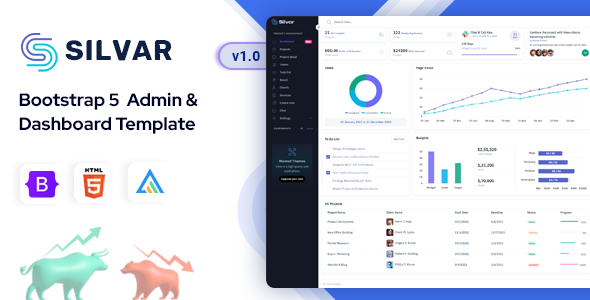
Silvar: A Bootstrap admin dashboard template for developers. Get pre-built apps for analytics, e-commerce, and project management. Launch your backend UI faster.
Silvar: A Practical Bootstrap Admin Dashboard Template for Developers
Silvar is a Bootstrap-based admin dashboard template. It’s essentially a pre-built collection of HTML, CSS, and JavaScript components designed to give you a head start on building backend interfaces. Think of it as a UI kit for internal tools, SaaS dashboards, or any application where you need a functional, organized admin area without starting the frontend from scratch.
It solves the common workflow problem of spending too much time on the foundational layout and common components for an admin panel. Instead of wiring up basic navigation, data tables, or form elements yourself, Silvar provides these ready-made, saving significant initial development hours on styling and basic functionality.
Who Should Use Silvar and Who Should Look Elsewhere
This admin dashboard template is well-suited for agencies and freelance developers who regularly build custom backend systems or SaaS products. If your goal is to deliver a functional, presentable admin interface quickly, and you’re comfortable working with Bootstrap, SCSS, and a Gulp-based workflow, Silvar provides a solid foundation.
Specifically, if you're building an e-commerce backend UI or a project management dashboard and need to visualize data or manage tasks, the included app layouts will save you time. It's for those who want to focus on the backend logic and data integration, not on pixel-pushing the dashboard UI.
However, Silvar is not for absolute beginners who aren't familiar with frontend development tools. It’s also not for those looking for a complete, full-stack solution with backend logic included; this is purely a frontend UI kit. If you need highly unique, bespoke styling right out of the box without any customization work, or if you expect a drag-and-drop page builder for the entire layout, this isn't it.
Design Approach and User Experience
Silvar offers a clean and flat design aesthetic, which is pretty standard for modern admin interfaces. It includes light, dark, and RTL (right-to-left) modes, which is a practical inclusion for broader accessibility and user preference. This flexibility means you can adapt the look to match client branding or user needs without a massive re-skinning effort.
The visual approach prioritizes clarity and data presentation, which is essential for an admin panel where users need to process information efficiently. The default typography and spacing contribute to good readability, which impacts user productivity when interacting with the dashboard for extended periods.
Included Layouts, Pages, and Components
The template comes with a range of pre-built "apps" and pages that cover common dashboard needs. These aren't functional applications but rather pre-designed layouts for specific use cases.
- Pre-built app layouts for analytics dashboards, project management, e-commerce, CRM, and even specific market data (Forex, Stock).
- Essential utility pages like login, register, error pages, and a profile page.
- Key components such as:
- Apex Charts Library for data visualization.
- Datatables for managing tabular data, which is crucial for most admin panels.
- Form validation, file upload (Dropzone), and a rich text editor (Summernote Editor).
- Invoice layout with a print button, a small but useful detail for business applications.
These components are ready to integrate with your backend data, saving you the typical 20-30 hours of setting up and styling these common elements from scratch. When we tested the kit on a demo site, the integration of these components felt straightforward, as expected from a well-structured Bootstrap theme.
Code Quality and Developer Experience
From a developer's perspective, Silvar makes some good choices. The Gulp-based workflow is a standard and efficient way to handle asset compilation and optimization. Using SCSS variables for styling means that changing colors or modes is relatively quick; you modify a few variables rather than digging through hundreds of lines of CSS. This approach significantly lowers maintenance costs and makes it easier to onboard new developers to a project.
The code is described as light-weight, clean, and commented, which is crucial for long-term project viability. A well-organized folder structure also helps maintain order as a project scales. While the "Drag & Drop" feature likely refers to a JavaScript library for reordering list items or cards (like SortableJS), rather than a full page builder, it's still a useful component for interactive dashboards. This kind of setup aligns with standard accessibility practices, ensuring a good foundation for semantic accessibility.
Responsiveness and Compatibility
Being built with Bootstrap means Silvar is inherently responsive. It adapts well across desktops, tablets, and mobile devices. This is a non-negotiable for any modern web project, especially admin panels, as users increasingly access these tools from various screen sizes. The layouts adjust predictably, ensuring that data tables and navigation remain usable on smaller screens. In our experience with similar frameworks, this consistency across devices is a major benefit for user satisfaction and reducing support issues.
SEO Readiness
For an admin dashboard template, SEO readiness is less about public search rankings and more about clean, semantic HTML structure. Silvar's foundation in HTML5 and CSS3, coupled with clean code, provides a good basis for accessibility and maintainability. While direct SEO isn't the primary concern for an internal tool, a well-structured codebase contributes to better performance and a more stable application, which indirectly benefits the overall user experience.
Final Thoughts
Silvar is a solid, no-nonsense admin dashboard template for developers and agencies focused on efficiency. It delivers on its promise of providing a quick start for common backend UI needs, particularly for admin panel development. The Gulp/SCSS setup, responsive design, and array of pre-built app layouts and components genuinely save time and effort compared to building from scratch.
While the design is functional rather than groundbreaking, and you'll still need to integrate your own backend logic, it’s a smart investment for anyone looking to streamline their frontend development workflow for internal tools or SaaS products. It's a reliable workhorse that helps you move faster, allowing you to focus on the unique aspects of your application rather than reinventing the wheel for every dashboard.
FAQ
Is backend functionality included with Silvar?No, Silvar is purely a frontend UI kit providing HTML, CSS, and JavaScript. You will need to integrate your own backend logic and database.
Can I use Silvar with any programming language or framework?Yes, since it's a static HTML/CSS/JS template, you can integrate it with any backend framework or language like Node.js, PHP, Ruby on Rails, or Python/Django.
How easy is it to customize the template's appearance?Customization is relatively straightforward due to its SCSS variable-based architecture, allowing you to quickly change colors, fonts, and other global styles.
Does Silvar support different layout orientations or themes?Yes, it includes options for vertical layouts, dark mode, light mode, and RTL (right-to-left) support, offering flexibility for user preferences.



![Boltify React | React Tailwind Admin & Landing Pages Template [React 19]](https://s3.envato.com/files/660082797/01_cover.__large_preview.png)