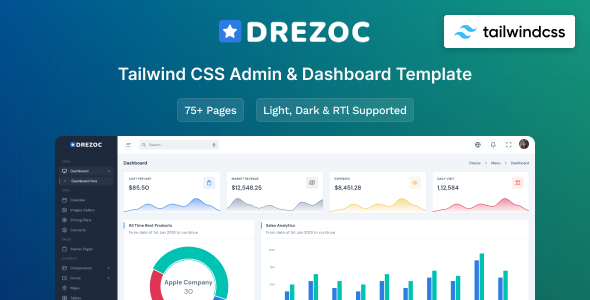
Drezoc is a Tailwind CSS admin dashboard template and UI kit, providing a solid foundation with 30+ pages and 300+ UI components for web application development.
What Drezoc Offers for Web Application Development
This template is essentially a frontend starter kit for building admin panels, SaaS interfaces, CRMs, or any custom web application dashboard. It’s built with Tailwind CSS, which means you’re getting a utility-first approach to styling, moving away from traditional component-based frameworks.
The core value here is skipping the initial setup of common UI elements. If you need a responsive admin template with Gulp for your build process, Drezoc provides a structured starting point. This saves a significant chunk of time that would otherwise be spent on boilerplate CSS and JavaScript for standard components.
Who Benefits from This Tailwind CSS Admin Template
Drezoc is a good fit for agencies and freelance developers who regularly build custom admin panels or SaaS interfaces and need fast turnarounds. If your team is already comfortable with Tailwind CSS and a Gulp workflow, you’ll hit the ground running.
It’s particularly useful for those needing a UI kit for custom admin panels where the frontend needs to be consistent and well-structured, but the backend logic is handled separately. However, this isn't for beginners unfamiliar with modern build tools or for projects that require deep custom backend logic to be integrated directly into the template. It's a frontend tool, not a full-stack solution.
Design Philosophy and Component Library
The design is clean and generally follows current web trends without being overly opinionated or flashy. It leverages Preline UI, which gives it a familiar, component-like feel despite being built on Tailwind's utility classes. This makes it easier to understand how elements are constructed.
With over 300 UI components, you get pretty much everything you'd expect in an admin dashboard: forms, tables, buttons, modals, and charts. This extensive library means you won't be building basic elements from scratch, which is a major time-saver for any project, especially when you need to maintain a consistent look across many pages.
- 30+ Pages: Includes dashboards, calendar, contacts, forms, tables, and icons.
- 300+ UI Components: A wide array of pre-built elements.
- Charts Library: Essential for data visualization in admin interfaces.
- Icon Libraries: Google Material Icon Library and Iconify Icon Library for diverse icon needs.
Developer Experience and Workflow Integration
From a developer's perspective, the use of SCSS variables for easy customizations is a practical touch. While Tailwind is utility-first, having SCSS variables for core colors or spacing means you can manage global changes more efficiently without diving into every utility class. This helps maintain design consistency and reduces future maintenance costs for clients.
The Gulp workflow for development and tooling is standard for many projects. It handles tasks like compiling SCSS, optimizing assets, and live reloading. When we tested the kit on a demo site, the asset loading felt reasonably quick, suggesting a decent default setup for Core Web Vitals. This translates to a better mobile experience and lower bounce rates for the end users of your web application.
Responsiveness and Browser Compatibility
The template is fully responsive, which is a baseline expectation for any modern web project. It adapts well across various devices, from desktops to mobile phones. We found the mobile menu behavior to be standard and intuitive, which is crucial for admin panels where users might need to manage data on the go.
Browser compatibility covers all major modern browsers like Chrome, Firefox, Safari, and Edge. This means less time spent on cross-browser testing, ensuring your web application looks and functions correctly for most users.
Technical SEO Considerations for Admin Panels
While an admin panel itself isn't typically focused on public SEO, the underlying code quality matters for maintainability and potential public-facing sections. Drezoc’s clean semantic structure, inherent in well-built Tailwind projects, lays a good foundation. This means that if parts of your web application become public, they’ll have a better starting point for search engine indexing due to well-organized HTML.
The way assets are loaded and the overall lightweight nature of a Tailwind setup can contribute to faster page load times. This is a technical benefit that translates to a better user experience and can indirectly impact the perceived quality and performance of your application.
Final Thoughts on Drezoc for Your Next Project
Drezoc is a solid, practical choice if you're building a Tailwind CSS admin dashboard for SaaS or similar web applications. It solves the workflow problem of starting from scratch on the frontend, giving you a comprehensive set of pre-built pages and components.
The Gulp setup and SCSS variable integration are thoughtful inclusions that streamline customization. While it’s not a full-stack solution and requires you to bring your own backend, it provides a robust, responsive, and well-organized frontend. After building multiple agency sites with tools like this, Drezoc feels like a reliable investment to save development time and deliver consistent results for client projects.
FAQ
Does Drezoc include any backend functionality?No, Drezoc is purely a frontend admin dashboard template and UI kit. You will need to integrate your own backend logic and data handling.
Is Drezoc easy to customize for specific branding?Yes, it uses SCSS variables for core styling, which makes global color and typography changes straightforward. You'll also leverage Tailwind's configuration for deeper customization.
What is the learning curve for using Drezoc effectively?If you're already familiar with Tailwind CSS and a Gulp workflow, the learning curve will be minimal. For those new to these technologies, there will be an initial ramp-up period to understand the setup.