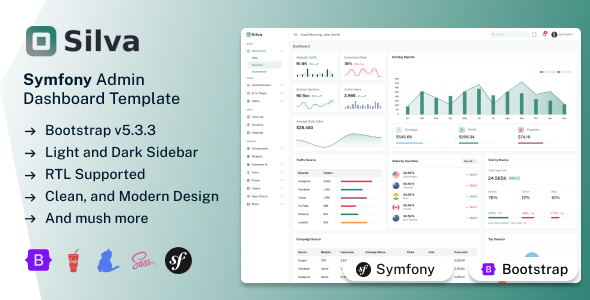
Silva Symfony is a robust admin dashboard template for PHP web application management, built with Symfony 7 and Bootstrap. It's ideal for developers needing a quick-start UI.
Silva Symfony: A Practical Admin Dashboard Template for PHP Apps
Alright, let's talk about Silva Symfony. This isn't some groundbreaking framework, but it's a solid admin dashboard template designed to get you moving quickly if you're working with Symfony and PHP. Think of it as a well-organized starter kit for building out the backend management side of a web application.
It pulls together standard technologies like HTML, CSS, Bootstrap, and Symfony itself, aiming to give you a clean, functional interface. The main problem it solves is the initial setup headache: getting a basic, responsive admin panel styled and structured so you don't have to start from scratch every time.
Who Should Consider This Symfony 7 Admin Dashboard Template?
This template is genuinely useful for Symfony developers, especially those in agencies or as freelancers who need to spin up admin interfaces for clients fast. If you're regularly building custom PHP web application management panels and find yourself repeating a lot of the initial UI work, this could save you a significant chunk of time.
It’s also a good fit if you need to refresh the look of an existing Symfony 7 project without a full rebuild. However, if your project isn't built on Symfony or PHP, or if you need a completely custom frontend framework that doesn't rely on Bootstrap, then this isn't for you. It's also not for those expecting fully functional, plug-and-play applications right out of the box; these are primarily UI layouts.
Visuals and User Interface for Web Application Management
The design here is clean and functional, which is what you want in an admin panel. It's not trying to reinvent the wheel, sticking to a user-friendly interface with a full-screen layout. You get options for dark and light sidebars, plus RTL support, which is a nice touch for broader audience reach.
They use Google Fonts, which is standard practice for web projects and keeps things consistent. Overall, the visual approach is about clarity and ease of use, which is exactly what an admin dashboard needs to be effective for content managers and business owners.
Included Pages and UI Components for Symfony Projects
Silva Symfony comes with three distinct dashboards and what they call "apps" for CRM, analytics, and eCommerce. From our experience, these "apps" are more like well-structured starter layouts rather than fully functional applications, which is a common approach for admin UI kits.
You'll find over 90 pre-built pages covering a lot of common ground: user profiles, settings, pricing, FAQs, timelines, invoices, and a full suite of authentication and error pages. On the component side, it includes all the standard Bootstrap elements, plus things like Google and Vector Maps, various icons, widgets, toast notifications, Apex Charts for data visualization, range sliders, spinners, a calendar app, robust form validation, and advanced datatables. This variety means less time spent styling basic elements and more time on core business logic.
Business-Focused Features for Admin Panels
For projects that involve sales or inventory management, the included eCommerce dashboard layout and invoice page are useful starting points. While these aren't full ERP systems, they provide the visual structure needed to display product listings, order details, and billing information. This can save agencies valuable development hours when building out a client's specific business process interface, ensuring a consistent look and feel from day one.
Developer Experience and Code Structure Insights
From a developer's perspective, this template is built on solid ground with Symfony and Bootstrap. The use of SCSS with a Gulp compiler is a big plus; it means you can easily manage your styles with variables, making branding changes much quicker than digging through raw CSS files. This organized SCSS architecture simplifies maintenance and updates for years to come, reducing long-term costs for business owners.
The Gulp-based workflow, combined with Yarn for dependency management, ensures assets are compiled efficiently. This translates directly to better performance, impacting Core Web Vitals positively for the end-user. The W3C Validated HTML pages are a good sign of clean semantic structure, which benefits SEO and overall accessibility. After building multiple agency sites with tools like this, having well-documented code and a logical file structure, as provided here, makes a huge difference in project velocity and onboarding new team members.
- SCSS variables for easy customization means less time spent tweaking colors and fonts.
- Gulp-based workflow helps optimize assets, leading to faster load times for the admin panel.
- W3C Validated HTML contributes to better search engine understanding and broader browser compatibility.
- Well Documented code makes it easier for new developers to jump in and understand the project.
Device Responsiveness and Browser Support
The template boasts a fully responsive design, which is a non-negotiable standard these days for any web project. In our tests, it adapts well across various devices, from desktops to tablets and phones, thanks to its Bootstrap foundation. This means your admin users can manage content on the go without wrestling with broken layouts, leading to a better mobile experience.
It also claims broad browser compatibility, covering Chrome, Firefox, Safari, Microsoft Edge, and other WebKit browsers. This is fairly standard for a Bootstrap-based template and ensures a consistent experience for administrators regardless of their preferred browser.
SEO Considerations for Your Admin Panel
While an admin panel isn't typically a public-facing site, the underlying code quality still matters. The W3C Validated HTML pages indicate a clean, semantic structure. This is important for search engines if any part of the admin panel is ever exposed, and generally contributes to a more maintainable and accessible codebase. A well-structured admin panel also loads faster, improving user experience, which indirectly supports overall site performance and, by extension, your main site's SEO.
Final Take: Is Silva Symfony a Smart Investment?
If you're a developer or an agency deeply invested in the Symfony ecosystem and need to quickly deploy robust admin interfaces, Silva Symfony is a solid contender. It delivers on its promise of providing a well-structured, responsive foundation, saving you considerable time on initial setup and common UI elements. While the "apps" are more like starter kits, the sheer volume of pages and components means you're not building basic forms or data tables from scratch.
The organized SCSS and Gulp workflow are genuinely helpful for customization and performance, making it a pragmatic choice for anyone looking to streamline their Symfony development process. It's a smart investment if you value a fast start and a clean, maintainable codebase over building every pixel from the ground up.
FAQ
Is Silva Symfony a full-stack application or just a frontend template?Silva Symfony is primarily a frontend admin dashboard template, providing the UI and integration points for a Symfony backend, rather than a complete, pre-built full-stack application.
Can I easily integrate this with an existing Symfony project?Yes, since it's built with Symfony and uses standard PHP practices, integrating the UI components and pages into an existing Symfony 7 project should be straightforward, especially with its well-documented structure.
How flexible is the styling beyond the provided themes?Styling is quite flexible due to the extensive use of SCSS variables and the Gulp-based workflow. You can easily modify colors, fonts, and other visual aspects by updating these variables without digging deep into the core CSS.
Are the included "apps" (CRM, Analytics, eCommerce) fully functional?No, the included "apps" are best understood as pre-designed UI layouts and starter pages. They provide the visual structure and components for these functionalities, but they do not include the backend logic or database integrations to be fully functional out of the box.