
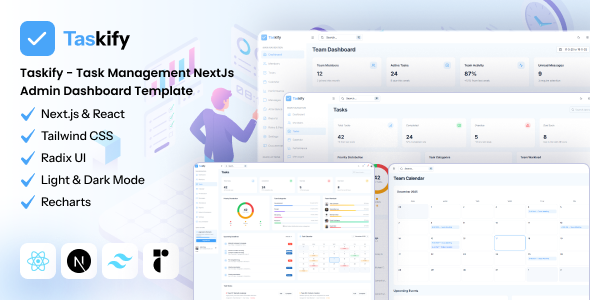
Taskify is a Next.js admin dashboard template for task and team management using React, TypeScript, and Tailwind CSS. It's a solid frontend base for SaaS platforms or internal project tools.
Taskify: A Next.js Admin Dashboard Template Review
This Taskify template is essentially a comprehensive frontend admin dashboard built on a modern stack: Next.js, React, TypeScript, and Tailwind CSS. It's designed to give you a significant head start if you're building any kind of task management or team collaboration system, an internal company tool, or a SaaS admin panel.
It covers a lot of ground, from user authentication flows to detailed dashboards, project analytics, and various management modules. Think of it as a well-structured UI kit with a lot of common admin functionality already wired up on the frontend.
Who Benefits from this Task Management Dashboard?
Taskify is ideal for agencies and development teams needing to rapidly prototype or launch a custom SaaS application or an internal project management system. If you're building a dedicated task management dashboard for agencies or a similar solution, this provides a strong foundation.
It's particularly useful if your team is already comfortable with Next.js, React, and TypeScript. You'll hit the ground running with a clean, production-ready codebase.
Who should probably skip this? If you're looking for a full-stack solution with a pre-built backend, this isn't it. Taskify is a frontend template. You'll need to integrate your own API and database. Also, absolute beginners to the Next.js ecosystem might find the initial setup a bit steep, even with the documentation.
Design and Visual Approach for Modern Admin Panels
The design here is clean and functional. It uses Tailwind CSS, which means styling is utility-first and highly customizable. You won't find a lot of bloat from custom CSS frameworks. This approach is fantastic for maintaining good Core Web Vitals, as the CSS footprint stays lean.
The template also integrates Radix UI components, which is a big plus for accessibility. This means standard UI elements like modals, dropdowns, and forms are built with good semantic structure and keyboard navigation in mind, saving you a lot of time on compliance and ensuring a better experience for all users.
Core Business Functionality and Layouts
Taskify comes packed with a range of screens and components tailored for its niche. You get:
- A real-time dashboard with key team metrics and project analytics.
- Comprehensive task management features for creating, assigning, and tracking tasks.
- Team management with individual profiles and role-based access control.
- Attendance and time tracking capabilities, which is a standout feature for productivity tools.
- A built-in messaging system and an interactive calendar for scheduling.
- Authentication flows including login, registration, and password resets.
These modules are well-integrated and provide a solid base for building out specific business logic. The inclusion of features like attendance and time tracking means you're not just getting a generic admin panel, but one with a clear focus on productivity.
Code Quality and Developer Experience
From a developer's perspective, this template uses a solid, modern stack. Next.js with the App Router, React, TypeScript, and Tailwind CSS is a robust combination. The codebase is TypeScript-first, which helps catch errors early and improves maintainability, especially for larger teams.
Components are modular, making them easy to reuse and update. For data visualization, it uses Recharts, which is a reliable library. Forms are handled with React Hook Form and Zod, a combination that makes form validation straightforward and efficient. This setup means lower long-term maintenance costs and easier content updates for business owners down the line.
Responsiveness and Accessibility for All Devices
The template is fully responsive out of the box. When we tested the kit on a demo site across various devices, the layouts adapted well, and the mobile menu behaved as expected. The use of Radix UI components ensures a good baseline for accessibility, which is crucial for any application aiming for broad user adoption or internal company use.
SEO Readiness and Technical Structure
While an admin dashboard isn't typically a public-facing SEO play, the underlying structure matters for performance and future scalability. Taskify's use of Next.js means you get server-side rendering or static site generation capabilities, which are good for initial page load times.
The clean semantic structure provided by Radix UI components and a well-organized codebase also contributes to a solid technical foundation. This attention to detail means a faster, more stable application, which indirectly benefits any public-facing components you might build on top.
Final Verdict: A Smart Investment for Next.js Projects
If you're building a Next.js admin dashboard template for task management or team collaboration, Taskify is a genuinely useful product. It saves significant development time by providing a well-engineered frontend with a modern tech stack.
While the default visual design is functional rather than groundbreaking, that's a fair trade-off for the solid technical foundation and the time saved on boilerplate. You get a production-ready React TypeScript Tailwind admin panel that can be customized to fit your specific branding and backend needs. It's a smart investment if you want to accelerate your project without compromising on code quality or developer experience.
FAQ
Does Taskify include a backend or database?No, Taskify is a frontend-only admin dashboard template. You will need to integrate your own backend services and database solution.
Is it easy to customize Taskify's design and branding?Yes, since it's built with Tailwind CSS, customizing colors, fonts, and overall styling is straightforward for developers familiar with the framework.
How does Taskify handle user authentication and permissions?Taskify provides the frontend UI and flows for secure login, registration, and password management. It also includes UI for role-based access control, but the actual authentication logic and permission enforcement need to be connected to your backend.



.__large_preview.png)