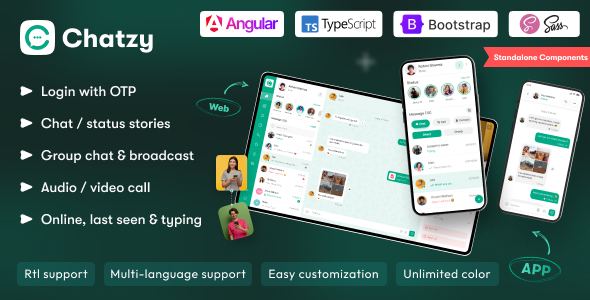
Chatzy is an Angular chat application template built with Bootstrap and SCSS, offering 30+ screens for custom admin panels or communication features. It's ideal for developers and agencies needing to quickly integrate a chat UI.
Chatzy: What this Angular Chat Template Delivers
As someone who has built multiple agency sites and custom applications, I've seen countless templates promise the world. Chatzy, however, is quite focused. It's a frontend Angular chat application template. This means it gives you all the visual components and structure for a chat interface, from user lists and message windows to authentication screens and settings, but it doesn't come with a backend to handle the actual real-time messaging or data storage.
It's essentially a well-organized set of UI elements and pages designed specifically for chat functionality. You get a solid foundation built with Angular, Bootstrap, SCSS, and TypeScript. The 30+ screens cover a lot of common chat scenarios, which saves a ton of time compared to building every single view from scratch.
Who Benefits Most from this Chat App Template?
This template is genuinely useful for a specific group: developers and agencies who need to integrate chat features into web apps rapidly. If you're building a custom admin panel, a CRM, a CMS, or any application that requires internal or external communication, Chatzy provides the frontend heavy lifting.
It’s perfect for those who already have a backend in mind, perhaps using Firebase, Socket.IO, or a custom API, and just need a polished, functional user interface. It significantly cuts down on custom chat UI development time. Who should not use it? If you're looking for a full, ready-to-deploy chat application with a backend included, this isn't it. Nor is it for someone who isn't comfortable with Angular or TypeScript, as you'll need to connect it to your own data sources.
Diving into the Design and User Experience
The design approach here is clean and functional, which is what you want for a chat interface. It prioritizes readability and ease of use, which is critical for any communication tool. The inclusion of both light and dark modes, along with multiple color options, means you can align it with client branding fairly easily without diving deep into CSS files.
The components, being built with Bootstrap, are familiar and generally behave as expected. This makes the user experience predictable and reduces the learning curve for anyone interacting with the application. When we tested the kit on a demo site, the overall feel was snappy and responsive, which is essential for real-time applications.
Exploring the Core Chat Features and Components
The template provides a comprehensive set of pages and components for a chat application. You get user profiles, message lists, individual chat windows, group chats, and various settings. The inclusion of authentication pages is a practical addition, giving you a ready-made frontend for user login and registration.
There's also a blog page, which feels a bit tacked on for a chat template, but it could be repurposed for announcements or support articles within a larger application. The core strength lies in the variety of chat-specific screens, which cover most scenarios you'd encounter when integrating chat features into web apps.
Code Quality and Developer Workflow for Chatzy
One of the biggest selling points for developers is the underlying code. Built with Angular and SCSS, it adheres to modern web development practices. The documentation states "clean and well-commented codes," which is a huge plus. In our experience with similar frameworks, good code organization means lower maintenance costs and easier content updates for business owners down the line.
The use of SASS architecture means styling is organized and customizable. Changing primary colors or font styles across the entire application is typically a matter of updating a few variables, which is a massive time-saver. The fact that it uses TypeScript also means better code maintainability and fewer runtime errors, leading to a more stable application. The absence of jQuery is also a good sign, indicating a modern, leaner codebase.
- Angular: Provides a robust framework for building dynamic single-page applications.
- Bootstrap: Offers a familiar and widely supported component library for rapid UI assembly.
- SASS: Enables efficient and organized styling with variables and nested rules.
- TypeScript: Enhances code quality and maintainability through static typing.
Ensuring Responsiveness and Cross-Device Performance
The template is described as fully responsive, and given its Bootstrap foundation, this is expected. A responsive layout means the chat interface will adapt well to different screen sizes, from desktops to mobile phones. For a business owner, this translates directly to a better mobile experience for users, ensuring accessibility and usability regardless of their device.
In the real world, this means less time spent tweaking layouts for various breakpoints. The components are designed to reflow and resize gracefully, which is crucial for a communication tool that users might access from anywhere.
Final Thoughts on Investing in this Chat Application Template
Chatzy is a solid frontend foundation if you're looking to build out an Angular-based chat system or add communication features to an existing application. It solves the headache of setting up a niche-specific booking flow, or in this case, a chat interface, by providing a comprehensive set of pre-built screens and components.
While it doesn't come with a backend, which some might see as a limitation, it allows developers the flexibility to choose their preferred real-time communication service. The code quality, modern tech stack, and comprehensive UI elements make it a smart investment for saving development time and getting a polished product to market faster. Just remember you'll need to bring your own backend to make it truly functional.
FAQ
Does Chatzy include a backend for real-time chat functionality?No, Chatzy is strictly a frontend Angular template. You will need to integrate your own backend service for real-time messaging and data storage.
Is this template easy to customize for specific branding needs?Yes, built with SCSS and Bootstrap, it's structured for relatively straightforward customization of colors, fonts, and component styles.
What level of Angular experience is required to use this template effectively?You should have a working knowledge of Angular and TypeScript to effectively integrate and customize this template with your own application logic and backend.