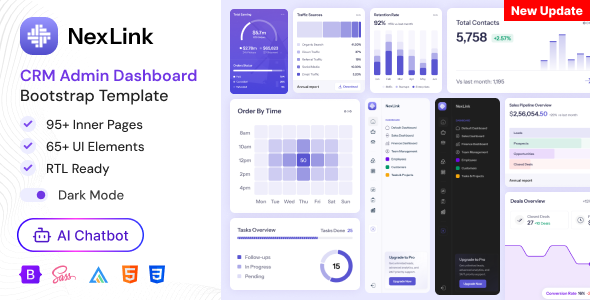
NexLink is a pre-built CRM Admin Dashboard Bootstrap template designed for quickly launching internal management interfaces for sales, analytics, and project tracking. It's best suited for developers and agencies who need to deploy functional dashboards without starting from scratch.
Streamlining CRM Dashboard Development for Agencies
The biggest workflow problem this NexLink CRM admin dashboard template solves is the initial setup time for common internal tools. Instead of spending days laying out basic components like data tables, navigation, and user authentication flows, you get a solid foundation. This saves significant hours, especially for agencies needing to spin up multiple client dashboards or internal tools on tight deadlines.
In our experience building multiple agency sites with tools like this, the value isn't in groundbreaking design, but in the sheer volume of pre-configured pages and components. It means less time on repetitive UI tasks and more focus on integrating backend logic or custom features, directly impacting project profitability and delivery speed for internal tools development.
Technical Standards and Code Organization in NexLink
From a technical standpoint, NexLink uses a standard Bootstrap framework, which means most developers will find the CSS and component structure familiar. The inclusion of SCSS files is a definite plus, allowing for easier theme customization and maintainable stylesheets compared to digging through compiled CSS. This clean structure translates to lower maintenance costs and quicker modifications for any business owner.
The template includes standard accessibility practices for basic elements, ensuring a decent starting point for screen reader compatibility and keyboard navigation. Its semantic HTML structure for navigation and content areas also provides a clean foundation for search engine optimization, which helps with content discoverability even for internal dashboards.
- The SCSS architecture is well-organized, making it straightforward to override variables and component styles. This is crucial for maintaining a consistent brand identity without fighting the framework.
- Asset loading feels standard for a Bootstrap template; it's not overly optimized out-of-the-box for Core Web Vitals, but it's not bloated either. A developer would still need to implement proper minification and concatenation for production.
- Mobile responsiveness is what you'd expect from a Bootstrap base. The mobile menu collapses predictably and handles longer navigation items without breaking the layout, providing a consistent user experience on smaller devices.
- The template utilizes Google Fonts, specifically Instrument Sans. This is a common practice and generally GDPR-ready if fonts are self-hosted or standard Google CDN usage is accepted.
- Having 80+ inner pages means a wide range of common dashboard layouts are covered, from basic data displays to more complex forms and charts. This variety helps reduce the need to build many common CRM dashboard components from scratch.
Strengths of this Bootstrap CRM Template
What impresses most about NexLink is its sheer breadth of pre-built pages and components. You get a lot of common CRM dashboard elements out of the box, which is a huge time-saver. Compared to many templates in this niche that focus heavily on flashy animations, this one stays grounded, offering functional layouts that prioritize data presentation and user interaction.
The included chat, email, and calendar applications are fully functional UI mockups, providing a great starting point for integrating real-time features. This focus on specific CRM functionalities makes it a more targeted resource than generic admin templates.
Who Should Use NexLink for Dashboard Development
This template is ideal for freelance developers or agencies building custom CRM systems, internal tools, or client portals where a polished, functional admin interface is needed quickly. It's also suitable for startups looking to prototype an internal dashboard without investing heavily in custom UI development. This is not for those needing deep custom backend logic or a pre-integrated database solution, as it's purely a frontend HTML template.
Limitations of this Admin Dashboard Template
One aspect that feels fairly standard, rather than exceptional, is the out-of-the-box theming. While SCSS is included for customization, the default aesthetic is perfectly adequate but doesn't offer a particularly distinct visual identity compared to other premium templates. A developer will still need to put in effort to make it truly unique. Also, while it covers many pages, some niche-specific CRM data visualizations might still require custom development.
Final Thoughts: Is it worth it?
For anyone regularly building internal tools or client-facing dashboards, NexLink offers a solid foundation that genuinely saves development time on common UI elements. Its extensive page library and well-structured SCSS mean you can get a functional prototype or even a production-ready frontend up and running much faster than starting from scratch. It’s a practical investment for streamlining your workflow and delivering projects more efficiently.
FAQ
Does NexLink include a database or backend system?
No, NexLink is strictly an HTML template. It provides the frontend user interface, but you'll need to integrate your own backend and database logic.
Can I easily change the primary colors and fonts?
Yes, the template includes SCSS files, which makes it straightforward to modify colors, fonts, and other global styles by adjusting variables.
How does this template handle complex data tables with many columns?
The included table components use Bootstrap's responsive utilities, typically providing horizontal scrolling or collapsing columns on smaller screens to manage wide data sets.
Is the template suitable for a multi-user environment?
While the template provides authentication pages and user management UI, the actual multi-user logic and permissions system would need to be built into your custom backend.