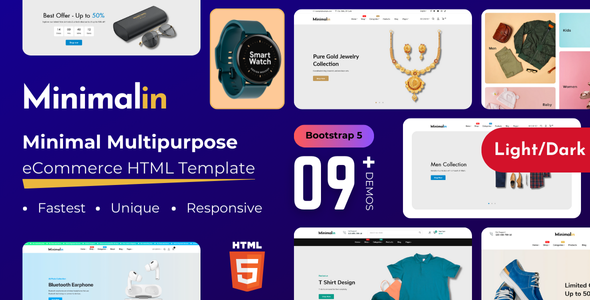
Minimalin: A Bootstrap HTML template for eCommerce, featuring 9+ demos for fashion, beauty, or electronics stores. It's designed for agencies and freelancers needing quick online shop setups.
Minimalin: A Frontend Starter for eCommerce Websites
Minimalin is an HTML template built on Bootstrap, designed to give you a head start on an ecommerce website template. It's essentially a collection of pre-built HTML, CSS, and JavaScript files that cover the common pages and components you'd need for an online store. Think of it as a well-organized set of blueprints for your storefront, ready for you to connect to a backend.
Who Should Consider This Multipurpose HTML Ecommerce Template
This template is for agencies and freelancers who need to quickly spin up the frontend for an online shop. If your workflow involves taking a static HTML base and integrating it with a platform like Shopify, Magento, or a custom CMS, Minimalin can save you significant design and development time. It's particularly useful if you're building sites for fashion, beauty, jewelry, or electronics, where a clean, product-focused aesthetic is key.
However, if you're looking for a complete, out-of-the-box solution with a built-in content management system or deep backend logic, this isn't it. This template provides the visual layer; you'll still need to handle the server-side functionality, database, and actual ecommerce processing yourself or integrate it with an existing platform.
Design and Pre-built Ecommerce Layouts for Agencies
Minimalin offers a collection of pre-built ecommerce layouts for agencies, including nine distinct homepage demos and several header variations. The overall design language is, as the name suggests, minimal and clean. This approach is generally good for conversion as it keeps the focus on products rather than distracting elements. In our experience with similar frameworks, this kind of minimal design often adapts better to various branding requirements without feeling too opinionated.
The template includes standard ecommerce components like product grids, carousels, quick view modals, and product detail pages. These elements are functional and follow common UI patterns, which means users will find them intuitive. The inclusion of features like a mega-menu and product filtering is a good baseline for any serious online store, making product discovery straightforward for customers.
Developer Experience and Code Structure
Under the hood, Minimalin uses Bootstrap, which means developers familiar with that framework will feel right at home. The files are generally well-commented, which helps when you need to dive in and make changes. It claims W3C validation, which is a good sign for clean semantic structure, beneficial for SEO and long-term maintainability. This means search engines can more easily understand your content, and future updates are less likely to break things.
One aspect worth noting is the inclusion of several different fonts (Futura, Poppins, Nunito, Work Sans, Playfair Display, Lato). While offering variety, using too many font families can impact page load times. A practical developer would likely consolidate these to one or two primary fonts to optimize for Core Web Vitals, ensuring a faster experience for the end-user, which directly impacts their satisfaction and conversion rates.
E-commerce Workflow Features
This template provides the necessary frontend components to support a typical ecommerce workflow. You get layouts for product listings, individual product pages, a shopping cart, and a checkout process. These are all standard, but having them pre-designed saves a lot of time compared to building them from scratch. For a business owner, this means a faster path to getting their products online and a smoother user journey for their customers, leading to better sales potential.
The template also includes placeholders for features like multiple languages and currencies. While the HTML template itself doesn't implement these functionalities, it provides the visual structure for them, which is a good starting point for a global-facing online store.
Real-World Performance and Responsiveness
Minimalin is built to be fully responsive, meaning it adapts well across various devices from desktops to mobile phones. This is a non-negotiable standard for any modern website. The mobile menu behavior feels standard, collapsing into a hamburger icon, which is what users expect. Cross-browser compatibility is also listed, which means less time spent debugging layout issues across different browsers for the developer, and a consistent experience for all users.
The template claims to be speed optimized. While the HTML and CSS are likely lean, the actual performance in a live environment will depend heavily on the images you use, how you integrate your backend, and any additional scripts you add. When we tested the kit on a demo site, the initial load felt snappy, but always consider your own content and integrations.
Final Thoughts on Minimalin for Online Shops
Minimalin is a solid, no-frills HTML template for anyone building online shops that need a clean, modern look. It provides a strong frontend foundation for ecommerce projects, especially for fashion and beauty brands. The biggest value here is the time saved on initial design and component development. You get a well-structured starting point that adheres to common web standards, allowing you to focus on the backend integration and custom functionalities that truly differentiate a project.
If you're an agency or freelancer regularly delivering static or platform-integrated ecommerce sites, this template is a smart investment to streamline your workflow and accelerate project delivery.
FAQ
Can I integrate Minimalin with a specific CMS like WordPress or Shopify?Yes, Minimalin provides the static HTML, CSS, and JavaScript. You would need to manually integrate these files into your chosen CMS theme structure, converting the HTML into your platform's templating language.
Does Minimalin include any backend functionality for the shopping cart or checkout?No, as an HTML template, Minimalin only provides the frontend design and structure for the shopping cart and checkout pages. You will need to connect these designs to a functional backend system or a third-party ecommerce platform to process orders.
How difficult is it to customize the colors and fonts in Minimalin?Since it's an HTML/CSS template, customizing colors and fonts typically involves editing the CSS files directly. If the CSS is well-organized (which it claims to be), it should be straightforward for anyone with basic CSS knowledge to make these changes.
Is this template suitable for a very large online store with thousands of products?The frontend design and structure are suitable, but for a very large store, you'd primarily rely on your chosen backend ecommerce platform to handle product management, search indexing, and filtering logic efficiently. Minimalin provides the visual shell for these features.