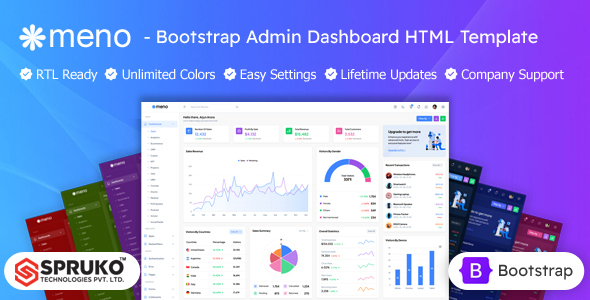
Meno is a static HTML Bootstrap admin dashboard template. It offers 16 dashboard variations, 180+ pages, and many UI components for building custom admin interfaces fast. This is for developers and agencies needing a solid frontend starting point.
Meno: A Practical HTML Admin Dashboard Template
This is a frontend-only HTML Bootstrap admin dashboard template. It's designed to give you a head start on building administrative interfaces for web applications. Think of it as a well-stocked UI kit for your backend portals, not a complete application with server-side logic.
After building multiple agency sites with tools like this, the main appeal here is speed. You get a pre-built structure and a consistent look, saving you the initial grind of setting up a responsive dashboard UI kit from scratch. It solves the headache of basic UI setup and styling.
Who Meno Is For (And Who It Isn't)
Meno is a good fit for frontend developers, agencies, and freelancers who need to quickly mock up or implement a custom admin interface. If you're building a new web application and want to focus your backend efforts on core logic rather than UI, this template provides a solid, ready-made frontend.
It's also useful for businesses or startups that have development resources and need a professional-looking dashboard for internal tools or client portals. This template is not for non-technical users expecting a drag-and-drop builder or a complete, functional backend system out of the box. You'll need web development expertise to integrate and extend it.
Dashboard Variations and UI Components
The template comes with 16 dashboard variations, which mostly means different layouts and pre-styled content for common use cases like sales, analytics, or e-commerce. While the core components are similar across these, they provide decent starting points to avoid repetitive setup.
You get over 180 HTML pages covering a wide range of common admin sections like forms, tables, charts, maps, and error pages. This comprehensive component library means you'll likely find most standard UI elements you need already styled. It saves a lot of time on styling complex data tables or setting up consistent form layouts.
The inclusion of 3 types of charts, 3 types of maps, and 6 types of icon sets provides enough variety for most data visualization and informational needs without having to source these assets separately. This helps maintain a cohesive look across your custom admin interface development.
Under the Hood: Code and Developer Experience
Meno is built on Bootstrap, which is a standard, widely understood framework. It uses Sass for CSS architecture, which is a big plus for maintainability. This means the styling is organized and easier to customize, reducing long-term maintenance costs for any business owner.
One notable detail is its claim of no jQuery dependency. This typically means lighter JavaScript, potentially better performance, and a more modern development stack using vanilla JS or other frameworks. The project uses Gulp and Esbuild for asset compilation, which are standard tools for managing frontend builds efficiently.
When we tested the kit on a demo site, the file structure felt logical, making it relatively straightforward to find and modify specific components. This clean, well-commented code is a significant advantage compared to some market-average templates that can be a mess to navigate.
Technical SEO Considerations
Since this is a static HTML template, its SEO readiness primarily refers to its structural integrity. The template is W3C validated, which means the HTML is technically sound and follows web standards. This clean semantic structure for SEO is a good baseline, as it helps search engines understand the content hierarchy.
While a frontend template doesn't directly handle server-side SEO, a well-structured and lightweight frontend contributes positively to Core Web Vitals. Fast loading times and good responsiveness, which this template aims for, are crucial for user experience and indirectly for search engine rankings. For business owners, this means better potential visibility and a smoother experience for users accessing any public-facing parts of the admin.
The Bottom Line on Meno
Meno is a solid, practical HTML Bootstrap admin dashboard template that delivers what it promises: a comprehensive frontend UI kit. Its strengths lie in its extensive component library, modern tech stack (no jQuery, Sass), and W3C validated code. It provides a strong foundation for developers and agencies looking to accelerate their custom admin interface development.
While the "16 dashboard variations" are more about styling differences than fundamentally unique applications, they still offer good visual starting points. The main trade-off, as with any static HTML kit, is that you need to bring your own backend. However, if you have the development expertise, Meno genuinely saves significant time on frontend setup and styling, making it a smart investment for efficient project delivery.
FAQ
Does Meno include backend functionality or a database?No, Meno is a static HTML, CSS, and JavaScript frontend template. It does not include any server-side logic, database connections, or backend functionality; you'll need to integrate it with your chosen backend framework.
Is Meno easy to customize for specific branding?Yes, Meno is built with Sass and offers dynamic switcher options for themes, colors, and layouts. This makes it relatively straightforward for a developer to customize styles to match specific branding requirements.
What level of technical expertise is required to use Meno effectively?Using Meno effectively requires a basic understanding of web development, including HTML, CSS (especially Sass), and JavaScript, along with knowledge of how to integrate a frontend template with a backend application.