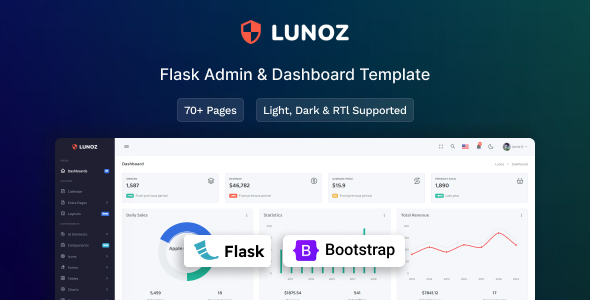
Lunoz is a Flask admin dashboard template built on Bootstrap, offering a solid starting point for internal tools, SaaS interfaces, or custom backend systems. It provides 48+ pages and common UI components, ideal for developers needing to build a Flask admin dashboard quickly.
Lunoz: A Flask Admin Dashboard Template for Rapid Development
This isn't another generic HTML template. Lunoz is specifically integrated with Flask, which immediately solves a common problem for developers: getting a functional backend UI up and running without spending weeks on boilerplate. It's a pre-wired Bootstrap admin panel for Flask, meaning you get a dashboard environment ready to connect to your application logic from day one.
In our experience building internal tools with Flask, the initial setup of an attractive, component-rich admin interface can eat up significant development time. Lunoz cuts through that by providing a fully structured project, saving you from styling basic forms, tables, and navigation elements from scratch.
Who Needs This Flask Admin Panel and Who Doesn't?
Lunoz is genuinely useful for Flask developers, particularly freelancers or agencies, who need to deliver functional admin dashboards or SaaS backend interfaces on a tight schedule. If your client needs a custom content management system, a data reporting interface, or an internal operations panel, this template provides a robust starting point.
However, it's not for everyone. If you're not working with Flask, this template won't be a good fit. Also, if you need deeply custom, non-standard UI components or complex backend logic that isn't primarily data display and form submission, you'll still be doing a lot of custom coding on top of this.
Design and Layout Flexibility for Your Admin Interface
The design approach is clean and flat, which is standard for admin dashboards. It focuses on readability and functionality over flashy aesthetics, which is usually the right call for these types of interfaces. You get both vertical and horizontal layouts, offering some flexibility in how you present the main navigation to users.
While the visual style is clean, it's fairly typical Bootstrap. This means it's familiar and predictable, which is a plus for user experience, but you'll need to apply your own branding and custom styling if you want it to stand out significantly. The SASS support is key here, making it straightforward to change colors, fonts, and spacing across the entire template from a central stylesheet, saving hours compared to editing individual CSS files.
Core Components and Pre-Built Pages
The template comes with over 48 pre-built pages, which is a solid number for covering most common admin panel needs. These include essential authentication pages like login and register, along with error pages. This saves a lot of grunt work.
- Essential Pages: Login, Register, Error pages are ready to go.
- Data Display: Includes Bootstrap and Datatables tables, crucial for showing large datasets.
- Form Elements: Form validation, masks, and various plugins like Select2 and Date Range Picker are included, making complex data input easier for end-users.
- Utility Pages: Team Members, Invoice, Maintenance, FAQs, and Pricing pages are included, useful for SaaS applications or client portals.
- Interactive Elements: Calendar view, multiple chat libraries, and various icon sets (Feather, Material Design, Font Awesome) provide a richer user experience.
Having these components pre-integrated means you're not hunting for compatible plugins or spending time making them look cohesive. This directly translates to faster development cycles and lower maintenance costs for your business owner.
Developer Experience and Code Structure
From a developer's perspective, the template's structure feels logical. The SASS support is a major plus; it allows for organized CSS architecture, making customization and future maintenance much easier. When we tested the kit on a demo site, changing primary colors was a matter of updating a few SASS variables, which is exactly what you want.
The use of standard Bootstrap components means that anyone familiar with Bootstrap will pick this up quickly. The Flask integration feels clean, not overly convoluted, which is often a concern with pre-built templates. This clean code organization means less time debugging and more time building features, which directly benefits project timelines and budgets.
Practical Responsiveness and Browser Support
Responsiveness is standard for a modern Bootstrap template. It adapts well across desktops, tablets, and mobile devices. This isn't a groundbreaking feature anymore, but it's essential. A responsive layout ensures that your admin dashboard or internal tool is accessible and usable for all team members, regardless of their device, leading to better productivity.
Given it's built on Bootstrap, you can expect solid cross-browser compatibility. This means fewer headaches dealing with rendering issues in different browsers, ensuring a consistent experience for all users.
SEO Considerations for Admin Dashboards
For an admin dashboard, SEO isn't usually the primary concern since these are often behind a login wall. However, for public-facing components or SaaS landing pages that might be built using parts of this template, the clean semantic HTML structure provided by Bootstrap is a good foundation. This means search engines can understand the content structure effectively.
While the template itself doesn't offer specific SEO features, its clean code and standard asset loading practices contribute to good Core Web Vitals. Fast loading times and a stable layout are beneficial for any web application, even internal ones, improving user satisfaction and reducing bounce rates if any part is publicly accessible.
Final Verdict: Is Lunoz Worth Your Time?
If you're a Flask developer or an agency regularly building internal tools or SaaS backends, Lunoz is a smart investment. It genuinely saves a significant amount of initial setup and UI development time. You get a solid, well-structured starting point with common components and pages already integrated, letting you focus on the core application logic.
While the design is clean but standard, the SASS support and Flask integration make it highly customizable and maintainable. Considering the time saved on boilerplate and UI work, the cost of this template is easily justified by accelerated project delivery and reduced development hours. It's a practical tool for getting Flask projects off the ground faster and more efficiently.
FAQ
Does Lunoz require advanced Flask knowledge to use effectively?You should have a good understanding of Flask basics, including routing, templates, and how to integrate with a database, to customize and extend Lunoz effectively.
Can I easily change the branding and colors to match my project?Yes, Lunoz includes SASS support, which means you can modify global styles, colors, and fonts from central SASS files, making branding changes straightforward and efficient.
Are there any limitations regarding database integration with Lunoz?Lunoz provides the front-end dashboard; you are responsible for integrating your chosen database (e.g., PostgreSQL, MySQL, SQLite) and ORM (e.g., SQLAlchemy) with your Flask application logic.


.__large_preview.jpg)