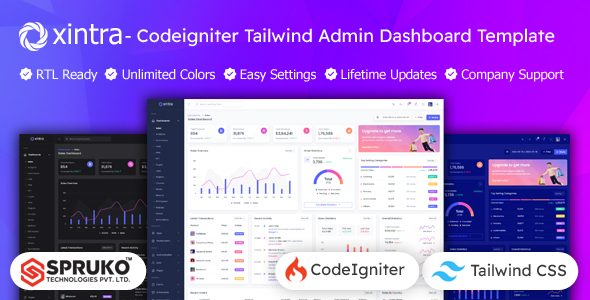
Xintra is a Codeigniter and Tailwind CSS admin dashboard template with 16 layouts and 180+ pages. It’s built for PHP developers and agencies who need to quickly deploy polished backend interfaces.
Xintra: A Codeigniter Admin Dashboard Template Overview
Having worked with countless admin templates over the years, Xintra presents itself as a solid option if you're specifically in the Codeigniter ecosystem and prefer a utility-first CSS framework like Tailwind. This isn't a full-blown application; it’s a UI kit, a collection of pre-designed HTML pages and components. It gives you a head start on the visual layer of your admin panel, letting you focus on the backend logic and data integration.
The core value here is skipping the tedious initial setup of common dashboard elements. Think charts, tables, forms, and navigation. It’s built on Codeigniter and Tailwind CSS, which means you're getting a modern stack that avoids jQuery, leading to potentially faster load times and a lighter footprint. For a business owner, this translates to a more responsive admin experience, which can improve internal team efficiency and reduce frustration when managing content or data.
Who This Tailwind CSS Admin Panel is For (and Who It Isn't)
This Xintra Codeigniter Tailwind admin panel is definitely for PHP developers already comfortable with Codeigniter and who appreciate Tailwind's approach to styling. Agencies that need to rapidly prototype or build custom admin interfaces for clients will find this useful. Freelancers looking for a robust starting point to deliver a professional-looking backend without designing every pixel from scratch will also benefit. If you’re building a content management system, an internal reporting tool, or a custom CRM, this template provides a strong foundation.
However, if you're new to Codeigniter or PHP development in general, this isn't a beginner's "install and go" solution. It requires you to understand how to integrate the static UI into your dynamic Codeigniter application logic. It's also not for developers tied to other PHP frameworks like Laravel or Symfony, unless you plan on doing significant adaptation, which defeats the purpose of buying a framework-specific template. If you need a fully functional, out-of-the-box backend application with user management and database interactions pre-built, look elsewhere; this is a UI layer.
Practical Layouts and Components for Codeigniter Projects
Xintra comes packed with 16 distinct dashboard variations, covering common use cases like sales, analytics, e-commerce, and CRM. This variety is genuinely helpful, offering different starting points rather than a single rigid design. With over 180 PHP pages, you'll find pre-built layouts for almost any standard admin screen you can imagine, from user profiles and settings to error pages and basic e-commerce flows like shopping carts and order details.
When we tested the kit on a demo site, the component library felt extensive. You get common UI elements like tables (including Grid JS), forms (with advanced options), charts, maps, and various icon sets. The inclusion of plugins like Filepond and Dropzone for file uploads is a practical touch, saving developers from sourcing and integrating these common features independently. For a business, this means less development time spent on basic UI elements, allowing more focus on unique business logic.
Developer Experience and Code Quality for Xintra Admin Template
From a developer's perspective, the "no jQuery dependent" claim is a big win. Modern frontend development generally moves away from jQuery for performance and bundle size reasons. The use of Tailwind CSS means styling is handled with utility classes, which can feel a bit verbose in the HTML at first, but it ensures design consistency and makes custom styling straightforward once you're familiar with it. The CSS is well-organized, as expected with Tailwind, making it easy to trace styles.
The template states it has "well-commented code" and is "W3C Validated," which are good indicators of maintainability. Clean semantic structure for SEO is also mentioned, which is crucial for any public-facing parts of an admin panel or for ensuring accessibility. The template is responsive out of the box, handling various screen sizes well, which is standard but essential for modern web applications. The documentation covers dependencies like Codeigniter 4.5.5, PHP 8.2.12, and Node, which helps in setting up the development environment correctly. One minor limitation, common with such comprehensive templates, is that the sheer volume of included pages and components might lead to some initial "bloat" if you only need a fraction of them, requiring careful pruning during development to keep your final application lean.
Final Thoughts on This Codeigniter Tailwind Admin Dashboard
Xintra is a solid choice for any developer or agency committed to the Codeigniter framework and looking for a pre-built, modern UI layer. It genuinely solves the problem of starting an admin panel from scratch, saving significant design and frontend development hours. The focus on a modern stack (Codeigniter, Tailwind, no jQuery) ensures a good foundation for performance and maintainability.
While it's not a plug-and-play backend, it provides a well-structured and comprehensive set of visual assets that can accelerate your development workflow. If your team is building custom Codeigniter admin dashboards regularly, investing in a template like Xintra makes practical sense to standardize your UI and cut down on repetitive work. It’s a tool that helps you deliver polished results faster, allowing you to allocate more resources to the unique, complex aspects of your application.
FAQ
Does this template include backend functionality like user authentication or database integration?No, Xintra is a static UI kit providing the visual layout and components for an admin dashboard. You will need to implement all backend logic, including authentication and database interactions, using Codeigniter.
Can I easily customize the colors and overall theme?Yes, the template leverages Tailwind CSS, which is highly customizable. It also includes switcher options for light/dark themes, various header/menu styles, and dynamic color pickers, making visual customization straightforward.
What technical expertise is required to use Xintra effectively?You should be proficient in PHP, Codeigniter, HTML, CSS (especially Tailwind CSS), and JavaScript. Familiarity with Composer, Gulp, Node, and npm for environment setup is also beneficial.
Is this template suitable for building an admin panel for any type of business?Yes, with its extensive component library and multiple dashboard variations, Xintra is versatile enough to be adapted for various business needs, from e-commerce and analytics to project management and HR systems.