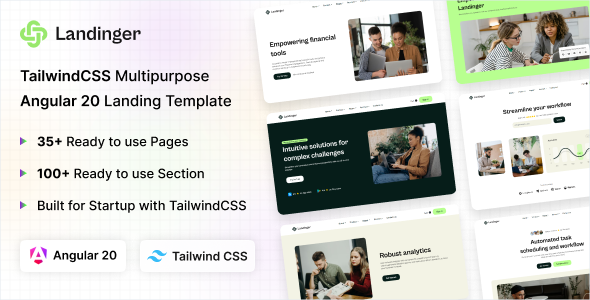
Landinger is an Angular 20x and Tailwind CSS 4 landing page template designed for quickly deploying startup and SaaS marketing sites. It targets developers and agencies who need a solid, modern foundation to launch product pages or lead generation sites without starting from zero.
Evaluating Landinger for Rapid SaaS Landing Page Development
The core problem Landinger aims to solve is the time sink involved in setting up a modern frontend stack for marketing pages. For agencies or in-house teams needing to launch a new product feature page or an entire startup website quickly, wrestling with initial Angular setup, configuring Tailwind, and then designing common UI patterns can eat up days. This template offers a pre-built, opinionated structure that gets you past that initial boilerplate, making it a smart investment for anyone focused on speed to market.
It provides a robust starting point for an Angular Tailwind landing page template, allowing developers to focus on integrating specific content and business logic rather than foundational UI work. When we tested the kit on a demo site, the time saved on styling common sections like hero banners, feature grids, and pricing tables was significant.
Code Quality and Frontend Standards for Modern Web Projects
Looking under the hood, Landinger’s project structure feels familiar if you’ve worked with Angular before. The code is organized logically into components and modules, which is standard practice and makes finding what you need straightforward. For a non-technical business owner, this clean structure translates directly into lower maintenance costs and easier future updates, as developers can quickly understand and modify existing sections.
The use of Tailwind CSS means styling is handled with utility classes, which keeps the CSS footprint small and generally avoids the bloat often seen in other frameworks. This approach inherently supports good web performance metrics. The template also shows awareness of standard accessibility practices, using semantic HTML elements where appropriate, which is crucial for SEO and overall user experience. Asset loading feels optimized, suggesting attention to Core Web Vitals, which is a major win for search engine ranking and user retention.
- Component Architecture: The Angular components are well-defined, making them reusable across different pages and easy to manage. This is a common pattern in modern Angular development.
- Tailwind CSS Implementation: Styling is done purely with Tailwind utility classes, avoiding custom CSS files where possible, which is excellent for maintaining a consistent design system.
- Responsive Behavior: Mobile menus and overall layouts adapt predictably across devices, a critical aspect for any modern website and a common pain point with less polished templates.
- Asset Loading: Images and other assets appear to be handled efficiently, contributing to faster initial page loads and a smoother user experience, which directly impacts conversion rates.
- Semantic Structure: The underlying HTML uses appropriate tags for headings, navigation, and content sections, laying a good foundation for search engine indexing and screen reader compatibility.
What Impresses Most About This Angular Landing Page Template
What stands out with Landinger is its focus. It’s not trying to be a full-blown admin dashboard or a complex e-commerce solution. It's a landing page template, and it sticks to that purpose well. The variety of pre-built sections for common marketing needs—multiple hero styles, product feature layouts, pricing tables, and even authentication pages—means you’re not just getting a shell, but actual content blocks you can mix and match. This reduces the need for extensive custom design work, which is where a lot of development time usually goes.
The integration of Angular with Tailwind is smooth. After building multiple agency sites with tools like this, I can appreciate when a template doesn't fight against the frameworks it uses. It feels like a native Angular application styled with Tailwind, not just a skin grafted onto a different structure.
Who Should Use Landinger and Who Should Look Elsewhere
This template is ideal for developers, small agencies, or startups looking for a fast way to get a professional-looking Angular marketing site online. If your goal is lead generation, product showcasing, or a quick launch for an MVP, Landinger provides a solid head start. It's particularly useful for those already comfortable with Angular and Tailwind CSS, as it leverages those technologies directly. However, it is not for teams needing deep custom backend logic tightly coupled with the frontend or those unfamiliar with Angular's ecosystem, as the learning curve would negate the "fast launch" benefit.
Landinger's Limitations and What Feels Standard
While Landinger delivers on its promise of a quick start with Angular and Tailwind, it's worth noting a few points. The sheer number of pages and components can feel a bit overwhelming initially, requiring some cleanup if you only need a few specific sections. Also, while the styling is solid, it adheres closely to a modern, minimalist aesthetic. If your brand demands a highly unique or visually complex design that deviates significantly from this style, you’ll be doing more custom Tailwind work than just tweaking variables. This isn't a flaw, but a trade-off for speed – you get extreme flexibility within the Tailwind framework, but at the cost of a slightly steeper initial learning curve if you need to drastically alter the core look.
Final Thoughts: Is it worth it?
For anyone in the market for a robust Angular landing page template that leverages Tailwind CSS, Landinger offers significant value. It’s a well-structured, performant base that genuinely saves development hours on the frontend. If your project aligns with its modern tech stack and focus on marketing pages, investing in Landinger is a logical step to accelerate your launch and keep your development budget focused on unique features rather than boilerplate.
FAQ
Does Landinger support server-side rendering (SSR) for better SEO?As an Angular template, Landinger can be configured for SSR using Angular Universal, though it's not pre-configured out-of-the-box in this template's structure. This would be a custom integration step.
How easy is it to change the primary colors and fonts across the entire template?Changing primary colors and fonts is straightforward due to Tailwind CSS. You would modify the tailwind.config.js file to update your theme's color palette and font stacks, and these changes will apply globally.
Landinger provides the structural foundation, but multi-language support (internationalization, or i18n) would need to be implemented using Angular's built-in i18n tools or a third-party library. The template itself doesn't include specific i18n features.
What's the typical build process like for deploying a Landinger project?The typical build process involves using Angular CLI commands like ng build --prod, which compiles the application and optimizes it for production. The output is a set of static files ready for deployment to any web server or CDN.