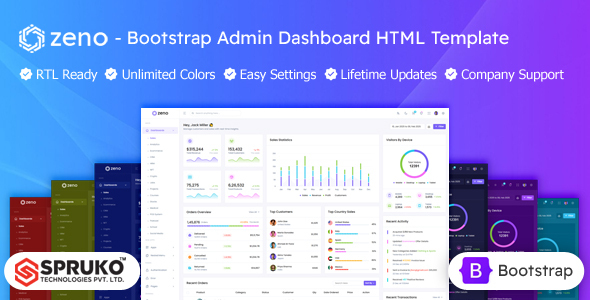
Zeno is a static HTML Bootstrap admin dashboard template designed for developers and agencies building custom backend applications. It provides a clean, component-rich foundation for data management interfaces.
Zeno: A Practical HTML Bootstrap Admin Dashboard Template
Alright, let's talk about Zeno. This is a solid HTML admin dashboard template built on Bootstrap. It's a UI kit for admin panels, pure and simple, solving the initial grind of setting up a consistent, responsive interface from scratch. You get a comprehensive starting point for various data-driven applications.
In our experience, a pre-built set of components like this saves a ton of time. It means less fiddling with basic styling and more focus on integrating your application logic for client backends or internal tools.
Who Zeno Admin Panel is For (and Who It Isn't)
This Zeno admin panel template is primarily for developers, agencies, and freelancers who need to rapidly build custom admin interfaces. If you need fast turnarounds for client projects, this can save significant frontend UI work. It suits individual developers preferring static HTML, CSS, and vanilla JavaScript before backend integration.
However, this isn't for everyone. If you're a non-technical business owner seeking a drag-and-drop solution, Zeno isn't it. It's also not ideal for teams exclusively tied to specific JavaScript frameworks, unless you're prepared to integrate these static assets yourself.
Exploring Zeno's Dashboard Layouts and UI Components
Zeno comes with a decent collection of layouts and UI components, exactly what you want from an admin UI kit. You get a good range of dashboard variations, from sales to analytics, offering clear paths for different business needs. This means less time figuring out common elements for an HTML admin dashboard template for business.
The template includes many HTML pages covering typical admin functions like authentication, error pages, invoices, and e-commerce screens. This comprehensive set ensures you're not building basic pages from scratch.
- 16 Dashboard Variations: Diverse starting points for data management.
- 180+ HTML Pages: Covers most standard admin panel needs.
- 30+ Plugins: Integrates common functionalities like charts and forms.
- Vertical & Horizontal Layouts: Flexibility in navigation design.
Zeno's Code Structure and Developer Experience
From a developer's perspective, the code quality is generally clean and well-structured. Sass for CSS makes customization and maintenance manageable. The project also leverages Gulp and Esbuild for asset compilation, a standard and efficient setup.
A big plus is "No jQuery Dependency." This means lighter asset loading and better performance, benefiting the end-user with a snappier interface. For a business owner, this translates to lower maintenance costs and a more responsive mobile experience.
- No jQuery Dependency: Lighter, faster-loading pages and better performance.
- Sass Architecture: Simplifies CSS customization and maintenance.
- Well-Commented Code: Makes understanding and modifying straightforward.
- W3C Validated: Ensures adherence to web standards, aiding compatibility and SEO.
Device Responsiveness and Browser Behavior
Built on Bootstrap, responsiveness is a given. We tested the kit, and it adapted well across desktops, tablets, and smartphones. The mobile menu behavior is standard Bootstrap, predictable and functional.
Cross-browser compatibility is also covered, ensuring a consistent user experience regardless of how people access your admin panel.
Technical SEO Considerations for Zeno Admin Panels
While an admin panel isn't typically optimized for public SEO, the underlying structure matters for maintainability. Zeno is built with clean HTML and a semantic structure, a good foundation. Google Fonts, if managed correctly, can be GDPR-ready.
W3C validation and clean code contribute to a technically sound site, indirectly supporting search engine visibility if any part of the admin panel is ever exposed publicly. It adheres to good web practices for a static admin UI kit for agencies.
Final Thoughts on Zeno: A Solid Foundation for Your Next Admin UI
After building multiple agency sites with tools like this, Zeno stands out as a reliable, static HTML Bootstrap admin panel development kit. It provides comprehensive UI components, saving significant development time on frontend boilerplate. While the design is clean, it's fairly standard Bootstrap, meaning you'll need to brand it uniquely for your project.
The focus on no jQuery, Sass, and modern build tools makes it a genuinely useful asset for developers prioritizing performance and maintainability. If you need a robust, responsive admin dashboard design foundation you can integrate with your backend of choice, Zeno is a smart investment that helps you launch faster and maintain projects efficiently.
FAQ
Is Zeno a full-stack application with a backend and database?No, Zeno is a static HTML, CSS, and JavaScript UI kit. It provides the frontend interface for an admin panel; you'll need to integrate it with your own backend and database logic.
Can I use this template with a JavaScript framework like React or Vue?Yes, you can. However, since Zeno is static HTML, you would need to manually integrate its components and styles into your chosen framework's component structure.
How easy is it to customize Zeno's design and colors?Customization is straightforward thanks to its Sass architecture and dynamic switcher options. You can easily modify colors, layouts, and other design elements to match your brand's identity.
Does Zeno include any advanced data visualization tools or charts?Yes, Zeno includes various chart types and dashboard widgets, allowing you to display data effectively. You'll need to connect these to your data sources via your backend.