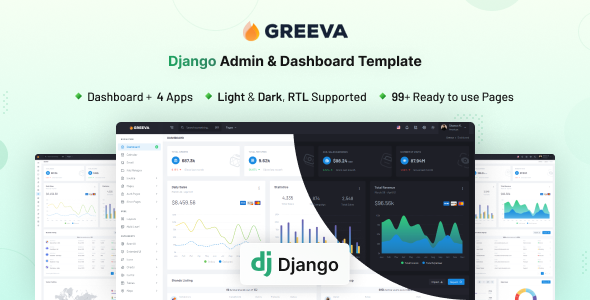
Greeva is a Django admin dashboard template built with Bootstrap for Python developers. It offers 80+ pages and 200+ UI components for rapid backend development.
Greeva: A Practical Django Admin Dashboard Template for Developers
As developers, we know the grind of setting up admin interfaces from scratch. Greeva aims to cut through that by providing a pre-built foundation. It's essentially a comprehensive UI kit and page collection specifically tailored for Django projects, designed to fast-track the creation of backend dashboards and management interfaces.
This isn't just a collection of HTML files; it's integrated with Django, meaning the structure is set up to work within a Python framework environment. It solves the common workflow problem of spending countless hours on boilerplate UI elements, allowing teams to focus on core application logic instead of styling forms and tables.
Who Benefits from Greeva's Admin Panel and Who Should Look Elsewhere?
This template is ideal for agencies and freelance developers who regularly build Django applications and need to deliver functional admin panels quickly. If you're looking for a solid starting point for a Python Django project, especially for data management, user administration, or reporting dashboards, Greeva offers significant time savings.
It's also a smart investment for developers comfortable with Django's templating system and Bootstrap. However, if your project demands a highly unique, custom-designed admin interface with bespoke styling that deviates heavily from Bootstrap's aesthetic, you might find yourself fighting the existing structure more than building upon it. It's not for those needing deep custom backend logic to be magically generated, as you'll still write your own views and models.
Analyzing Greeva's Design and Customization Options
The design is clean and intuitive, which is what you want in an admin panel. It's not flashy, but it prioritizes usability, which is key for long-term administrative tasks. It includes both light and dark themes, which is a standard but welcome feature, giving users a choice for their viewing preference.
Customization is handled through extensive use of SCSS variables. This is a developer-friendly approach because it centralizes styling adjustments. For a business owner, this means branding changes like updating primary colors or fonts can be done efficiently by a developer, leading to lower maintenance costs and a consistent brand experience across the application.
A Deep Dive into Greeva's Pre-built Pages and UI Components
Greeva comes packed with a substantial number of pre-built assets. You get over 80 pages, covering everything from basic dashboards to specific application interfaces, and more than 200 UI components.
- Components: This includes all standard Bootstrap components, various icons, toast notifications, and advanced elements like Apex Charts for data visualization, range sliders, and advanced datatables. These components mean less time building common interactive elements.
- Apps: Built-in apps like Calendar, File Manager, and Invoice provide immediate functionality for common backend tasks, saving considerable development time for building admin panels with Python Django.
- Pages: There are starter pages, FAQs, maintenance, timeline, and pricing pages. The inclusion of comprehensive authentication pages (Login, Register, Recover Password, Lock Screen, etc.) and various error pages (401, 404, 500) is a huge plus. This covers nearly all the boilerplate you'd typically have to build from scratch.
In our experience with similar frameworks, having these pages pre-configured greatly reduces the initial setup burden, allowing developers to focus on integrating their specific application data.
Greeva's Codebase and Developer Workflow Insights
The template is built with Django and Bootstrap, which are solid, widely adopted technologies. The use of SCSS for styling indicates a well-organized CSS architecture, making it easier for developers to understand and modify styles without creating spaghetti code. This clean organization translates to easier maintenance and fewer bugs down the line.
The documentation is thorough, which is crucial for any template of this scope. After building multiple agency sites with tools like this, good documentation is often the difference between a quick setup and days of frustration. The asset loading feels standard for a Bootstrap-based project; optimizing Core Web Vitals would involve standard Django and web performance practices, but the template itself provides a decent baseline.
Device Responsiveness and Browser Compatibility for Admin Users
Greeva is fully responsive, adapting well across different devices and modern browsers. This is essential for an admin panel, as team members might need to access it from a desktop, tablet, or even a smartphone. A good mobile experience for admin users ensures they can manage data and perform tasks efficiently, regardless of their device, leading to better productivity.
Technical SEO Considerations for Your Greeva-Powered Admin Panel
While an admin panel isn't typically exposed to public search engines, its underlying structure still matters for maintainability and potential future integrations. Greeva's use of standard HTML5 and CSS3, combined with Bootstrap's semantic approach, generally results in a clean semantic structure. This is good practice for any web project, ensuring the content is well-organized and accessible, even if not directly for public SEO.
For projects where parts of the admin might eventually become public-facing or need to interact with external services, this clean structure provides a solid foundation for future technical SEO efforts or efficient data management.
Final Verdict: Is Greeva the Right Django Admin Template for Your Project?
If you're a Python developer or an agency regularly taking on Django projects, Greeva offers a significant head start. It provides a robust, well-structured foundation for a Django admin dashboard template review, saving considerable development time on boilerplate UI. The extensive component library and pre-built pages mean you can get a functional backend up and running much faster than building from scratch.
While the default design is competent, it's fairly standard. You might need to invest extra time in custom styling if your brand requires a highly unique visual identity. However, for sheer efficiency in building admin panels with Python Django, Greeva is a smart investment that lets you focus on your application's core logic rather than UI minutiae.
FAQ
Can I integrate Greeva with an existing Django project?Yes, Greeva is designed as a template for Django, so you can integrate its UI and pages into your existing Django project by following the provided documentation and adapting your views.
How flexible is the design customization beyond SCSS variables?While SCSS variables handle primary styling, deeper visual changes or custom component layouts would require modifying the underlying HTML and CSS/SCSS files directly, which is standard for most templates.
Does Greeva include any database ORM integration examples?Greeva provides the UI structure and components, but it doesn't include specific Django ORM integration examples beyond what's typical for an admin panel; you'll connect your own models and data.
What are the performance implications for a large-scale application?Greeva uses Bootstrap, which is generally efficient. Performance for a large application will largely depend on your Django backend's query optimization and server configuration, not solely the template's frontend assets.