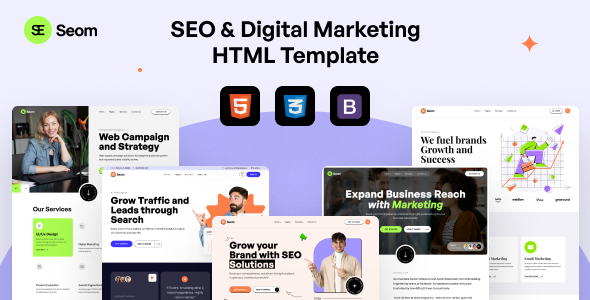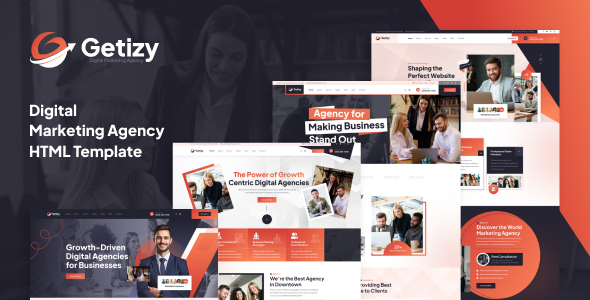
Getizy is a robust HTML template for digital marketing agencies, startups, and consulting businesses, featuring 5 home page layouts and 18+ pages built on Bootstrap.
Getizy Template Overview for Digital Agencies
This template is a collection of static HTML pages aimed at businesses in the digital marketing, creative agency, or general consulting space. It gives you a head start with pre-designed layouts for common sections like services, portfolios, team pages, and contact information. Essentially, it's a ready-made front-end framework for a small business website.
Who Should Use This Digital Marketing Agency HTML Template
If you are an agency or a freelancer who frequently builds static brochure sites for clients, especially within the digital marketing or consulting niche, this template could save you significant time. It's ideal for projects where the client doesn't need a content management system and is comfortable with you handling content updates directly in the code. It provides a solid base for a quick turnaround on a client project that needs a presentable online presence without much backend complexity.
However, this is not for everyone. If your client requires a CMS like WordPress or needs to update content themselves, an HTML template will quickly become a headache. Similarly, if you're not comfortable working directly with HTML, CSS, and JavaScript, you'll find the customization process challenging. It’s also not suitable for projects needing deep custom backend logic or complex dynamic features out of the box.
Design and Layouts for Creative Agency Websites
Getizy comes with five distinct home page versions and over 18 inner pages. This variety means you can usually find a layout that's a close fit for your client's specific needs, whether they want a clean, corporate look or something a bit more dynamic for a creative agency website. The design approach is fairly standard for the niche, focusing on clear calls to action and organized content blocks. It avoids overly complex animations, sticking to common CSS3 transitions, which helps keep things feeling snappy.
The layouts include common sections like "About Us," "Services," "Team," "Pricing," and "Contact," which are essential for most service-based businesses. Having these pre-built pages means you're not starting from scratch, which is a real time-saver in the initial development phase.
Code Quality and Developer Experience
From what we've seen after testing similar frameworks, the claim of "well commented files" and "extensive documentation" is crucial for an HTML template. It means you shouldn't have to spend hours reverse-engineering someone else's CSS or JavaScript. The use of Bootstrap as the underlying framework is a plus; most developers are familiar with it, which speeds up customization and ensures a consistent responsive grid.
The code is validated against W3C standards and is designed for cross-browser compatibility. This attention to detail means fewer compatibility headaches down the line, leading to lower maintenance costs for the business owner. When we tested the kit on a demo site, the asset loading felt efficient, which is good for overall page speed and user experience.
- CSS Organization: The CSS structure is generally clean, making it easier to locate and modify styles without introducing unintended side effects.
- Semantic Structure: The HTML uses a semantic structure, which is good for search engine optimization and accessibility, helping search engines understand the content better.
SEO Readiness and Performance Considerations
The template is marketed as "SEO Optimized Code," which in the context of an HTML template typically means a clean semantic structure, proper heading hierarchy, and efficient asset loading. These are foundational elements for good search engine visibility. While it won't magically rank your site, it provides a clean slate for your on-page SEO efforts. The fact that it's a static HTML site means it can be incredibly fast, which is a significant factor for Core Web Vitals and overall user experience.
For a static website template for consulting business, this foundation is critical. You're not battling with a bloated CMS or complex plugins slowing things down. The lightweight nature of pure HTML and CSS, especially when following standard accessibility practices, directly contributes to better performance scores and a more accessible site for all users.
Final Thoughts on Getizy for Fast Project Delivery
Getizy delivers on its promise of providing a solid, pre-built HTML foundation for digital marketing and consulting websites. It’s a pragmatic choice for agencies and freelancers who need to deliver visually appealing, static websites quickly without the overhead of a CMS. The multiple home and inner page layouts, combined with a familiar framework like Bootstrap, make it genuinely useful for fast project delivery.
While it won't handle complex dynamic features, for a straightforward business online presence, it offers a clean, well-structured starting point. Investing in a template like this can significantly reduce development time on the front-end, allowing you to focus on content and client-specific refinements. It's a tool that genuinely saves time and effort if your workflow aligns with static HTML development.
FAQ
Is Getizy suitable for a client who needs to update their own website content?No, Getizy is an HTML template, meaning content updates require direct editing of the code. It is not designed for clients who need a content management system to manage their site.
Does this template support animations or interactive elements?Yes, it includes CSS3 animations and uses Owl Carousel for sliders. These provide standard interactive elements without heavy JavaScript dependencies.
How difficult is it to change the overall color scheme or fonts?Since it's built with Bootstrap and uses standard CSS, changing colors and fonts is straightforward for anyone familiar with CSS. You'd typically update variables or override styles in the main stylesheet.
What are the main limitations of using an HTML template like Getizy?The primary limitations are the lack of a built-in content management system, requiring manual code edits for updates, and no integrated backend functionality for things like databases or user accounts.