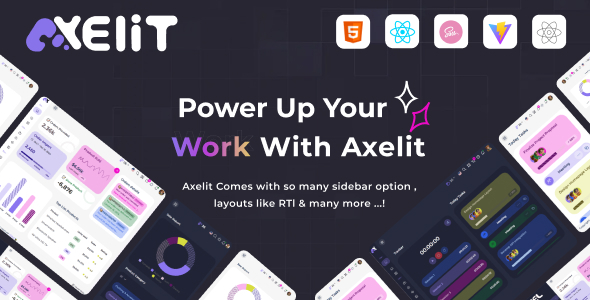
Axelit React JS (Vite) Admin Dashboard Template is a solid foundation for custom admin panels, built with React and Vite. It's ideal for agencies and developers needing to ship internal tools quickly.
Axelit React Admin Dashboard: A Frontend Foundation for Internal Tools
Alright, let's talk about Axelit. This isn't a full-stack solution, so get that idea out of your head immediately. What it is, though, is a frontend React admin dashboard template built with Vite. Think of it as a pre-assembled UI kit for the backend of your application. It gives you a head start on building things like custom CRMs, internal dashboards, or the admin interface for a SaaS product without having to build every single component from scratch.
The core problem this template solves is boilerplate. Setting up a responsive layout, navigation, and a consistent design system for an admin panel takes time. Axelit provides a decent set of common application layouts and components, letting you jump straight into integrating your data and business logic. It's about saving those initial 40-80 hours of frontend setup.
Who Benefits from this React Admin Dashboard and Who Should Look Elsewhere
This React admin dashboard template is genuinely useful for a few specific groups. If you're an agency or a freelance developer regularly building custom web applications for clients, especially those that need an internal administrative interface, this is a time-saver. It's also a good fit for in-house development teams needing a quick way to prototype or launch a Vite admin panel for SaaS or internal operational tools. You need to be comfortable with React and understand how to connect a frontend to your chosen backend.
Who should probably skip this? If you're not a developer, or if you're looking for a drag-and-drop solution that handles both frontend and backend without writing any code, this isn't it. It's also not for someone who needs an extremely unique or custom UI that deviates heavily from standard admin panel conventions, as you'd spend more time overriding styles than building.
Practical Design and Visuals for an Admin Dashboard
The design of Axelit is functional and clean. It uses Montserrat, which is a common and readable font, and includes both light and dark modes. This is pretty standard for admin templates, ensuring readability and reducing eye strain during long working hours. There's nothing particularly groundbreaking about the aesthetic, but it's not offensive either. It provides a solid, neutral base that you can brand without too much fuss.
From a compliance perspective, using standard fonts and a clear layout generally aligns with basic accessibility practices, which is important even for internal tools. The visual structure is straightforward, which helps with information hierarchy in a data-heavy environment.
Pre-built Apps and Components for Rapid Development
Axelit comes packed with a good selection of pre-built application UIs, which is where it offers real value. You get two different dashboard layouts, plus specific UIs for things like a calendar, invoice generation, a Kanban board for task management, user profiles, timelines, FAQs, pricing pages, galleries, team directories, chat interfaces, and even an e-shop app. This collection of common app layouts means you're not building these essential internal tool components from scratch.
- Two different Dashboard layouts
- Dedicated Calendar and Invoice UIs
- A functional Kanban Board for task tracking
- Profile, Timeline, FAQ, Pricing, Gallery, and Team apps
- Chat, E-shop, Project, To-do, API, Bookmark, and File Manager interfaces
Having these components ready to go can shave significant time off a project, letting you focus on the unique business logic rather than recreating standard UI patterns.
Business-Focused Features for Operational Efficiency
The included components directly support common business operations. The invoice and pricing apps are useful for financial tracking, while the project and Kanban board apps are essential for internal project management. The E-shop app could be a starting point for an internal inventory or product management system. These features mean you have a ready-made frontend for many critical operational aspects of a business, directly improving efficiency for your users.
Developer Experience: React, Vite, and SCSS Architecture
This template is built with React and uses Vite for its build process, which is a smart choice. Vite is known for its fast development server and quick build times, which translates to a more fluid developer workflow and faster deployments. This directly benefits non-technical business owners through quicker feature delivery and lower development costs in the long run. The use of SCSS for styling is also a plus; it makes managing and customizing the CSS much more organized than raw CSS, allowing for easier theme changes and consistent branding across your application.
The claim of "clean & well commented codes" and "detailed documentation" suggests a decent developer experience. In our experience with similar frameworks, good code organization means easier onboarding for new team members and lower maintenance overhead, which again, saves money over the lifespan of the application.
Ensuring Responsive Access for Your Admin Panel
The template states it has a "Fully Responsive layout," which is non-negotiable for any modern web application, especially an admin panel. Your internal users or clients will access this dashboard from desktops, laptops, tablets, and even phones. A truly responsive design ensures a consistent and usable experience across all devices, allowing employees to manage tasks or view data on the go without frustration. This improves productivity and reduces support requests related to layout issues.
Technical Foundations for a Performant Admin Interface
While an admin panel isn't typically targeting public SEO, the underlying technical choices still matter. Vite's performance benefits contribute to faster load times for internal users, improving their daily workflow. The semantic structure inherent in a well-built React application, combined with clean SCSS, lays a good foundation for maintainability and potential future integrations. This means a more stable and efficient tool for your business operations, even if it's not about ranking on Google.
Final Thoughts: Is Axelit the Right React Admin Panel for Your Project?
Look, Axelit isn't going to revolutionize web development, but it's a solid, practical frontend admin template for React projects. If you're a developer or agency needing to quickly set up a functional, component-rich admin interface, this template offers a lot of pre-built value. The combination of React, Vite, and SCSS is a good modern stack, and the range of included app UIs means you can cover a lot of common ground without writing tons of boilerplate. It's a smart investment to save significant development time, especially if your project fits the mold of a standard internal tool or SaaS dashboard. The main limitation is that it's just the frontend, so you'll still need to bring your own backend to the party.
FAQ
Is Axelit a full-stack solution that includes a backend?No, Axelit is a frontend-only React admin dashboard template. You will need to integrate it with your own chosen backend technology and APIs.
How easy is it to customize the styling and branding of this template?Since it uses SCSS, customizing the styling and branding should be relatively straightforward for a developer familiar with CSS preprocessors. You can typically adjust variables for colors and fonts to match your brand.
Does this template support different data sources or APIs out of the box?Axelit provides the frontend UI components. You will need to connect these components to your specific data sources or APIs using standard React data fetching methods, as it does not come with pre-configured data integrations.
What's the expected performance of a large application built with Axelit?Given its foundation on React and Vite, the template provides a performant base. However, the overall performance of a large application will ultimately depend on your specific data fetching strategies, backend optimization, and how efficiently you manage state and render components.

![Boltify React | React Tailwind Admin & Landing Pages Template [React 19]](https://s3.envato.com/files/660082797/01_cover.__large_preview.png)