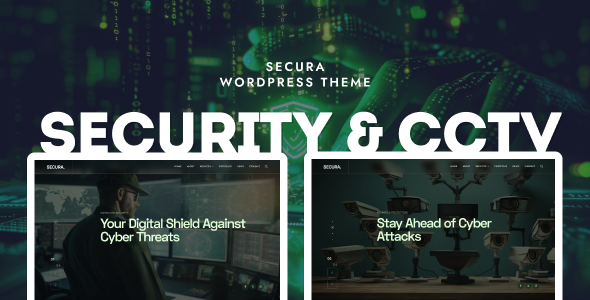
Secura is an Elementor-based WordPress theme designed for security and CCTV businesses, offering pre-built layouts and widgets to quickly launch service-oriented websites.
Secura Theme for Security & CCTV Business Websites
Secura is built specifically for security and CCTV firms aiming to establish an online presence without starting from scratch. It's a pre-packaged Elementor environment tailored to this niche, designed to cut down development time for service-based businesses.
The theme provides most common sections and layouts a security company needs out of the box. This saves you from designing every service page or testimonial section from zero within Elementor.
Who Should Use Secura for Security Service Layouts
This theme is a solid choice for freelancers and small agencies needing to deploy a functional security or CCTV company website quickly. If your workflow relies on Elementor and you build sites for clients in this sector, Secura offers a strong head start.
It's also suitable for business owners comfortable with Elementor who want to manage their own content. However, it's not for those needing deeply custom backend logic, unique database integrations, or a pure code approach. It's also less ideal if you require a very specific design outside the theme's core offerings without significant Elementor customization.
Secura's Pre-built Components and Elementor Widgets
Secura includes over 60 custom Elementor widgets and more than 20 custom sliders. This means you get many pre-designed elements for showcasing services, team members, client testimonials, and project galleries specific to the security industry.
The theme also offers various blog layouts like grid, masonry, and list styles, which is standard but useful for content marketing. You can set different layouts for archives, helping with content organization. While many widgets offer flexibility, in our experience, too many can crowd the Elementor interface and potentially introduce unnecessary CSS if not managed well.
Design Flexibility for Security Company Websites
The theme is responsive and retina-ready, standard expectations for any current WordPress theme. It includes touch gestures on sliders for a decent mobile experience. You get over 10 different header variations, offering visual diversity without deep custom CSS.
For branding, the integration of 1000+ Google Fonts and custom font options is standard. When we tested the kit on a demo site, font loading seemed to use `font-display: swap` by default. This is good for Core Web Vitals, preventing text from being invisible during load—a small but important detail for user experience.
WooCommerce Integration for Security Product Sales
Secura includes full WooCommerce support, essential if your security firm sells products like alarm systems, surveillance cameras, or monitoring packages directly. The integration provides basic styling for shop pages, product listings, and the checkout process.
While it handles core ecommerce functionality, don't expect highly customized product page layouts for complex security equipment without extra Elementor work. It's a solid foundation for an ecommerce website template in this niche, but not a unique, conversion-ready funnel out of the box.
Developer Insights on Secura's Structure and Maintainability
The theme offers an Advanced Theme Options Panel and a Live Customizer. These are convenient for clients to make basic changes without developer intervention, which can lower maintenance costs for the business owner.
It's translation-ready with a .po file and includes one-click demo import, saving initial setup time. However, after building multiple agency sites with tools like this, we've found themes with many custom Elementor widgets can sometimes lead to slightly heavier page loads due to extra script and style dependencies. A clean semantic structure for SEO is present, but overall performance still depends on hosting and image optimization.
Technical SEO for Security & CCTV Websites
Secura claims to be SEO-friendly, and it does provide a clean, semantic HTML structure for its core layouts. This is a good starting point for search engines to understand your content hierarchy, especially for security service layouts.
However, "SEO friendly" mostly means it won't actively hurt your efforts. Achieving top rankings still requires strong content, proper keyword research for terms like "best CCTV installation services" or "home security system providers," and ongoing optimization. The theme provides the right foundation, but content and off-page SEO remain your responsibility.
Is Secura a Smart Investment for Your Security Website?
Secura delivers on its promise to provide a specialized Elementor theme for security and CCTV businesses. It genuinely solves the workflow problem of starting from scratch in a niche, offering a solid set of pre-built components and layouts.
For agencies or freelancers needing to deliver a professional security website quickly, this theme is a smart investment, saving significant development hours. The trade-off is working within an Elementor ecosystem, meaning less granular control than a custom build, and the sheer number of widgets could feel overwhelming. Overall, it's a practical tool for rapid deployment in this sector, making it easier to build a security service website fast.
FAQ
Does this theme impact website speed?Like many Elementor-based themes with numerous custom widgets, Secura can be heavier than a minimal theme. Performance will depend on your hosting, image optimization, and how many widgets you use per page.
Can I easily change the primary colors to match my brand?Yes, the theme includes a Live Customizer and Elementor's global styling options, allowing you to easily adjust primary and accent colors to align with your brand identity.
Is this suitable for a small, local security company?Absolutely. Secura provides all the necessary sections for showcasing local services, contact information, and testimonials, making it an excellent WordPress template for CCTV services or general security businesses of any size.
How easy is it to update the theme?Theme updates are typically handled through the WordPress dashboard, similar to any other ThemeForest product. The one-click demo import also makes initial setup straightforward.