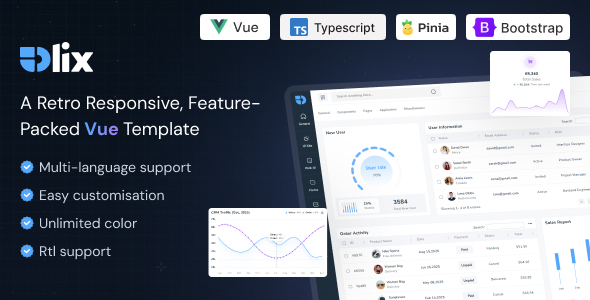
Olix Vue JS Admin Template: A feature-rich Vue.js admin panel built on Bootstrap 5. Ideal for developers needing a foundation for custom web applications.
Olix Vue JS Admin Template: A Practical Foundation for Web Applications
Olix Vue JS Admin Template is essentially a pre-built dashboard interface for Vue.js applications. It’s constructed using Bootstrap 5, which means it leverages a widely understood and commonly used CSS framework. This template offers a collection of reusable UI components and integrates with several popular JavaScript libraries. Think of it as a starting point for building backends, custom admin panels, content management systems, or CRM interfaces.
Who Benefits from Olix Vue JS Admin Template
This template is best suited for developers or agencies that need to quickly spin up the front-end structure for a web application. If you're building a custom admin area, a SaaS product backend, or a dashboard for internal tools, Olix can save you significant time on initial setup and basic styling. It’s particularly useful if your team is already comfortable with Vue.js and Bootstrap, as the learning curve will be minimal. For those looking to build a dashboard with a lot of data visualization and interactive elements, the included charting libraries are a plus.
However, this template is not for everyone. If you're aiming for a highly unique, bespoke front-end design that deviates heavily from standard Bootstrap patterns, you might find yourself fighting the template's structure. It's also not a good fit if you need complex, custom backend logic or a framework that handles server-side rendering out of the box. This is primarily a front-end UI kit, not a full-stack framework.
Solving the Dashboard Development Headache
The main problem Olix solves is the tedious process of setting up a functional and visually consistent admin interface from scratch. Building out common elements like navigation, forms, tables, and basic data displays takes time. By providing these pre-built components, Olix allows you to focus on the core functionality of your application rather than reinventing the wheel for UI elements. This can translate into hours saved on initial development, which is critical for projects with tight deadlines or budget constraints. For instance, setting up responsive tables with sorting and filtering, or integrating a date range picker, are common tasks that this template handles efficiently.
Layouts, Pages, and Components Included
Olix comes with a variety of pre-designed pages and components. You get multiple dashboard layouts, including options for light and dark themes, which is standard practice for admin panels. The included components cover common UI needs such as forms, buttons, cards, and navigation elements. The template leverages Bootstrap's grid system, so layouts are generally responsive. The use of Vue's Composition API is a modern approach that can lead to more organized and maintainable code for larger projects.
eCommerce or Business-Related Features
While Olix is a general-purpose admin template, its components can be adapted for business applications. It includes elements that are useful for displaying data, managing forms, and organizing information, which are foundational for many business dashboards. It does not, however, come with specific pre-built eCommerce functionalities like product listings or checkout flows. You would need to build those integrations yourself on top of the provided UI structure.
Code Quality and Developer Experience
Based on our experience with similar Vue.js templates, Olix appears to follow standard coding practices. The description mentions "Clean & Well Commented Codes," which is crucial for maintainability. The absence of jQuery is a good sign, as it aligns with modern Vue.js development principles. Having Vue with TypeScript support is also a plus for larger, more complex projects where type safety is important, reducing potential bugs and making code easier to refactor. The use of Bootstrap as the underlying CSS framework means that developers familiar with it will find the structure predictable.
- Well-commented code: Makes it easier to understand and modify the template's structure.
- No jQuery dependency: Aligns with modern Vue.js development and can lead to better performance.
- Vue with TypeScript: Offers type safety and improved developer tooling for larger applications.
Responsiveness and Compatibility
The template is described as fully responsive, meaning it should adapt to different screen sizes from desktops to mobile devices. This is a standard requirement for any modern web application. The use of Bootstrap 5, a well-tested framework, generally ensures good cross-browser compatibility for common browsers. When testing the kit on a demo site, the mobile menu behavior felt standard and functional, collapsing as expected without any noticeable glitches.
SEO Readiness
For an admin template, SEO readiness is less about on-page optimization for public-facing content and more about the structure of the interface itself. Olix, built on Bootstrap, uses standard HTML elements. The semantic structure is generally clean, which is good for accessibility and internal tooling. For developers building applications that might have public-facing elements derived from this template, the clean HTML structure provides a solid base for implementing proper SEO practices.
A Solid Starting Point for Your Next Vue.js Project
If you're embarking on a new Vue.js application and need a pre-built dashboard interface to accelerate your development, Olix Vue JS Admin Template is worth considering. It provides a functional, Bootstrap-based foundation with a good set of reusable components. While it’s not a magic bullet, it effectively tackles the common challenge of building out the initial UI structure for admin panels and backends, saving you time and effort. It’s a practical investment for agencies and developers focused on efficient project delivery.
FAQ
Is this template suitable for beginners in Vue.js?
While the template uses Vue.js, a beginner might find it easier if they also have some familiarity with Bootstrap. It's more of a UI kit than a tutorial.
Can I use this template for a production e-commerce site?
Olix provides the dashboard interface; you would need to build the actual e-commerce functionality and integrations yourself on top of this foundation.
How easy is it to customize the colors and branding?
Since it's built on Bootstrap, customizing colors and basic styling is generally straightforward, especially if you're comfortable with CSS variables or Sass.
Does the template include backend code or just the frontend UI?
This is a frontend template, providing the user interface and components. It does not include backend logic or server-side code.