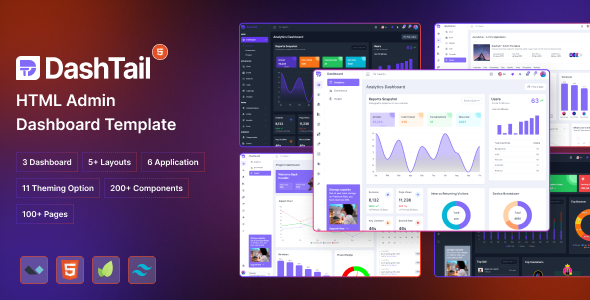
DashTail HTML is an admin dashboard template built with Tailwind CSS and Alpine.js, offering multiple layouts and pre-built applications for internal web projects. It's a solid starting point for developers aiming for quick setup.
This template provides a collection of pre-designed UI elements and pages for building an admin interface. It uses Tailwind CSS for styling and Alpine.js for interactive components, which is a lean and modern stack for frontend development. When you need to spin up an internal tool or a client-facing dashboard without getting bogged down in custom CSS, this kit offers a practical shortcut.
Intended Users for DashTail Admin Dashboard
This DashTail HTML template is particularly useful for agencies and freelancers who regularly build custom admin panels or internal tools and need a rapid development workflow. If you are comfortable with Tailwind CSS and Alpine.js, this package gives you a significant head start. It is also a good fit for individual developers who want to avoid the overhead of heavier JavaScript frameworks for simpler interactive UIs.
However, this template is not for beginners unfamiliar with utility-first CSS or basic JavaScript. If your project requires deep backend integration out of the box with a specific framework like React or Vue, or complex state management, you will be doing a fair amount of custom work to adapt it. It is also not ideal for those who prefer a drag-and-drop page builder experience.
Design and Visual Approach for Admin Interfaces
The design here is clean and functional, exactly what you expect from a Tailwind CSS-based project. It focuses on clarity and usability rather than flashy animations or complex visual effects. You get light and dark themes, which is standard but appreciated for user preference. The overall aesthetic is straightforward, making it easy to adapt to various brand guidelines without fighting a heavily opinionated design system.
Layouts, Pages, and Components for DashTail
DashTail HTML includes a decent collection of pre-built elements. You get three conceptual dashboards: analytics, ecommerce, and project, which serve as good starting points for specific use cases. The template also provides multiple layout options like horizontal or vertical menus, and even a collapsed menu layout, giving you flexibility in navigation structure.
The included applications are:
- Chat: A basic chat interface.
- Email: A standard email client layout.
- Kanban: A task management board.
- Calendar: A simple calendar view.
- Project: A project overview page.
You also get a range of common pages such as authentication flows, invoice, pricing, FAQ, blog, and error pages. The 80+ advanced elements cover forms, cards, tables, and charts, which are the bread and butter of any admin dashboard template with Tailwind CSS. These components are built with Tailwind principles, meaning they are easily customizable through utility classes.
eCommerce and Business-Related Features
While DashTail HTML offers an ecommerce dashboard layout, it is purely a frontend template. This means it provides the visual structure for displaying product data, orders, and customer information. It does not come with any integrated backend logic for processing payments, managing inventory, or handling user accounts. You would need to connect this frontend to your own ecommerce platform or custom backend API. This solves the headache of setting up a niche-specific booking flow visually, but the actual booking logic is up to you.
Code Quality and Developer Experience
From a developer's perspective, the code is clean, which is a huge plus. Alpine.js and Tailwind CSS are known for their minimal footprints and ease of understanding, and this template leverages that well. After building multiple agency sites with tools like this, I can say that a clean codebase directly translates to lower maintenance costs and faster debugging down the line. The file structure is logical, making it easy to find and modify specific components or styles.
Key aspects of the developer experience include:
- Clean Code: Reduces cognitive load and speeds up onboarding for new team members.
- Alpine.js & Tailwind: A lightweight stack that avoids JavaScript framework bloat.
- Well Documented: This is critical for any template, ensuring you can understand how to use and extend it without constant guesswork.
- Component-based: Encourages reusability and modular development.
When we tested the kit on a demo site, changing colors or adjusting component spacing was straightforward using the Tailwind configuration file, as expected. This approach means you are working with a familiar system if you already know Tailwind, rather than learning a custom CSS architecture.
Responsiveness and Compatibility
The template is fully responsive, which is standard for modern web development but still crucial. It adapts well across different screen sizes, from mobile phones to large desktop monitors. This ensures a consistent user experience regardless of the device your internal users or clients are on, leading to better usability and lower support queries. Browser compatibility is generally good with Tailwind CSS projects, as it relies on modern but widely supported CSS features.
SEO Readiness for Admin Panels
For an admin dashboard, traditional SEO is less of a concern since these are typically behind a login. However, the clean semantic structure is beneficial for overall code health and potential future public-facing sections. While not a primary focus, good HTML structure and efficient asset loading (which Tailwind and Alpine promote) contribute to faster page loads. This indirectly helps with perceived performance and user experience, even for logged-in users. Faster loading means less waiting, which is always a win for productivity.
Final Thoughts on DashTail HTML
DashTail HTML offers a genuinely useful starting point for anyone building an admin panel or internal web application using a modern, lightweight frontend stack. It solves the significant problem of having to build common UI elements and layouts from scratch, potentially saving dozens of hours on initial setup. While it is a frontend-only solution, its clean code, component library, and developer-friendly approach make it a smart investment for those comfortable with Tailwind CSS and Alpine.js. If you need a solid foundation to launch your next project quickly, this developer-friendly admin panel is worth considering.
FAQ
Does DashTail HTML include a backend or database?No, DashTail HTML is a purely frontend template. It provides the visual interface and interactive elements but does not include any server-side logic, database, or API integrations.
Can I easily change the primary colors and fonts?Yes, since it uses Tailwind CSS, you can customize colors, fonts, and other design tokens by modifying the `tailwind.config.js` file. This allows for straightforward branding adjustments.
Is this template suitable for a large-scale enterprise application?While the clean code and component-based structure are scalable, for very large enterprise applications with complex state management or specific framework requirements, you might find yourself building a lot on top of it. It is best suited for medium-sized internal tools or dashboards where Alpine.js's reactivity is sufficient.
What if I need features not included, like a custom chart type?The template provides a good foundation of common elements. For custom features like unique chart types, you would integrate a third-party JavaScript library or build them yourself, leveraging the existing Tailwind CSS and Alpine.js setup.
.png)

.__large_preview.png)