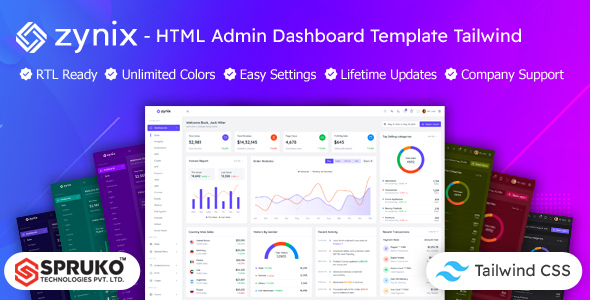
Zynix is an HTML admin dashboard template built with Tailwind CSS, offering 16+ dashboard variations and 180+ pages. It's ideal for developers building custom web applications.
Zynix: A Tailwind CSS Admin Dashboard Template for Rapid UI Development
Alright, let's talk about Zynix. This isn't a WordPress theme or a full-stack framework; it's a static HTML admin dashboard template built on Tailwind CSS. What that means in practice is you're getting a pre-designed, front-end user interface kit ready to be hooked up to your own backend logic.
The core problem this product solves is the time sink of building an admin UI from scratch. If you've ever spent weeks styling forms, tables, and navigation for a custom web application, you know the pain. Zynix gives you a significant head start, providing a consistent design system right out of the box.
Who Benefits Most from this Tailwind Admin Panel UI Kit?
This template is genuinely useful for a few specific groups. Agencies and freelancers who frequently build custom web applications, CRMs, or internal tools will find it saves a ton of design and front-end development time. If you appreciate the utility-first approach of Tailwind CSS and want a pre-built foundation, this is for you.
However, it's crucial to understand who this is not for. If you're a beginner expecting a drag-and-drop solution or a full-stack application, you'll be disappointed. This is a static HTML, CSS, and JavaScript package. You need to know how to integrate it with your chosen backend technology, whether that's Node.js, PHP, Python, or something else. It's not for those needing deep custom backend logic included, as that's entirely your responsibility.
Exploring the Zynix Dashboard Layouts and UI Components
Zynix offers a lot of ground to cover. You get over 180 HTML pages and 16 distinct dashboard variations, which is quite extensive for an HTML dashboard template for custom backend. This includes layouts for sales, analytics, e-commerce, CRM, and even niche dashboards like crypto or medical.
Beyond the main dashboards, there’s a comprehensive set of UI components. This covers everything from forms, tables (including Grid JS tables), charts (three types), and various widgets. In our experience, having these pre-styled elements can save dozens of hours compared to building them all individually.
- 16 Dashboard variations for different application types.
- 180 HTML Pages covering common admin interface needs.
- Comprehensive component library including forms, tables, and charts.
Developer Experience and Code Structure in this Tailwind CSS Admin Template
From a developer's perspective, the decision to build with Tailwind CSS is a big plus. It means less custom CSS to manage and a more predictable styling process. The source code is well-commented, which helps when you need to dig in and modify things. They've also skipped jQuery, which is a good move for performance and modern development practices.
The template uses SASS for its CSS architecture and Esbuild for asset bundling, which are standard, efficient tools. This setup generally leads to faster load times and a lighter page weight, which directly impacts Core Web Vitals and overall user experience. Moving files and customizing colors typically involves editing the Tailwind config, which is straightforward if you're familiar with the framework.
- Tailwind CSS Framework ensures a utility-first, consistent styling approach.
- No jQuery Dependent leads to lighter, faster-loading pages.
- Well Commented Code makes it easier to understand and customize.
Ensuring Device Compatibility with the Zynix Admin Dashboard
Responsiveness is a given for any modern web product, and Zynix delivers here. The layouts adapt well across desktops, tablets, and smartphones. We tested the kit on a demo site, and the mobile menu behavior was predictable and functional, which isn't always the case with every template out there. It also claims cross-browser compatibility, which is standard but still important for a smooth user experience across different browsers.
Technical SEO Considerations for Zynix Dashboard Implementations
While an admin dashboard isn't typically public-facing or heavily reliant on SEO, a clean, well-structured codebase still matters. Zynix features W3C validated HTML and a clean structure. This provides a good foundation for semantic accessibility and ensures that if parts of your application ever become public, they'll be built on a solid, technically sound base.
Final Thoughts on Zynix for Your Next HTML Dashboard Template Project
Zynix is a solid static admin panel UI kit if you're building custom web applications and want to accelerate your front-end development. The sheer volume of pages and dashboard variations means you'll likely find something close to what you need, saving you from building common UI elements repeatedly.
The main trade-off is the initial learning curve if you're not already comfortable with Tailwind CSS, but that's an investment that pays off quickly. While the number of variations is impressive, it might also mean a bit of extra work to prune out unused assets if you only need a specific subset. Overall, for developers and agencies looking for a robust Tailwind CSS admin dashboard template for web apps, this offers a practical, time-saving solution.
FAQ
Is Zynix a full-stack application or does it include a backend?No, Zynix is a static HTML, CSS, and JavaScript template. It provides the front-end user interface, but you will need to integrate it with your own chosen backend technology.
Can I easily change the primary colors and branding?Yes, since it's built with Tailwind CSS, you can easily customize the theme's colors, fonts, and other design elements by modifying the Tailwind configuration file.
What level of technical expertise is required to use this template effectively?You should have a good understanding of HTML, CSS (especially Tailwind CSS), and JavaScript to effectively customize and integrate Zynix into your projects.
Are there any ongoing costs or subscriptions after the initial purchase?The purchase includes lifetime free updates, so you won't incur additional costs for future versions or enhancements of the template itself.