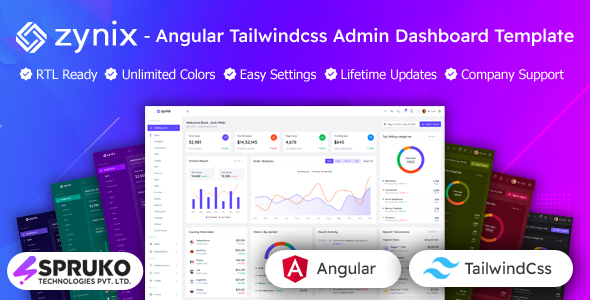
Zynix is an Angular admin dashboard template using Tailwind CSS, suitable for developers needing a pre-built UI foundation for complex backends and internal tools. It offers a solid starting point for building responsive and feature-rich administrative interfaces quickly.
Zynix: An Angular Tailwind CSS Admin Dashboard Template for Practical Development
After building multiple agency sites with tools like this, I can tell you that Zynix is an Angular admin dashboard template that leverages Tailwind CSS. It’s designed to give developers a jumpstart on creating administrative interfaces, whether for a SaaS platform, a CRM, or any internal management system. It’s not about reinventing the wheel, but providing a well-structured set of components and layouts so you can focus on the core logic of your application.
The core problem this template solves is the sheer amount of time and effort it takes to build a robust admin panel from scratch. We're talking about setting up navigation, handling different screen sizes, styling data tables, and integrating charts. Zynix bundles a lot of this boilerplate work into a coherent package, allowing you to get a functional dashboard up and running much faster than starting with a blank Angular project.
Who This Angular Admin Dashboard Template is For (and Who It Isn't)
This template is a smart choice for developers and agencies who need to build admin panels quickly and efficiently. If you're working on projects where a polished and functional backend interface is a requirement, and you're comfortable with Angular and Tailwind CSS, then Zynix can save you significant development hours. It’s particularly useful for those who need to deliver projects on tight deadlines without sacrificing the quality of the UI.
However, if you're looking for a no-code solution or a template that handles highly specific, custom backend logic out of the box, this isn't it. Zynix provides the UI foundation. You'll still need to integrate your own APIs, business logic, and potentially extend components further. It’s also not for developers who prefer a different CSS framework or are not working with Angular. If your project demands deep customization of the underlying architecture beyond what a UI template typically offers, you might find yourself fighting against the template's structure.
Streamlining Dashboard Development with Pre-built Angular Components
Zynix comes with a good collection of pre-built Angular components. This means you get ready-to-use elements like various chart types, data tables (using GridJS), forms, and even some e-commerce related pages like shopping cart and checkout. For anyone who has spent hours styling complex data tables or wrestling with chart libraries, having these pre-configured saves a lot of headaches. The practical benefit here is reduced development time and a more consistent look and feel across your admin interface, which translates to easier maintenance down the line.
The template includes 16 different dashboard variations, covering common use cases like sales, analytics, and CRM. This variety is helpful for quickly visualizing different data sets or for clients who have specific ideas about how they want their dashboard laid out. When we tested the kit on a demo site, the ability to swap between these layouts quickly helped in client presentations.
Code Structure and Developer Experience with Tailwind CSS
One of the things I appreciate about templates built with Tailwind CSS is the utility-first approach. Zynix leverages this well, meaning the CSS is organized in a way that's generally easy to understand and modify if you're familiar with Tailwind. The code is described as well-commented and clean, which is crucial for maintainability. In our experience with similar frameworks, well-structured code means less time spent deciphering what's going on when you need to make changes or fix bugs. The absence of jQuery is also a big plus, keeping the application lighter and more modern.
The template supports various layout and menu styles, including vertical and horizontal navigation, with options for fixed or scrollable menus. This level of configurability, managed through a settings switcher, is standard for good admin templates. It allows for a degree of personalization without requiring deep dives into the core code, which is a practical benefit for developers who need to adapt the interface for different users or client preferences.
Responsiveness and Browser Compatibility
As expected from a modern template, Zynix is built with responsiveness in mind, using Tailwind CSS's grid system and utility classes. This means the dashboard should adapt well to different screen sizes, from desktops to tablets and mobile devices. This is critical for any web application today, ensuring a good user experience regardless of how the admin panel is accessed. The template also boasts major browser compatibility, which is a standard but essential feature for any production-ready template, preventing issues where the interface breaks in certain browsers.
SEO Readiness and Core Web Vitals Considerations
While this is an admin dashboard template and not typically user-facing for public SEO, the underlying structure matters for internal applications. The template adheres to W3C validated standards, which is good practice. For applications that might expose certain data or reports publicly, a clean semantic structure is beneficial. The use of modern Angular and Tailwind CSS, without jQuery, generally contributes positively to performance metrics like Core Web Vitals, as it reduces the amount of JavaScript that needs to be parsed and executed, leading to faster load times and a smoother user experience for administrators.
A Solid Foundation for Your Next Admin Project
Zynix provides a practical and well-organized starting point for developing Angular admin dashboards. It addresses the common challenges of building complex UIs by offering a comprehensive set of components and flexible layout options. While it requires a developer's touch to integrate fully, it significantly reduces the initial setup and styling overhead, making it a worthwhile investment for projects that need a professional and efficient administrative interface. The ongoing updates and support are also key benefits for long-term project viability.
FAQ
Is this template suitable for beginners with Angular?While the template provides a pre-built structure, effective use requires a solid understanding of Angular and Tailwind CSS. Beginners might find it challenging without prior experience in these technologies.
How does the customization process work for colors and layouts?The template includes a settings switcher that allows for easy customization of theme modes, layouts, headers, and menu styles without extensive code modification.
Can I use this template for a client project with a tight deadline?Yes, this template is well-suited for client projects with tight deadlines as it significantly speeds up the initial UI development phase.
What kind of support is provided if I encounter issues?The template comes with professional support through an official helpdesk and detailed documentation to assist with implementation and troubleshooting.