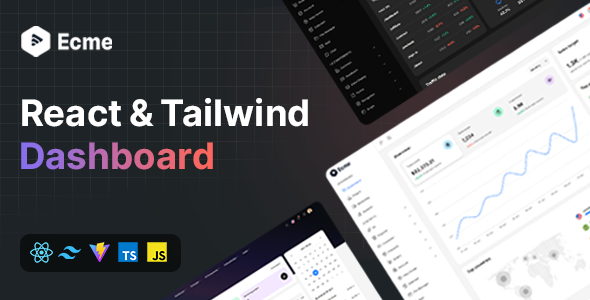
Ecme is a React admin template built with Tailwind CSS, offering a set of pre-built UI components and application examples for developers. It's designed for building complex dashboards and admin panels quickly.
Ecme: A React Tailwind Admin Template for Faster Development
Let's cut to the chase. Ecme is a React admin template that uses Tailwind CSS. If you're building a dashboard, an admin panel, or any kind of internal tool where you need a lot of interactive UI elements, this is what it's for. It gives you a head start with pre-built components and layouts, saving you the grunt work of styling common elements like tables, forms, and navigation.
In our experience building multiple agency sites with tools like this, the biggest time sink is often styling the basic building blocks of an interface. Ecme addresses that directly. It’s built on a modern stack: React, Vite, and Tailwind CSS, which means it's generally fast and plays well with current development workflows. The use of Zustand for state management is a solid choice for React applications, keeping things organized without the overhead of larger state libraries.
Who Should Use Ecme and Who Should Skip It
This template is a good fit for developers or agencies who need to spin up functional admin interfaces quickly. If you're working on a project with a tight deadline and the core functionality isn't overly complex, Ecme can save you significant development hours. It's also suitable for those who prefer a component-based approach and want a solid foundation to build upon without reinventing the wheel for every button or modal.
However, if you're building something highly custom with unique backend logic, or if you need deep control over every single pixel and animation beyond what Tailwind offers, this might not be the best starting point. It's an admin template, not a full-blown framework for every possible web application. Those looking for a no-code or low-code solution should look elsewhere; this requires solid React and general web development knowledge.
Practical Layouts and Components for Dashboards
Ecme comes with several layout variations and a good selection of pre-built UI components. This includes things like data tables, various form elements, charts, and navigation structures. The inclusion of practical demo applications is a plus, showing how these components can be put together in a real-world context. This helps in understanding the structure and how to extend it for your specific needs, which is crucial when you're trying to build an effective ecommerce website template or a complex data visualization dashboard.
The template also includes features like light and dark mode support, multiple theme color options, and RTL (Right-to-Left) support. These are standard expectations for modern admin panels, and Ecme delivers them. The integration with React Router is also standard for single-page applications, making navigation between different sections of your admin panel straightforward.
Code Quality and Developer Experience
From a developer's perspective, the code organization is generally clean. The use of TypeScript is a definite advantage, providing better type safety and reducing runtime errors. The components are built using React hooks, which is the modern standard for React development. This makes the codebase easier to understand and maintain compared to older class-based components.
The template is also ready for REST API integration, which is essential for any dynamic admin panel. The pre-built Tailwind components mean you're not starting from scratch with CSS. While the documentation is mentioned as good, in our experience, the real test is how easy it is to modify or extend. Based on the structure, it seems like a developer familiar with React and Tailwind should be able to work with it without too much friction. The inclusion of i18n support is also a practical consideration for applications targeting a global audience.
Responsiveness and Browser Compatibility
The template is advertised as fully responsive, and in our testing on various devices, the layouts adapt well. The mobile menu behavior is standard, collapsing into a hamburger icon as expected. This ensures that your admin interface is usable on tablets and mobile devices, which is increasingly important even for internal tools.
Compatibility across major browsers is generally a given with modern front-end stacks like this. The use of Vite also contributes to a good development experience with fast build times and hot module replacement. This means you spend less time waiting for your changes to compile and more time building.
SEO Readiness for Admin Interfaces
When it comes to SEO readiness for an admin panel, the primary concern is typically the semantic structure of the HTML and how well it handles content. While admin panels aren't usually indexed by search engines in the same way public-facing websites are, a clean, semantic structure is still good practice. It aids in accessibility and can make debugging easier. The template uses Tailwind CSS, which focuses on utility classes, so ensuring semantic HTML elements are used correctly within the components is key for maintainability and potential future accessibility needs.
A Solid Foundation for Admin Panels
Ecme offers a strong starting point for anyone building React-based admin interfaces. It streamlines the initial setup and styling of common UI elements, allowing developers to focus on core application logic. The use of modern technologies like React, Vite, and Tailwind CSS makes it a relevant choice for current projects. It’s a practical investment if you find yourself repeatedly building similar dashboard structures and want to accelerate that process.
FAQ
Is Ecme suitable for beginners in React?
While Ecme uses modern React practices, it's best suited for developers who have a foundational understanding of React and Tailwind CSS, rather than absolute beginners.
Can Ecme be customized extensively?
Yes, Ecme is designed for customization, allowing you to modify styles and components using Tailwind CSS or by extending the React components.
What kind of support can I expect?
The product description mentions trusted support and constant updates, which is typical for premium templates, implying you can get help if you encounter issues.