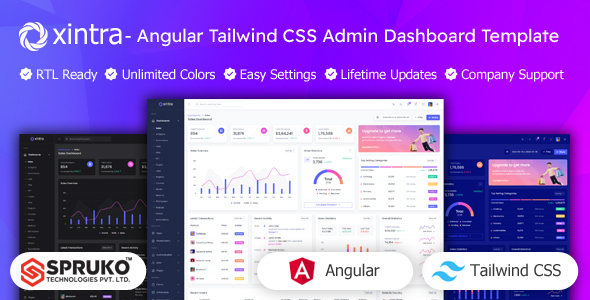
Xintra: An Angular admin dashboard template with Tailwind CSS, 16 variations, and 180+ pages for comprehensive data visualization and management. It is ideal for agencies and freelancers needing a modern frontend UI kit to accelerate project delivery.
Xintra: A Frontend Admin UI Kit for Angular Projects
Alright, let's talk about Xintra. This isn't a full-stack application; it's a frontend admin UI kit built with Angular and Tailwind CSS. Think of it as a comprehensive set of pre-built screens and components you can plug into your Angular projects when you need an admin panel or a dashboard for data visualization.
The core idea here is to save you the grunt work of setting up common dashboard elements from scratch. If you're building a custom web application and need a solid, modern-looking admin interface, this Angular admin dashboard template provides a substantial head start.
Who Benefits from Xintra and Who Should Look Elsewhere
This template is genuinely useful for agencies and freelance developers who regularly build custom web applications for clients. If you need to deliver a polished admin interface quickly, especially one that needs to be highly customized on the frontend, Xintra can cut down development time significantly.
It's particularly strong for projects where you're already committed to an Angular frontend and appreciate the utility-first approach of Tailwind CSS. However, if you are new to Angular or TypeScript, the learning curve will be steeper. This is not a drag-and-drop solution for non-developers. Also, since it's a static frontend template, it does not come with any backend logic or database integrations. If you are looking for a complete, ready-to-deploy solution with server-side functionalities, this is not it.
Exploring Xintra's Dashboard Variations and Component Library
Xintra offers a good range of pre-designed dashboards, 16 variations in total, covering common use cases like sales, analytics, and e-commerce. This variety means you often find a layout that's close to what you need, reducing initial design work.
Beyond the dashboards, you get over 180 individual Angular pages and a collection of 60+ integrated plugins. This includes a solid set of UI components: various chart types (Apex, Chart.js, Echart), data tables (Ngx-Easy Tables), forms, and other widgets. For a frontend admin UI kit, having these pre-integrated and styled components is where the real time-saving happens.
- 16 Dashboard variations cover diverse business needs.
- Over 180 Angular Pages provide extensive layout options.
- 60+ Integrated Plugins streamline common functionalities like charts and data tables.
Business-Specific Dashboards and Core Admin Functionality
The template includes specific dashboard types like Sales, Analytics, Ecommerce, CRM, Crypto, NFT, Projects, and HRM. This shows the developers have thought about the common data visualization needs across different business niches.
For example, the presence of a POS System Dashboard or a School Dashboard suggests it’s not just a generic UI, but a structured starting point for specific industry requirements. This focused approach can save developers a lot of time configuring and styling niche-specific data displays, allowing them to focus on the actual backend integration.
Developer's Take: Xintra's Codebase and Workflow
From a developer's perspective, Xintra is built on a modern stack: Angular, TypeScript, and Tailwind CSS. The absence of jQuery is a big plus, meaning a lighter, more performant application. The code is structured using Angular's component-based architecture, which makes it reasonably easy to navigate and maintain once you are familiar with the project.
When we tested the kit on a demo site, the asset loading felt efficient, largely due to Tailwind's approach to CSS, which generally results in smaller file sizes. This contributes positively to Core Web Vitals, meaning faster load times for end-users and better overall user experience. The documentation is decent, and the code is well-commented, which helps with customization. Changing primary colors across the entire Tailwind CSS admin panel is straightforward by adjusting the Tailwind config file, which is a significant time-saver for branding.
Device Responsiveness and Browser Support
As expected from any modern template, Xintra is fully responsive. It adapts well across desktops, tablets, and smartphones, ensuring a consistent user experience regardless of the device. This is standard practice now, but it's well-executed here.
It also boasts cross-browser compatibility, having been tested with major web browsers. This means you shouldn't run into unexpected layout breaks or functionality issues when deploying to different user environments.
Technical SEO Considerations for an Admin Panel
While an admin panel isn't typically indexed by search engines, the underlying code quality still matters for maintainability and performance. Xintra features clean, well-structured HTML, which aligns with good semantic practices.
This clean structure is beneficial if parts of the admin interface might eventually be exposed to public users or if you plan to use a similar component library for a public-facing site. Good code structure also generally leads to better accessibility, which is an increasingly important standard.
The Bottom Line: Is Xintra Worth Your Time?
If you're an Angular developer or an agency regularly building custom admin interfaces, Xintra offers a solid foundation. It saves a substantial amount of time on initial setup and styling of common UI components. The modern tech stack of Angular, TypeScript, and Tailwind CSS is a strong point, ensuring a performant and maintainable frontend.
While the sheer volume of pages can feel a bit overwhelming initially, and the default design is fairly standard for an admin dashboard, the ease of customization with Tailwind CSS means you can quickly brand it to your client's needs. It's not a magic bullet, but it's a smart investment if you want to accelerate your development workflow for a frontend admin UI kit and deliver polished results faster.
FAQ
Does Xintra include a backend or database?No, Xintra is a purely static frontend admin UI template built with Angular and Tailwind CSS. It does not include any backend logic, server setup, or database integrations.
What level of Angular experience is needed to use this template effectively?You should have a solid understanding of Angular, TypeScript, and component-based architecture to effectively customize and integrate Xintra into your projects.
Can I easily change the primary brand colors across the entire dashboard?Yes, changing primary brand colors is straightforward. Xintra uses Tailwind CSS, allowing you to modify the color palette through its configuration file to apply changes globally.
Is this template suitable for a large-scale enterprise application?Xintra provides a robust frontend foundation suitable for large applications, but you will need to integrate it with your own custom backend and business logic for enterprise-level functionality.

.__large_preview.jpg)
.__large_preview.png)