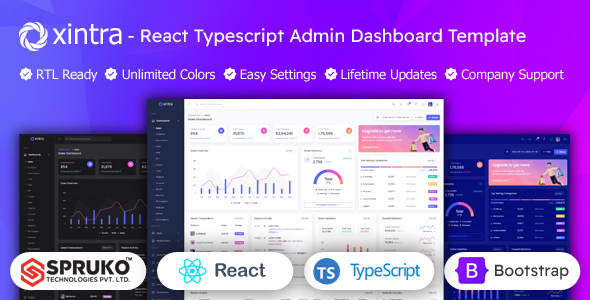
Xintra is a React, TypeScript, Bootstrap admin dashboard template. It offers 16 dashboard variations and 180+ pages for data-heavy applications. Ideal for developers building custom web admin panels.
Xintra: A React and TypeScript Admin Dashboard for Data Applications
Alright, so you're looking at Xintra, another admin dashboard template. After building multiple agency sites with tools like this, my first thought is usually, "What's the catch?" This one positions itself as a React, TypeScript, and Bootstrap foundation for admin interfaces. Essentially, it's a pre-built UI kit for developers who need to spin up a functional backend dashboard quickly, especially for projects heavy on data visualization and management.
The core problem it solves is the grunt work of setting up common admin UI elements from scratch. Think charts, tables, forms, user management pages. It gives you a head start, saving a significant chunk of time you’d otherwise spend styling and wiring up basic components.
Who Benefits from this React Admin Panel Template?
This Xintra React admin panel template is primarily for agencies and freelancers who need fast turnarounds on client projects that require an administrative interface. If you're a developer comfortable with React, TypeScript, and Bootstrap, and your project demands a polished, responsive dashboard without reinventing the wheel, this kit can be a real time-saver.
It’s also a good fit for startups needing a robust internal tool or a quick prototype for data management. The variety of dashboard types listed, like sales, analytics, ecommerce, and even NFT dashboards, shows it's designed for diverse data-driven applications.
However, this is not for absolute beginners in React or TypeScript. While it provides a foundation, you'll need a moderate level of technical expertise to customize it effectively and integrate it with your backend logic. It’s also not for someone looking for a completely custom, non-Bootstrap UI, as you'd be fighting the framework more than using it.
Exploring Xintra's Dashboard Layouts and UI Components
Xintra comes packed with 16 distinct dashboard variations and over 180 pre-built React pages. This is a substantial offering. When we tested the kit on a demo site, the sheer number of ready-to-use screens for common admin tasks, like user lists, invoices, and various form types, was impressive. It means less time spent sketching out basic layouts and more time on core application logic.
You get a decent array of components: charts (Apex, Chart.js, Echart), data tables (Grid JS), file uploaders (Filepond, Dropzone), and even Firebase Authentication integration. This comprehensive set is a strong point for a Typescript admin UI kit, providing most of what you'd expect to find in a modern admin panel. The flexibility in layout options, like vertical, horizontal, RTL, and various menu styles, is a nice touch for adapting to different user preferences or branding needs.
Code Quality and Workflow for React Developers
From a developer's perspective, the code quality is generally clean and well-structured, which is crucial for long-term maintenance. The project is built with React, TypeScript, and React-Bootstrap, leveraging Sass for styling. This SASS architecture makes it relatively easy to manage and update styles across the application, ensuring consistent branding without digging through messy CSS files. The documentation, while not groundbreaking, is sufficient to get you started with installation and basic customization.
A significant plus is the explicit "No jQuery Dependency." This means a lighter, faster application and avoids the common pitfalls of mixing older JavaScript libraries with modern React workflows. The code is also well-commented, which helps when onboarding new team members or revisiting a project after some time. This attention to detail translates to lower maintenance costs and a smoother development experience down the line for any business owner.
Performance, Responsiveness, and Web Standards Compliance
The template is designed to be fully responsive, ensuring it looks and functions well across desktops, tablets, and smartphones. This is standard expectation these days, but it’s executed competently here. The mobile menu behavior is predictable and doesn't throw any surprises, which is always a good sign for user experience.
Being jQuery-free and built with modern React practices, the performance feels snappy. This directly impacts Core Web Vitals, meaning better load times and a smoother experience for end-users, which can help with SEO and user retention. It’s also W3C Validated, indicating a clean semantic structure, which is a foundational aspect of good technical SEO and accessibility practices.
One aspect that feels pretty standard is the default visual styling. While clean and functional, it doesn't offer a particularly unique aesthetic out of the box. You'll likely need to put in effort to customize the theme colors and fonts to truly make it stand out from other Bootstrap-based admin panels.
Final Take: Is Xintra a Smart Investment for Your Next Project?
Xintra is a solid choice if you need to build a React and TypeScript admin dashboard template and want to save a significant amount of development time on the UI. It provides a robust foundation with a vast collection of pre-built components and pages, making it a smart investment for agencies, freelancers, and businesses focused on efficient development.
The trade-off is that it's a static template; you'll need to connect your own backend logic. But for getting a professional-looking, responsive admin UI up and running quickly, Xintra delivers. Its focus on modern tech like React, TypeScript, and a jQuery-free architecture means you're building on a current and maintainable stack. If your workflow involves delivering data-heavy web applications with administrative interfaces, this kit can genuinely accelerate your process and reduce boilerplate headaches.
FAQ
Does this template include backend functionality or a database?No, Xintra is a static front-end admin dashboard template. It provides the user interface components and pages, but you will need to integrate your own backend logic and database.
What level of React and TypeScript knowledge is required to use Xintra effectively?You'll need a moderate level of familiarity with React, TypeScript, and Bootstrap to customize Xintra and integrate it into your projects. It's not suitable for absolute beginners.
Can I use Xintra for commercial projects or client work?Yes, once purchased, you can use Xintra for commercial projects, client work, or personal applications. Always check the specific license terms on ThemeForest for full details.