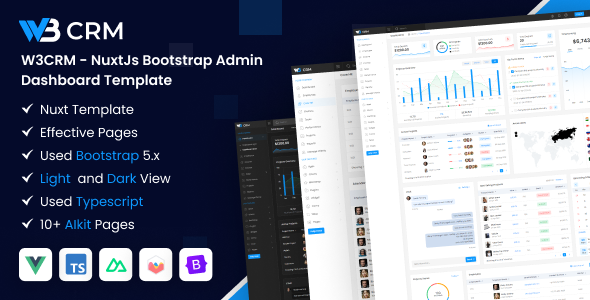
W3CRM is a NuxtJs admin dashboard template built with Bootstrap and VueJs, offering 100+ pages for rapid backend UI development. This template suits agencies and freelancers.
W3CRM NuxtJs Dashboard Template: A Practical Overview
This W3CRM NuxtJs admin dashboard template is essentially a pre-built UI kit for internal tools or CRM interfaces. It’s designed to give you a significant head start on projects that need a polished backend without building every component from scratch.
The core value here is reducing setup time for common admin UIs. Instead of spending days styling data tables, forms, or integrating charting libraries, you get a robust foundation that uses modern frameworks like NuxtJs, VueJs, and Bootstrap.
Who Benefits from this NuxtJs Admin Panel?
This template is a solid fit for specific scenarios, and less so for others.
It’s for:
- Agencies and freelancers who need to deliver custom CRM dashboard template projects quickly. The sheer number of pre-built pages and components saves significant development time.
- Teams familiar with VueJs and NuxtJs wanting a solid starting point with modern frameworks like Pinia and Bootstrap. The TypeScript integration is a plus for maintainability.
- Developers looking for a comprehensive NuxtJs admin panel starter kit to avoid boilerplate setup.
It's likely not for:
- Projects requiring a deeply unique or custom design language that deviates significantly from Bootstrap's aesthetic. While customizable, it's still Bootstrap at its core.
- Teams or individuals unfamiliar with the Vue/Nuxt ecosystem. There's a learning curve if you're coming from other frameworks.
- Anyone expecting a full-stack solution with integrated backend logic; this is purely a frontend UI kit.
Layouts and Components for CRM Development
The template boasts over 100 pages, which covers a lot of ground for a typical CRM dashboard template. You'll find common admin screens like data tables, various form layouts, user profiles, authentication pages, and error pages.
It integrates standard, well-regarded libraries such as Fullcalendar for scheduling, Apexcharts for data visualization, and CKEditor for rich text editing. Having these components pre-integrated means less time spent wiring them up and ensuring they look consistent.
Features like 6+ menu styles, light and dark modes, and horizontal navigation offer some visual flexibility without requiring a complete re-architecture. The "Wizard" component is particularly useful for multi-step forms, a common requirement in many admin interfaces.
Developer Experience and Code Structure
Under the hood, W3CRM uses a modern stack: NuxtJs, VueJs, TypeScript, Pinia for state management, and Bootstrap. The inclusion of TypeScript is a significant benefit for larger projects, as it helps catch errors earlier and improves code readability.
The presence of Sass files for styling means you can easily customize the theme with variables and mixins. This approach is far more efficient for branding consistency and lower maintenance costs than digging through compiled CSS.
The description claims "Clean Coded" and "Well Commented," which, if true, directly translates to easier onboarding for new team members and quicker debugging. When we tested the kit on a demo site, the asset loading felt optimized, which is generally expected with Nuxt and contributes to better Core Web Vitals.
One thing I'd note is that while documentation is included, like many templates, it often focuses on setup rather than deep customization examples. More practical, scenario-based documentation would enhance the developer experience even further.
Real-World Responsiveness and Browser Support
As expected from a Bootstrap-based template, W3CRM is responsive across various devices and generally handles different browser environments well. This means less time fixing layout quirks, leading to a consistent user experience for business owners.
The mobile menu behavior is standard Bootstrap, which is predictable and functional. Cross-browser compatibility is typically robust with Bootstrap, saving developers the headache of extensive testing on older or less common browsers.
Technical SEO Considerations for Admin Dashboards
While an admin dashboard isn't typically a primary SEO target, NuxtJs is a strong foundation for any web application where SEO matters. Its server-side rendering (SSR) capabilities mean search engines receive fully rendered HTML, which is better for indexing than purely client-side rendered apps. This is crucial if any admin parts are public-facing or indexed.
The template likely provides a reasonably semantic HTML structure, especially given its Bootstrap foundation. This helps search engines understand the content, even for internal tools. The use of Google Web Fonts and Font Awesome is standard, but Nuxt's asset handling should ensure they load efficiently, impacting overall page speed.
Final Thoughts on W3CRM for Rapid UI Builds
W3CRM offers a solid, modern foundation for anyone building a NuxtJs admin dashboard or a custom CRM. It's a clear time-saver, letting you focus on unique business logic instead of recreating common UI elements.
The trade-off is that while it's customizable, you're buying into a specific framework and design aesthetic. For agencies and developers who regularly build custom admin interfaces, this VueJs admin template provides a significant head start and is a smart investment to deliver functional UIs quickly.
FAQ
Is this W3CRM template suitable for a multi-tenant SaaS application?Yes, the frontend structure can support a multi-tenant application, but you'll need to implement the backend logic for tenant isolation and data management yourself.
Can I easily change the primary branding colors across the entire W3CRM dashboard?Yes, with Sass files and Bootstrap's variable system, changing primary branding colors globally should be straightforward, affecting all components consistently.
Does this template include any backend API integrations or example data?No, W3CRM is a frontend-only admin dashboard template; it does not include backend API integrations or example data beyond what's needed for the UI components to function.
How does W3CRM handle data tables with large datasets?It includes table sorting and likely pagination components. For truly massive datasets, you'd integrate a robust server-side data fetching and virtualization solution, but the UI components are there.