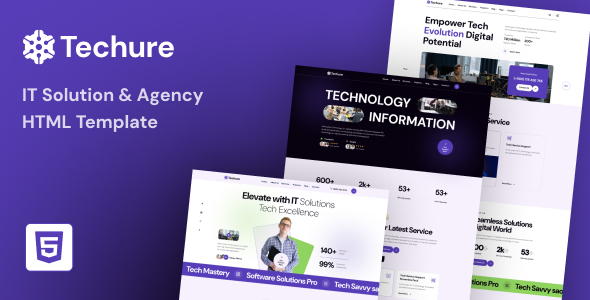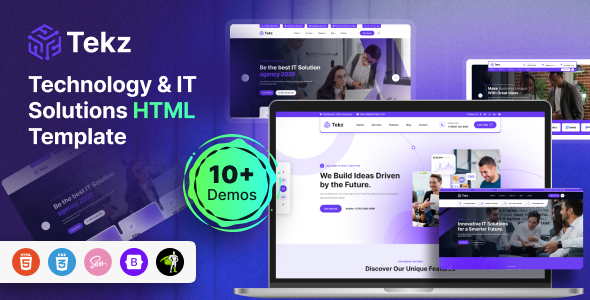
TekZ is an HTML5 template for IT services, SaaS, and tech startups, featuring 5 homepages and key inner pages. Built on Bootstrap, it's for agencies and freelancers needing quick, clean deployments.
TekZ HTML Template for IT Services and SaaS Platforms
Alright, so you're looking at TekZ, an HTML template aimed squarely at the IT services, SaaS, and general tech startup market. It’s a solid frontend package designed to get a professional-looking site up quickly without diving into a full CMS build from day one.
This template solves the initial hurdle of setting up a visually appealing online presence for a tech business. It gives you a strong starting point, especially if your client just needs a brochure site or a landing page to test an idea.
Who Should Use This Tech Startup Website Template (and Who Shouldn't)
This template is ideal for agencies and freelancers who need a fast turnaround on client projects in the IT or software space. If you're building a quick marketing site for a new SaaS product or a portfolio for a cybersecurity firm, this gives you a head start.
It's also a good fit for solo developers comfortable with HTML, CSS, and JavaScript, who prefer to integrate their own backend or CMS later. However, if you're a non-developer looking for a drag-and-drop solution or a full-fledged content management system, this isn't for you. It's also not for projects requiring deep custom backend logic.
Evaluating the Modern Design of TekZ HTML Template
TekZ leans into a clean, modern aesthetic appropriate for the tech niche. It avoids overly flashy elements while incorporating smooth page transitions and subtle animations. The design is generally crisp, and the "Retina Ready" claim holds up, meaning assets look good on high-resolution screens.
In our experience with similar frameworks, maintaining a consistent look across various tech-focused pages can be tricky. TekZ manages a cohesive visual identity across its different layouts, which saves time on styling adjustments. It's well-executed and avoids common design pitfalls.
Pre-Built HTML Pages for IT Service Website Layouts
What you get here is a decent collection of pre-built pages. There are 5 distinct homepage layouts, offering good variety for different business focuses. Beyond that, you have all the expected inner pages: Services, Portfolio, About, Blog, FAQ, Pricing, Testimonials, and Contact.
This means you're not starting from scratch for basic site structure. Having dedicated layouts like a pricing page or a well-structured portfolio section can save several hours compared to building these common elements from the ground up.
- You get 5 unique homepage designs, offering flexibility for different brand tones.
- Essential inner pages like Services, Portfolio, and Blog are included, covering common business needs.
- The structure provides a solid foundation for conversion-ready funnels, especially with pricing and testimonial pages.
Developer-Friendly Clean HTML CSS Code in TekZ
After building multiple agency sites with tools like this, the code quality in TekZ feels pretty standard and well-organized. It’s built on Bootstrap, a known quantity for most developers, making it easy to understand the grid system and component structure. The inclusion of SCSS files is a big plus for customization.
This means you can manage your styles with variables and mixins, making color changes and global style adjustments much more efficient than digging through raw CSS. Well-commented files help when figuring out specific sections. For a business owner, this translates to lower maintenance costs because developers can work with the code more efficiently.
- The SCSS architecture makes global style changes, like brand colors, straightforward and quick.
- Well-commented files reduce the learning curve for new developers working on the project.
- It uses common libraries like jQuery, Swiper, and GSAP, familiar tools for front-end development.
Ensuring Mobile-Ready HTML Template Performance
The template is fully responsive, as expected from anything built on Bootstrap. When we tested the kit on a demo site, it adapted well across various screen sizes, from desktops down to smaller mobile phones. This is crucial for user experience and search engine rankings.
The mobile menu behaves as you'd expect, collapsing cleanly and providing easy navigation. This ensures a consistent and positive experience for visitors, regardless of the device they're using, which benefits any business owner concerned with reaching a broad audience.
Technical SEO for Websites: TekZ HTML Template Analysis
The description mentions "SEO optimized," and while an HTML template can only do so much, TekZ provides a clean semantic structure. This means it uses appropriate HTML5 tags like `header`, `nav`, `main`, `section`, and `footer`, which helps search engines understand content hierarchy.
The use of Google Fonts is generally good for GDPR-ready font loading practices if configured correctly. While it doesn't handle content optimization or schema markup directly, it lays a solid foundation for on-page SEO, making it easier for your content to be indexed and ranked.
Final Thoughts on TekZ: An Efficient HTML Template for IT Companies
TekZ is a practical choice if you need to deploy an IT services or SaaS website quickly and efficiently. It's not going to reinvent the wheel, but it delivers a well-structured, visually appealing starting point that saves significant development time on the front end. The clean code, Bootstrap foundation, and SCSS integration make it developer-friendly, which translates to easier maintenance and customization down the line.
While it's just an HTML template, meaning you'll need to handle any backend functionality separately, for what it is—a robust frontend kit—it's a smart investment. It effectively solves the problem of needing a professional web presence without the overhead of a full CMS from day one. If your workflow involves building out static or client-side heavy sites for the tech sector, this template will genuinely streamline your process.
FAQ
Is this template easy to customize for specific branding?Yes, because it includes SCSS files and is built on Bootstrap, changing colors, fonts, and overall styling to match specific branding is relatively straightforward for a developer.
Does this HTML template support dynamic content or databases?No, as an HTML template, TekZ provides only the frontend structure. You would need to integrate it with a backend system, CMS, or database solution separately to handle dynamic content.
How well does this template perform on mobile devices?The template is fully responsive and built with Bootstrap, ensuring it adapts well and looks good across all modern devices, providing a good user experience on mobile.
What is the typical workflow for using this template for a client project?A typical workflow involves customizing the HTML and SCSS files for branding and content, then either deploying it as a static site or integrating it into a custom backend or headless CMS for content management.