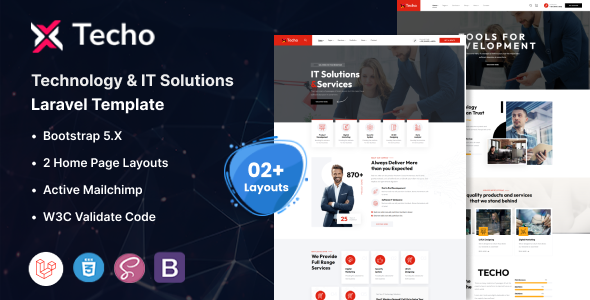
Techo is a Laravel 12 template designed for IT solutions and technology companies. It offers 22+ Blade files, two multi-page demos, and a Bootstrap foundation for quick project launches.
Understanding the Techo Laravel Template
Techo is essentially a pre-built frontend for Laravel applications, specifically aimed at the IT services, technology, and SaaS sectors. It provides a solid visual and structural starting point, allowing developers to focus on integrating their backend logic rather than building the UI from scratch.
This template solves the common problem of needing a professional, niche-specific design that integrates cleanly with a Laravel project without the overhead of a full-stack framework or a complex theme system. It's a smart investment for agencies looking to standardize their frontend approach for tech clients.
Who Benefits from this Technology Agency Website Starter
This template is for agencies and freelancers who regularly build websites for technology companies, IT service providers, or SaaS startups. If your workflow involves delivering multiple client sites with similar aesthetic and functional needs, Techo offers a significant head start.
It's also suitable for small to medium-sized tech businesses that have a development team familiar with Laravel and need a polished, conversion-ready frontend without the expense of custom design. However, it's not for absolute beginners to Laravel, as some understanding of Blade templating and asset management will be necessary to get the most out of it.
Layouts and Included Components for Tech Businesses
Techo comes with over 22 Blade files, which cover common pages like services, about us, contact, and various landing page styles. The two multi-page index demos provide distinct visual starting points, saving considerable time on initial design decisions.
These pre-built sections mean you're not just getting raw HTML; you're getting structured Laravel Blade views. This makes it easier to inject dynamic data from your Laravel backend into the frontend, streamlining content updates and reducing maintenance costs for business owners.
- 22+ Blade Files: Ready-to-use pages for typical IT and tech company websites.
- 2 Multi-Page Index Demos: Provides varied visual foundations to choose from, speeding up initial setup.
- Revolution Slider & Menuzord: Included for dynamic content and navigation, though some developers might prefer lighter alternatives.
Code Quality and Developer Experience
After working with many Laravel templates, the "W3C Valid Blade Files" claim is a good sign for clean markup. This generally translates to better SEO, improved accessibility for all users, and fewer browser rendering quirks, which means lower long-term maintenance costs for business owners.
The template is built on Bootstrap, which provides a familiar and well-documented grid system and component library. This means any developer with Bootstrap experience can jump in and customize layouts and styles quickly. The documentation is noted as detailed, which is crucial for reducing the learning curve and making customization straightforward.
- Bootstrap Foundation: Offers a widely understood and robust framework for responsive design.
- W3C Valid Blade Files: Indicates a commitment to clean, semantic HTML structure, beneficial for SEO and accessibility.
- Well Documented: Helps developers understand the project structure and customize efficiently.
Responsiveness and Cross-Browser Compatibility
The template is designed to be fully responsive, adapting well to various screen sizes from desktops to mobile devices. This is a standard expectation for any modern web template, ensuring a consistent user experience across all platforms. For a business owner, this means their website will look good and function correctly for all potential clients, regardless of how they access it, leading to better engagement.
Cross-browser compatibility is also covered, supporting common browsers like Edge, Firefox, Safari, Opera, and Chrome. This reduces the need for extensive browser testing, saving development time and ensuring a broad reach for your content.
SEO Readiness for Tech Companies
A clean semantic structure, as implied by "W3C Valid Blade Files," is a strong foundation for technical SEO. Search engines can more easily understand the content hierarchy, which contributes to better indexing and potential ranking. The use of Google Fonts is generally optimized for performance, helping with Core Web Vitals, which directly impacts search engine visibility and user experience.
While the template provides a good structural base, achieving high search rankings will still depend on quality content, proper keyword research, and ongoing SEO efforts. However, this template doesn't introduce unnecessary bloat that could hinder performance, which is a common issue with less focused themes.
Final Verdict on this Laravel IT Solutions Template
Techo is a solid choice for anyone needing a polished, functional frontend for a Laravel project in the IT and technology space. It genuinely solves the problem of getting a good-looking, structured site up and running quickly without starting from scratch. For agencies, it means faster project delivery and a consistent design language across clients.
While the inclusion of Revolution Slider and Menuzord might not align with every developer's preference for leaner, more modern component libraries, they are fully functional. Overall, this template offers a strong return on investment by significantly cutting down initial development time, making it a logical next step for saving both time and money on your next tech-focused web project.
FAQ
Can I easily integrate this template with my existing Laravel backend logic?Yes, since this template provides Blade files, you can integrate your existing Laravel backend logic by passing data to these views and using standard Blade templating features.
Is this template suitable for a large-scale Laravel application?This template provides a robust frontend foundation, but its suitability for large-scale applications depends on your backend architecture; it's primarily a UI kit, not a full-stack application framework.
How easy is it to update the template when new versions of Laravel are released?As a frontend template, major Laravel updates will likely have minimal impact on the Blade files themselves, but you'll need to ensure your application's dependencies and backend code remain compatible.
What if I need to change the design significantly beyond the included demos?The template is built with Bootstrap and has well-structured Blade files, making it quite customizable. Developers familiar with Bootstrap and CSS can modify styles and layouts to fit unique design requirements.